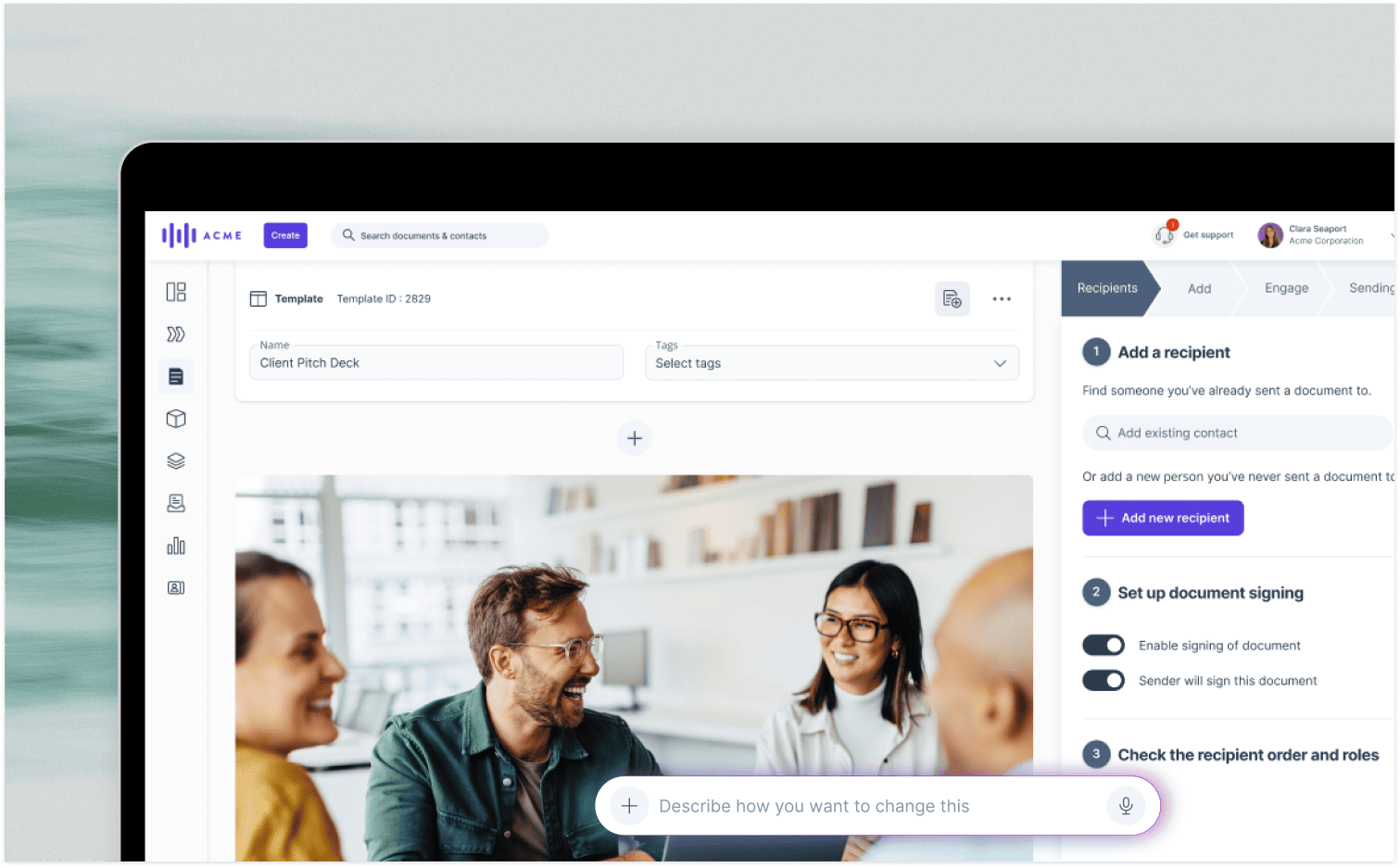
When you’ve just wrapped up a promising discovery call, it’s natural to want to put together a proposal as soon as possible. The problem is everything you need is in the CRM, while you’re starting from scratch in PowerPoint or a doc.
So, you copy across the account details, seat counts, plan tiers and pricing before sending the buyer a PDF. But when they ask for 80 seats instead of 50, you’re back to making changes, with no way of knowing whether the economic buyer even opened the proposal.
SaaS proposal software solves this by bringing CRM data, pricing, engagement tracking and e-signatures into one place. Below, we compare five tools on those four checks.
What is SaaS proposal software?
SaaS proposal software helps sales teams create, send, track and e-sign proposals, quotes and contracts, with subscription pricing and CRM data built into the process. While proposal software serves businesses across different industries, SaaS sales teams have particular requirements when it comes to quoting and selling subscriptions.
The term itself can mean three things:
- Software used by teams selling SaaS subscriptions.
- Proposal platforms delivered as SaaS products.
- Custom quoting workflows built using templates, scripts and CRM tools.
Here, we’re focusing on the first of these: helping SaaS sales teams choose the right proposal software. We’ll compare GetAccept, PandaDoc, Proposify, Qwilr and DealHub, with paid entry plans ranging from $19 to $39 per user per month, billed annually. DealHub uses custom pricing. All prices are accurate as of November 2026.
For SaaS sellers, proposals need to account for seat tiers, billing terms and CRM data, because buyers are committing to recurring payments instead of one-off purchases.
Most teams invest in proposal software to save time and create a more professional buying experience. Instead of pulling information from multiple systems into Word documents, PDFs or PowerPoint decks, reps can quickly put together consistent, branded proposals they’re confident sending to buyers.
GetAccept’s proposal software lets teams create professional proposals in minutes and track when buyers open them. Its eSign plan costs $25 per user per month, while Professional costs $49 per user per month, billed annually, with a five-user minimum.
What should SaaS teams look for in proposal software?
There are four things to prioritize when comparing SaaS proposal tools: adjustable pricing, CRM sync, engagement tracking and built-in e-signatures. Together, they reduce the manual work involved in moving a deal from discovery to signature, particularly when buyers want to change seat counts, pricing or contract terms.
Features like content libraries, approval workflows and AI-powered proposal drafting can also help, but these four capabilities form the basis of our comparison below.
How do SaaS buyers change seat counts and see the price update?
Adjustable pricing lets buyers adjust seat counts, subscription tiers, add-ons or billing terms and see the updated price immediately. This is particularly useful in SaaS, where a buyer might start with 50 seats before deciding they need 80.
Instead of asking your rep to revise and resend a PDF, buyers can make those changes themselves through a shared proposal link. When comparing tools, check whether buyers can adjust quantities, select optional products and have those changes reflected in the CRM.
GetAccept supports variable quantities and optional products on Professional plans and above, with buyer changes also synced back to the CRM. That keeps your sales forecast accurate, based on the latest proposal, while pricing tables on Professional also account for discounts and tax so buyers can see the correct total before signing.
How should proposal software sync with HubSpot and Salesforce?
Ideally, your proposal software should pull contact, deal and product information directly from your CRM, then send buyer engagement and signing activity back. Otherwise, HubSpot or Salesforce might show a quiet deal even while several stakeholders are actively reviewing the proposal.
Look for two-way syncing that captures proposal views, time spent on individual pages, comments, when new stakeholders join and signatures, alongside the product and pricing information used to generate the quote.
GetAccept offers two-way HubSpot integration on Professional plans, while Salesforce integration is available on Enterprise or as a Professional add-on. Teams can also automate proposal creation using CRM data, reducing the need to enter information manually. If you run HubSpot, see how proposal apps compare with HubSpot’s native quotes.
Once a proposal is signed, GetAccept can automatically mark the deal as won in Salesforce or HubSpot, using sync rules your admin sets up.
For teams looking to automate billing too, the GetAccept Automations add-on can pass signed customer data to platforms such as Chargebee.
What engagement signals should proposal tracking show?
Proposal tracking should show who opened it, when and how often they returned, what they read and how long they spent on each page. If someone keeps revisiting your pricing page, for example, your reps have something specific to follow up on.
That’s especially important when several stakeholders are involved. Your champion might focus on the solution, while the CFO reviews pricing and the security lead checks compliance. Ideally, your software should show what each of these people read and for how long.
Look for individual viewer tracking, alerts when someone opens or signs a proposal or invites a colleague and automated reminders that continue until the document is opened or signed.
GetAccept’s tracking and analytics show which buyers viewed what and for how long, so reps can follow up at the right time. If someone forwards a proposal, GetAccept can identify the new viewer by email, record what they read and add them to your CRM. These are the kinds of insights that make proposal analytics particularly valuable in multi-stakeholder SaaS deals.
Can you get legally binding e-signatures inside a proposal?
Yes. Electronic signatures can be legally binding under the ESIGN Act and UETA in the US, and eIDAS in the EU, provided the relevant legal requirements are met.
Having e-signatures built into your proposal software also means buyers can review and sign without switching to another platform. When comparing tools, look for identity verification options and a timestamped audit trail that records the signing process.
GetAccept’s electronic signature functionality supports the entire contract signing workflow, with a full evidence log and unlimited e-signatures included on every plan. Its compliance framework covers ESIGN, UETA and eIDAS, allowing teams to manage proposal signing online without introducing another manual step.
How should a SaaS proposal present subscription options?
A SaaS proposal should show each subscription tier, monthly and annual prices side by side and the seat count the quote assumes. A single pricing table works best, particularly when annual billing offers a lower monthly rate.
To make the options clear, include four things:
- Clearly named tiers: Show what’s included in each plan so buyers understand the price differences.
- Seat counts: State how many users the quote covers and how changing that number affects the price.
- Contract terms: Keep billing frequency and contract length alongside the pricing.
- Discounts: Show any savings separately so buyers can see exactly what’s been applied.
Make sure the table works on mobile, too. GetAccept’s editable pricing tables are easier to navigate on a phone than a static PDF.
With GetAccept CPQ, sales teams can build accurate quotes using professional pricing tables that account for discounts and taxes. Professional includes pricing tables and up to three stored library products, with CPQ available as a paid add-on. Enterprise includes CPQ and an unlimited product library.
You can also set up internal approval workflows so quotes are reviewed in a predefined order before reaching buyers. Through GetAccept’s HubSpot integration, you can automatically assign a manager to approve deals where discounts exceed a certain threshold.
Once the proposal is signed, the agreed pricing should carry straight through to billing. SmartPricing saves more than 10 hours of admin each week using GetAccept Automations, a paid add-on that connects HubSpot with Chargebee. That means finance can work from the same terms the buyer approved, without entering everything again.
If you’re dealing with usage-based pricing, bundles or dependencies where one selection changes another price, a standard table may no longer be enough. That’s where CPQ software becomes particularly useful.
How do you connect a SaaS proposal’s scope to the buyer’s workflow?
Start with the problem your buyer described during discovery. Maybe their reps spend hours copying data between systems, or approvals keep delaying deals. Your proposal should show how each part of the scope addresses that problem.
A shared timeline then helps turn that scope into action. GetAccept’s Mutual Action Plans (MAPs), available on Professional and Enterprise, let buyers and sellers agree on next steps, assign deadlines and track progress toward closing.
For example, the connection might look like this:
- The problem: Reps manually copy CRM data into proposal decks.
- The solution: Connect the CRM so proposals automatically populate with deal information.
- The next step: The buyer’s administrator approves CRM access by an agreed date in the Mutual Action Plan.
That gives the buyer a clear reason for each deliverable and a practical route to getting it implemented.
How the main SaaS proposal software tools compare
Most SaaS proposal platforms can create, send and e-sign documents. The bigger differences are how they handle adjustable pricing, CRM integrations and buyer engagement tracking, particularly which subscription plans include those capabilities. Here’s how five options compare, based on pricing and plans as of November 2026:
- GetAccept puts adjustable pricing, per-person tracking and HubSpot sync on Professional at $49 per user per month, billed annually with a five-user minimum. eSign is $25.
- PandaDoc puts a quote builder, CRM integrations and recipient analytics on its $49 per user/month Business plan, with Salesforce as a paid add-on. Starter is $19 per user/month, also billed annually, and a free plan covers e-signature for up to five documents per month.
- Proposify includes analytics, a product catalog and e-signature on Build at $39 per user per month, billed annually. It offers a 14-day trial, but Salesforce is only available as a paid add-on on the Scale plan.
- Qwilr includes e-signature, time-per-section analytics and HubSpot on Starter at $35 per user per month, billed annually. Salesforce starts on Scale, and there is a 14-day trial.
- DealHub is CPQ-led, with native Salesforce, HubSpot and Dynamics 365 integrations, DealRoom analytics and e-signature. Pricing is by quote, with no public free plan or trial.
|
Tool |
What it does |
Adjustable pricing |
CRM sync |
Engagement tracking |
E-signature |
Entry price and free trial |
|---|---|---|---|---|---|---|
|
GetAccept |
Proposals and quotes with e-signature and contract management |
Variable quantities and optional products on Professional and above |
Two-way with HubSpot (Professional) and Salesforce (Enterprise or Professional add-on); Microsoft Dynamics on Enterprise or as a Professional add-on |
Per-person views, time per section and new-viewer alerts on Professional and above |
Unlimited on every plan, with a full evidence log |
eSign $25 per user/month; Professional $49 per user/month (five-user minimum); no free plan |
|
PandaDoc |
Documents, quotes and e-signature |
Pricing tables where buyers select options and the total updates |
HubSpot and Salesforce on Business; Salesforce is a paid add-on; integration-created documents use usage credits |
Document analytics; recipient analytics on Business |
On every plan, including free (limited to five documents per month) |
Starter $19 per user/month; Business $49 per user/month; free plan |
|
Proposify |
Proposal builder with templates and a product catalog |
Interactive quoting with a product catalog |
HubSpot and Salesforce integrations; Salesforce gated to a higher plan |
Recipient timeline and time per section on Build |
Included |
Build $39 per user/month, billed annually; 14-day trial |
|
Qwilr |
Web-page proposals |
Quote block with buyer acceptance |
HubSpot on Starter; Salesforce on Scale |
Time per section, 60-day history on Starter |
Included on Starter |
Starter $35 per user/month, billed annually; 14-day trial |
|
DealHub |
CPQ with proposals |
Guided quotes and pricing rules |
Native Salesforce, HubSpot and Dynamics 365 |
DealRoom views, downloads and content engagement |
Included |
By quote; no public free plan or trial |
Before comparing subscription costs, check which plan supports your CRM and the features you actually need. A lower entry price won’t necessarily save you money if essential quoting or tracking capabilities require an upgrade.
For SaaS sales teams looking to combine adjustable pricing, two-way CRM sync, buyer engagement tracking and e-signatures, GetAccept offers the strongest overall fit. Its Digital Sales Rooms give buyers a shared space to review proposals, comment on documents and work through mutual action plans with clear owners and deadlines.
Tools like Bonsai and HoneyBook are less relevant here. They focus more on proposals and invoicing for freelancers and smaller businesses. For a broader comparison, explore the best proposal software options, including a closer look at how GetAccept compares with Proposify for SaaS sales teams.
When should you choose proposal software instead of RFP software?
Choose proposal software when you want to send and track your own quote by using CRM and pricing data to move a deal toward signature. RFP software works the other way around, helping you respond to a buyer’s request for proposal (RFP) or security questionnaire.
RFP tools typically pull answers from a library of previous responses and route questions to the right experts. SaaS teams may need both, since the same deal might involve answering a security questionnaire as well as sending a quote.
How GetAccept turns SaaS proposals into signed agreements
GetAccept connects the entire proposal process, from pulling CRM data into a quote to collecting signatures and managing renewals. Here’s how it works on the Professional plan:
- Your CRM fills the proposal. Deal fields and products populate the proposal and its pricing table, including discounts and taxes. Buyers can adjust quantities and optional products, while Professional supports up to three library products and Enterprise removes that limit.
- The buyer reviews and signs. Built-in chat and video let buyers ask questions without leaving the proposal, while stakeholder tracking shows who’s viewed what and for how long. You’ll also get alerts when someone views, forwards, invites a colleague or signs, with no account required for signing.
- The signed contract syncs with your CRM. Agreements save directly to your CRM, keeping the deal record and signed terms aligned. HubSpot sync comes with Professional, while Salesforce requires Enterprise or a Professional add-on. On Professional and Enterprise, admins can also set the CRM to mark deals as won the moment the contract is signed.
- Renewals stay on track. Signed contracts are stored in GetAccept, with automated renewal reminders on every plan. The AI contract management add-on is available on Professional and Enterprise.
Reps don’t have to rebuild proposals when seat counts change, finance doesn’t have to chase signed PDFs and everyone can work from the same agreed pricing, tier and terms.
GTM advisory firm ScaleWise saved 16 hours a month using GetAccept and increased its proposal-to-close rate by 51%.
Should you build your own SaaS proposal software?
For most SaaS sales teams, buying makes more sense than building. Developing your own proposal software means creating and maintaining templates, pricing tables, e-signatures, engagement tracking and CRM integrations, all of which need to work reliably together.
- Core functionality: You’ll be developing features that established platforms like GetAccept already provide.
- Legal compliance: E-signatures need to meet relevant requirements under the ESIGN Act, UETA and eIDAS, with reliable audit trails if an agreement is challenged.
- Pricing and tracking: You’ll need accurate discount and tax calculations, alongside a system that records engagement at the individual stakeholder level.
- Ongoing maintenance: CRM updates, pricing changes and evolving legal requirements all become your responsibility.
Building your own solution may make sense if proposal software is the product you’re selling. Otherwise, your team’s time and resources are generally better spent on the business itself.
See the full proposal workflow in GetAccept
Book a GetAccept demo and bring a recent quote with your seat tiers and terms, and tell us whether you run HubSpot or Salesforce. We’ll walk you through:
- Adjustable pricing: See how buyers can adjust seat counts and optional products, with totals updating automatically.
- CRM integration: Watch deal data populate a proposal and engagement activity sync back to your CRM.
- Engagement tracking and signing: See which stakeholders read specific sections before signing directly within the proposal.
If you’re using Chargebee or another billing platform, let us know. We can also show how GetAccept Automations, available as an add-on, can pass signed terms into your billing workflow.
By the end of the demo, you’ll have a clear picture of how your next proposal could move from CRM data to a signed agreement in your own sales process.

About the author
Anna AsaievaAnna is Content Manager at GetAccept, with a Master's degree in Journalism and seven years in B2B SaaS across fintech, VC fundraising, and sales. She loves all things organic marketing and tech, and off the clock, you’ll probably find her on the tennis court, practicing Swedish, or exploring Stockholm.