

Is your pipeline under control - but deals still stall at the finish line?
You can manage contacts, log activities, and track pipeline health. Yet, when it’s time to send proposals, follow up, and secure signatures, manual steps still cost you speed and precision.
Proposal software built for HubSpot closes that gap. It turns manual tasks into automated flows, turns several tools into one connected process, and turns “almost closed” into “deal signed.”
Let’s break down how it works - and why it’s helping sales teams close faster, more often.
The HubSpot + GetAccept integration (at a glance)
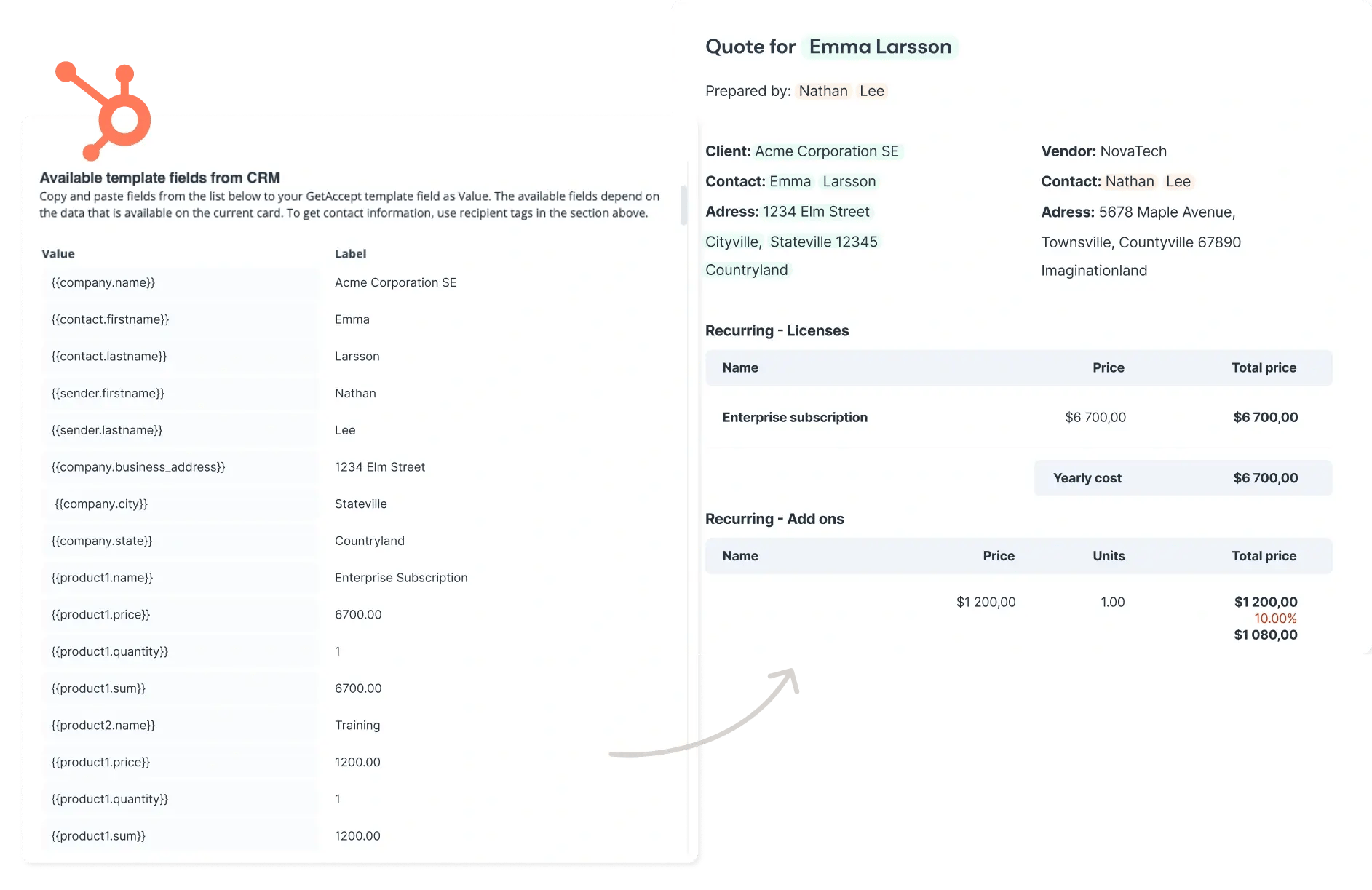
GetAccept’s native HubSpot integration helps sales teams:
- Auto-fill proposals using HubSpot contact and deal data
- Track document opens, views, and time spent in real-time
- Automate follow-ups based on buyer activity
- Collect secure e-signatures - no extra tools or platforms needed
- Sync signed data instantly to CRM records All within one connected workflow, without leaving HubSpot.
All within one connected workflow, without leaving HubSpot.

Does HubSpot have proposal software built in?
HubSpot has built-in quoting, and the full feature set needs a Revenue Hub Professional or Enterprise subscription plus an assigned seat for each quoting rep.
Here’s what you get with Quotes:
- A product library with flat-rate, stair-step and tiered pricing
- AI-assisted drafts built from deal and line item data
- Reusable templates for consistent quotes
- E-signature, click-to-accept or print-and-sign acceptance
- Online payments through HubSpot payments or Stripe
Both plans include standard approvals, while more advanced approval workflows require Enterprise. For teams handling relatively straightforward deals, that may be everything they need.
But what if your proposals need to do a little more?
The HubSpot Marketplace offers integrations with tools like GetAccept, PandaDoc, Proposify, Qwilr, Better Proposals, Portant and Prospero. Most of these can pull deal information into proposals and feed status updates back into HubSpot.
If your deals involve multiple buyers, the five signs below should help you work out which route makes sense for your team.
5 signs your HubSpot CRM needs proposal software
HubSpot does a good job of managing your sales pipeline and, with Professional or Enterprise, handling quotes too. But when proposals need to make their way through an entire buying committee, things can get complicated.
With multiple stakeholders reviewing documents at different stages of the sales cycle, keeping track of who's engaging with what, and when, becomes a challenge.
If your team is relying on disconnected tools or manual workarounds to keep track, it might be costing you deals without you realizing it.
Here are five signs your current workflow is holding you back - and how proposal software fills the gaps:
|
Challenge |
How proposal software solves it |
|
You spend too much time creating proposals |
Auto-fill dynamic templates with contact and deal data from HubSpot - no copy/paste required |
|
You have no visibility into buyer interest |
Track document opens, time spent per section, and shares in real-time, all within your CRM |
|
Follow-ups feel random and inconsistent |
Set automated reminders and follow-up triggers based on buyer behavior and document activity |
|
Deals stall waiting for signatures |
Collect secure e-signatures in the same document - no extra tools or back-and-forth emails |
|
Your proposals feel static and generic |
Add video intros, custom branding, and interactive pricing to create engaging, tailored proposals |
Each of these pain points adds friction to your pipeline and together, they slow down your sales engine. The good news? You don’t need to overhaul your tech stack - just enhance your HubSpot workflow with the right layer of automation, visibility, and buyer engagement.
Interactive web proposals vs generated documents
An interactive web proposal opens in the buyer’s browser, with video, live chat and pricing they can click through. A generated document is a Word, Google Docs or PDF file built from HubSpot data.
Before comparing these proposal tools, get clear on what you actually want buyers to do with the proposal once it lands.
If there's one decision maker who simply needs to review the details, a Word, Google Docs or PDF generated from HubSpot data may do the job nicely. But when several stakeholders need to weigh in you may need a more suitable solution.
An interactive web proposal gives everyone a shared link they can open in their browser, with video, live chat and clickable pricing to help them explore their options.
GetAccept builds interactive, mobile-responsive proposals and you can still upload a PDF if a file suits the deal better.
Which proposal apps work with HubSpot
GetAccept, PandaDoc, Proposify and Qwilr all work with HubSpot through the HubSpot Marketplace.
Some of these apps focus on generating documents from CRM data. Others help you build interactive proposals, manage signatures or follow what happens after you've hit send.
The table below starts with HubSpot's native Quotes, then looks at how each alternative works with your deals.
As you compare them, keep two questions in mind: what format suits your proposals, and how many people typically need to review them?
|
Option |
Built around |
How it works with HubSpot |
Worth knowing |
|---|---|---|---|
|
HubSpot Quotes (native) |
Quotes inside HubSpot’s CPQ |
Line items populate from the associated deal |
Shows views and other activity on each quote |
|
GetAccept |
Interactive web proposals, e-signature and Mutual Action Plans in one Digital Sales Room |
Deal, contact and company properties fill the document; status syncs back to the deal |
Best for long, multi-stakeholder deals |
|
Qwilr |
Interactive web proposals |
Pages are created from a deal, company or contact; on Growth and Scale plans, deal stages and accepted amounts update when a page changes status |
Listed as working with all HubSpot plans |
|
Proposify |
Proposals and other sales documents |
Create, edit, send and track from the HubSpot deal page; status and activity updates sync back to HubSpot |
Listed as working with all HubSpot plans |
|
PandaDoc |
Proposals, quotes and contracts with e-signature |
Create documents from HubSpot deals; automations update deal stage, properties and line items when status changes |
Also offers CPQ for HubSpot |
Features and plans change often, so confirm with the vendor.
GetAccept for long, multi-stakeholder HubSpot deals
GetAccept is the best fit for long, multi-stakeholder HubSpot deals, combining native HubSpot integration with AI-powered proposal creation, custom branding, buyer engagement tracking and e-signatures.
GetAccept’s HubSpot integration takes care of much of the admin. Deal, contact and company properties populate documents automatically, while line items come from your HubSpot product library. Changes to products or deal values can flow through too.
And as buyers engage, HubSpot stays in the loop:
- Sent, opened, signed and modified document statuses appear on the deal.
- Pipeline stages can advance when agreed milestones are reached.
- Deals can automatically close as won once contracts are signed.
- Follow-ups can trigger when buyers return to the room.
The integration installs through the HubSpot Marketplace without developer support, with the full Digital Sales Room experience available on GetAccept's Professional and Enterprise plans. Room engagement data can also feed Breeze AI on any HubSpot tier.
For a sense of how this works in practice, take N.Rich: its team creates rooms directly from HubSpot deal cards, giving buying committees of eight to 15 stakeholders one shared place to work through a deal.
That's particularly useful when the alternative is trying to piece together everyone's progress from scattered emails, forwarded documents and CRM notes.
See how GetAccept works inside HubSpot.
The business impact of proposal software for HubSpot
A fragmented closing process slows down deals.
With proposal software integrated into HubSpot, you can automate workflows, track engagement in real time, and eliminate delays from proposal to signature.
Here’s how it transforms your deal flow.
Close deals faster with shorter signature cycles
Waiting days for signatures slows your team down and puts deals at risk.
With automated document flows and e-signatures, your team can move quickly from proposal to close - without jumping between tools.
Ignition Program cut its average signing period from eight days to four.
Boost win rates with real-time engagement insights
When you know how buyers interact with your proposals, follow-ups become smarter and more effective.
Track opens, views, and time spent on each section so reps can engage at exactly the right moment - with messaging that aligns to what the buyer cares about most.
Eldo lifted its conversion rate from 38% to 58% and cut conversion time from 81 hours to just 9 with GetAccept.

Save hours every week by eliminating manual admin
Manually entering contract details and updating records eats up valuable selling time.
With GetAccept’s HubSpot integration, proposal creation, data syncing, and follow-ups are fully automated - so reps can focus on closing, not copy-pasting.
SmartPricing saves more than 10 hours of admin a week with GetAccept’s HubSpot and Chargebee automation.
How GetAccept customers use proposal software for HubSpot CRM
Here are five customers using sales proposal software for HubSpot CRM to automate sales workflows, improve buyer engagement, and close deals faster.
1. Automate data syncing and eliminate manual work
Customer case study: SmartPricing
SmartPricing is a fast-growing revenue management platform serving hotels across Europe. As the company scaled, its sales team struggled with manual data entry between HubSpot and Chargebee after contracts were signed - leading to human errors, inefficiencies, and inconsistent records.
With GetAccept Automations integrated into their HubSpot workflow, SmartPricing now syncs billing, subscription, and customer data instantly across both HubSpot and Chargebee - removing over 10 hours of manual work per week.
The system automatically checks for existing customers in Chargebee, updates data fields, and creates new records when needed - ensuring clean, accurate data without duplication.
With GetAccept, SmartPricing benefits from:
- Automated data syncing: Contract information auto-populates across both HubSpot and Chargebee, ensuring accuracy and consistency.
- Faster workflows: The sales team no longer re-enters billing data manually, freeing time to close more deals.
- Scalable processes: GetAccept’s solution supports SmartPricing’s expansion across Europe without requiring additional headcount or admin resources.
“We’ve managed to save over 10 hours of admin work per week thanks to the GetAccept Automation between HubSpot and Chargebee. It creates recurring revenue we enjoy continuously.”

2. Digitize contracts and maintain CRM accuracy
Customer case study: Jeeng
Jeeng helps publishers drive revenue through personalized audience engagement - and relies on HubSpot CRM to manage its fast-paced sales cycle.
But manually sending contracts, collecting customer info, and updating HubSpot created friction. Reps had to email documents, chase missing billing details, and manually enter data - leading to errors and slowing deal velocity.
With GetAccept integrated into HubSpot, Jeeng digitized its contract workflows and automated the entire process. Sales reps use CRM data to populate contracts and require buyers to complete critical fields like billing info and VAT numbers.
Once signed, all data flows back into the correct HubSpot record - accurately and instantly.
With GetAccept, Jeeng benefits from:
- Automated contract syncing: Signed documents and buyer-submitted details are instantly logged in HubSpot, with zero re-entry.
- CRM data integrity: Required input fields ensure reps capture accurate billing and company data every time.
- Operational efficiency: Reps spend less time on admin - and more time building relationships and closing deals.
“We chose GetAccept not only because of their great product, but also because of their professionalism and attentiveness to our business needs.”

3. Accelerate deal velocity with real-time engagement
Customer case study: Eldo
Eldo offers a 7-in-1 platform helping Home Improvement businesses digitize operations - from lead generation to customer communication. As demand for their services grew, they needed a faster, easier way to create contracts, track engagement, and close deals - all without burdening reps with admin work.
With GetAccept’s HubSpot integration, Eldo replaced their outdated electronic signature software with a tool built for speed and simplicity. Reps now use pre-built, branded templates stored in HubSpot to quickly tailor proposals to each buyer.

Real-time tracking shows how buyers interact with documents, while automated reminders (including via SMS) help accelerate signing - even on-site.
With GetAccept, Eldo benefits from:
- Dynamic proposal templates: Branded, customizable templates help reps build accurate, professional contracts - fast.
- Engagement analytics: Sales teams are alerted when a contract is opened and can track which sections buyers focus on.
- Faster sign-off: Automated follow-ups and mobile-friendly e-signatures keep deals moving, wherever the buyer is.
“GetAccept is the ideal contracting tool to simplify the daily life of sales teams.”

4. Align sales and operations with one connected workflow
Customer case study: Crisp Video Group
Crisp Video Group, a fast-growing video marketing agency, needed a document solution that integrated seamlessly with their existing tools - especially HubSpot.
Their sales and operations teams had outgrown a disconnected eSignature platform and wanted a more fluid, scalable way to send, track, and manage contracts and onboarding documents from a single system.
With GetAccept’s HubSpot integration, Crisp’s sales team can send proposals without leaving their CRM, personalize messaging using deal notes, and stay responsive using mobile alerts and live chat.
Post-signature, documents are automatically stored in Google Drive, and Google Analytics helps track recipient engagement. The operations team has since adopted GetAccept to streamline onboarding documents like release and commitment forms.
With GetAccept, Crisp Video Group benefits from:
- Integrated sales workflows: Proposals are created and sent directly from HubSpot, eliminating context-switching and manual entry.
- Faster client response: Mobile app notifications and texting make it easy to follow up quickly and personally.
- Cross-team adoption: Both sales and operations use GetAccept to create a frictionless experience from first touch to onboarding.
“Whenever anyone asks about E-Signing or sales enablement, I don’t know if a better solution exists! It's the easiest to use, has the right features, best adoption, and removes the barriers with E-Signatures.”

5. Create secure, compliant agreements directly in HubSpot
Customer case study: Ignition Program
Ignition Program, a French HR and recruitment agency, wanted to streamline how it created, signed, and tracked partnership agreements - directly from HubSpot.
Their goal was to replace fragmented workflows with a secure, centralized system that made it easy for both teams and clients to collaborate and sign documents quickly.
With GetAccept, Ignition’s teams can now generate personalized contracts in a few clicks using HubSpot data and prebuilt templates.
Two-factor authentication and signing order controls ensure only authorized individuals complete signatures - solving previous concerns around document security and compliance.
With GetAccept, Ignition Program benefits from:
- Efficient, secure document creation: Agreements are generated, personalized, and sent directly from HubSpot, with full signature tracking and access controls.
- CRM-connected storage and oversight: All contracts are saved and visible in HubSpot, with real-time status updates for every stakeholder.
- Faster turnaround time: With streamlined processes and mobile-ready signing, the average signing period has dropped from 8 days to just 4.
Questions about proposal software for HubSpot
How much does GetAccept cost with HubSpot?
GetAccept’s HubSpot integration is included on the Professional plan ($49 per user a month, billed annually, five-user minimum) and on Enterprise, which has custom pricing. On the eSign plan ($25 per user a month), the HubSpot integration is a paid add-on. Current plans are on our pricing page.
Can you e-sign a full proposal from HubSpot, or only a quote?
HubSpot’s native e-signature covers quotes. GetAccept collects e-signatures on any proposal or contract in the Digital Sales Room, with a set signing order. The signed status then syncs to the HubSpot deal.
The bottom line
HubSpot's native tools may be all you need if your team handles straightforward quotes. But when several stakeholders need to review, discuss and sign off on a deal, having everything in one shared place can make life considerably easier.
That's what GetAccept is built to provide. Take a look at how GetAccept integrates with HubSpot and see how it could fit into your sales process.
And if you want to see how it works with your own pipeline, book a demo below.