What we've been building

The latest features, improvements, and fixes shipped by the GetAccept team.

September 2026

Negotiate contract changes with your buyers, right on the signing page
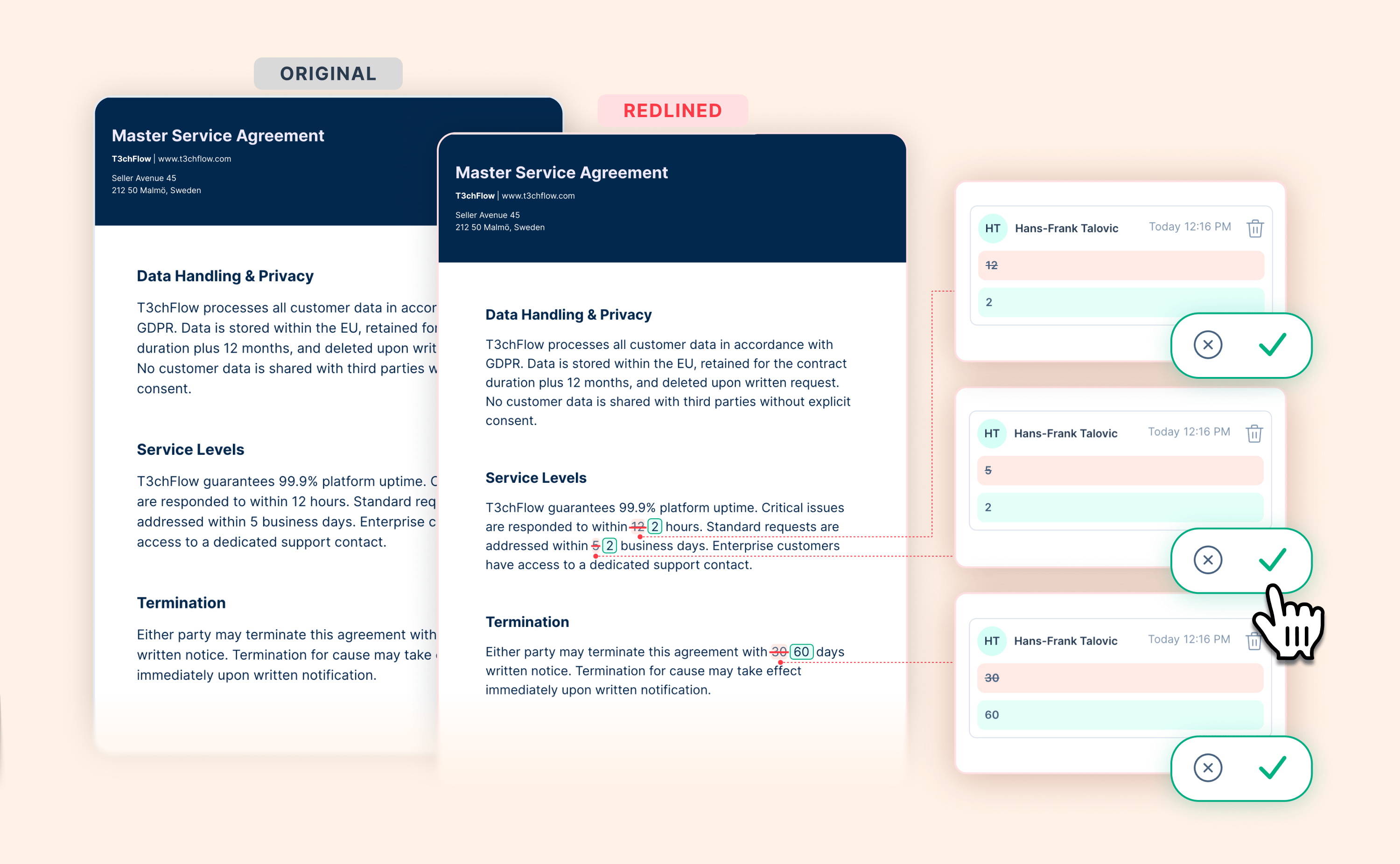
Negotiate contract changes with your buyers, right on the signing page

Getting a contract over the line usually means a round of edits from the other side.

By then, the deal has already lived its whole life inside GetAccept. You shared a Deal Room to collaborate through discovery and the early conversations, then sent a Contract to close with an e-signature. From the first opportunity to the final signature, nothing has had to leave GetAccept.

So when it’s time to settle the final wording, why would you let your buyer step outside and pull everyone into a chain of emailed files?

Now you do not have to. Recipients can suggest changes to a contract directly on the signing page, and you can accept, decline, or reply to each one without leaving GetAccept.

Here is what that unlocks:

  • Keep the negotiation in the room. Your buyer proposes exact wording, deletions, or comments on the contract itself, so edits never scatter into email.

  • Stay in control of every change. You decide what to accept, decline, or reply to, and nothing changes until you publish.

  • Protect the relationship with one clean update. Publishing notifies your buyer once, for the whole set of changes. AI drafts that update message for you, so you can review it and send.

  • Move to signature with confidence. Both sides can open any version and see exactly what changed, so no clause moves unnoticed.

Suggestions are off by default. You can switch them on in settings, for the whole entity or a single contract.
View help article

Let your reps create contracts, without letting them reinvent them

Let your reps create contracts, without letting them reinvent them

Every sales leader who cares about brand and legal has felt this tension. You want your reps fast and self-sufficient, able to spin up a contract the moment a deal is ready. You also want every contract that reaches a customer to use the right logo, the current terms and language your legal team has actually approved.

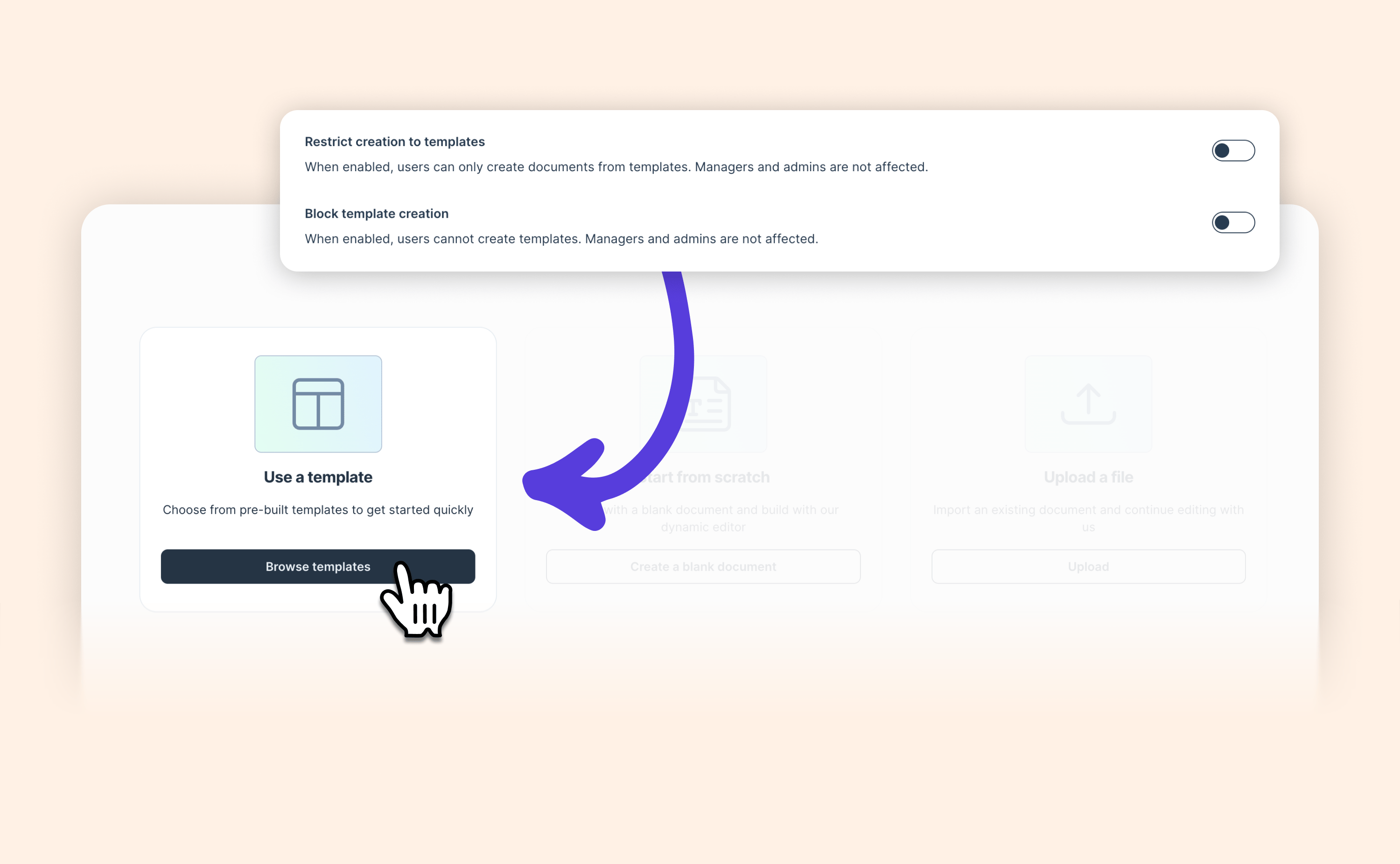
We are adding a new admin control in Document Settings to restrict contract creation to your approved templates.

Users go straight to template selection, with creating from scratch and uploading a PDF turned off. A companion control, Block template creation, keeps the templates themselves in the hands of the people who own the brand, so the approved set cannot be quietly worked around.

The result is simple to describe and hard to argue with. Your reps keep creating contracts and moving deals forward, and everything they send starts from material you have already approved.

View help article

Cleaner document names, filled in automatically

Cleaner document names, filled in automatically

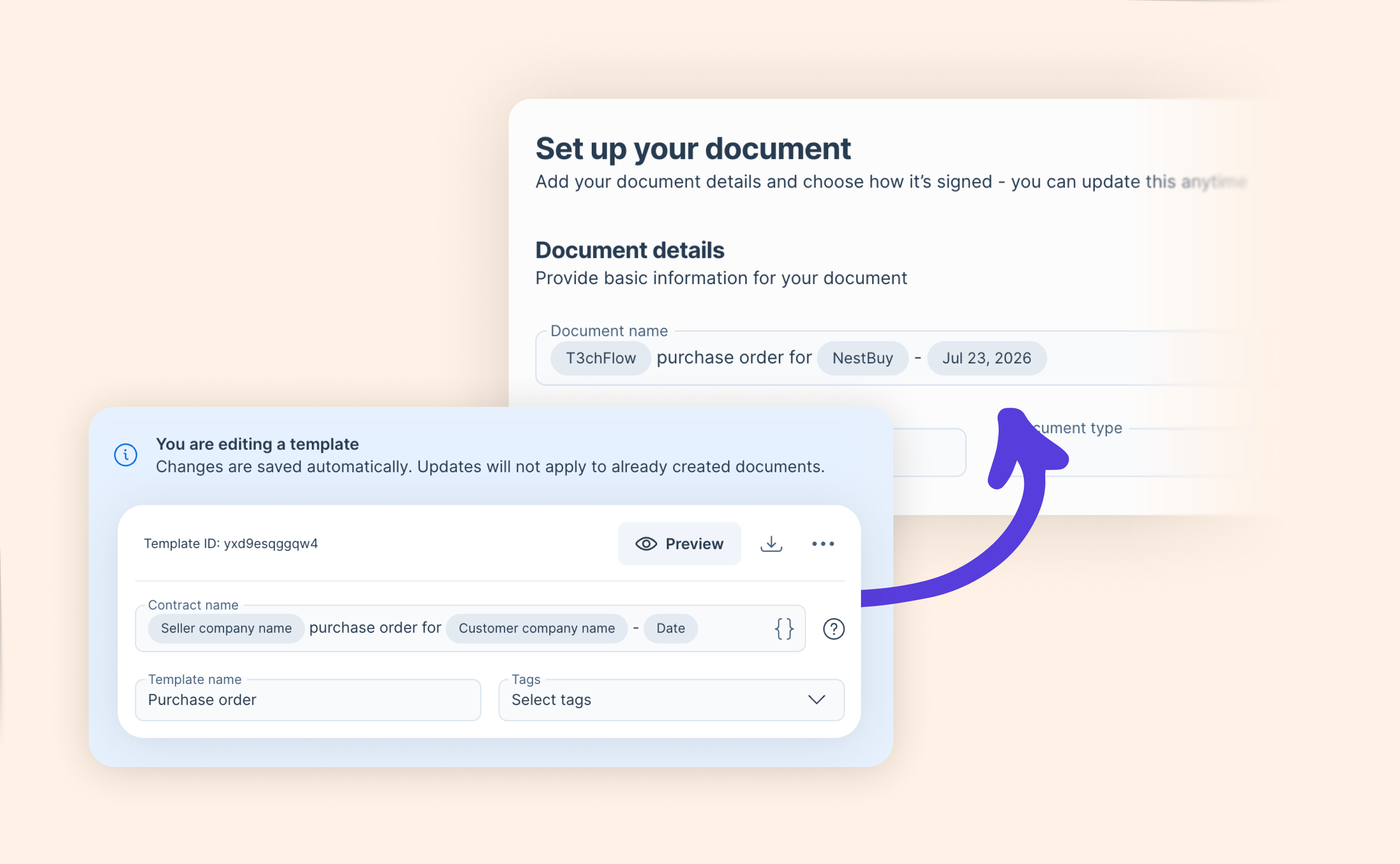
If you send contracts regularly, you have probably done this: you pick a template named something like "Sales EU Purchase order", send it, and then realize the customer just saw that internal name on their document. 😧

Admins can now set an internal template name and a separate, customer-facing document name for Contracts.

  • Keep template names structured for the sales team, so reps still find the right one quickly

  • Set a clean document name that customers see, powered by merge tags

  • Use Entity name, Customer company name, and Date so names personalize themselves

  • New documents from the template are named automatically, with no renaming step

Your templates stay organized behind the scenes, while every document that reaches a customer looks intentional and professional from the first glance.

Learn more

Teams just got more flexible

Teams just got more flexible

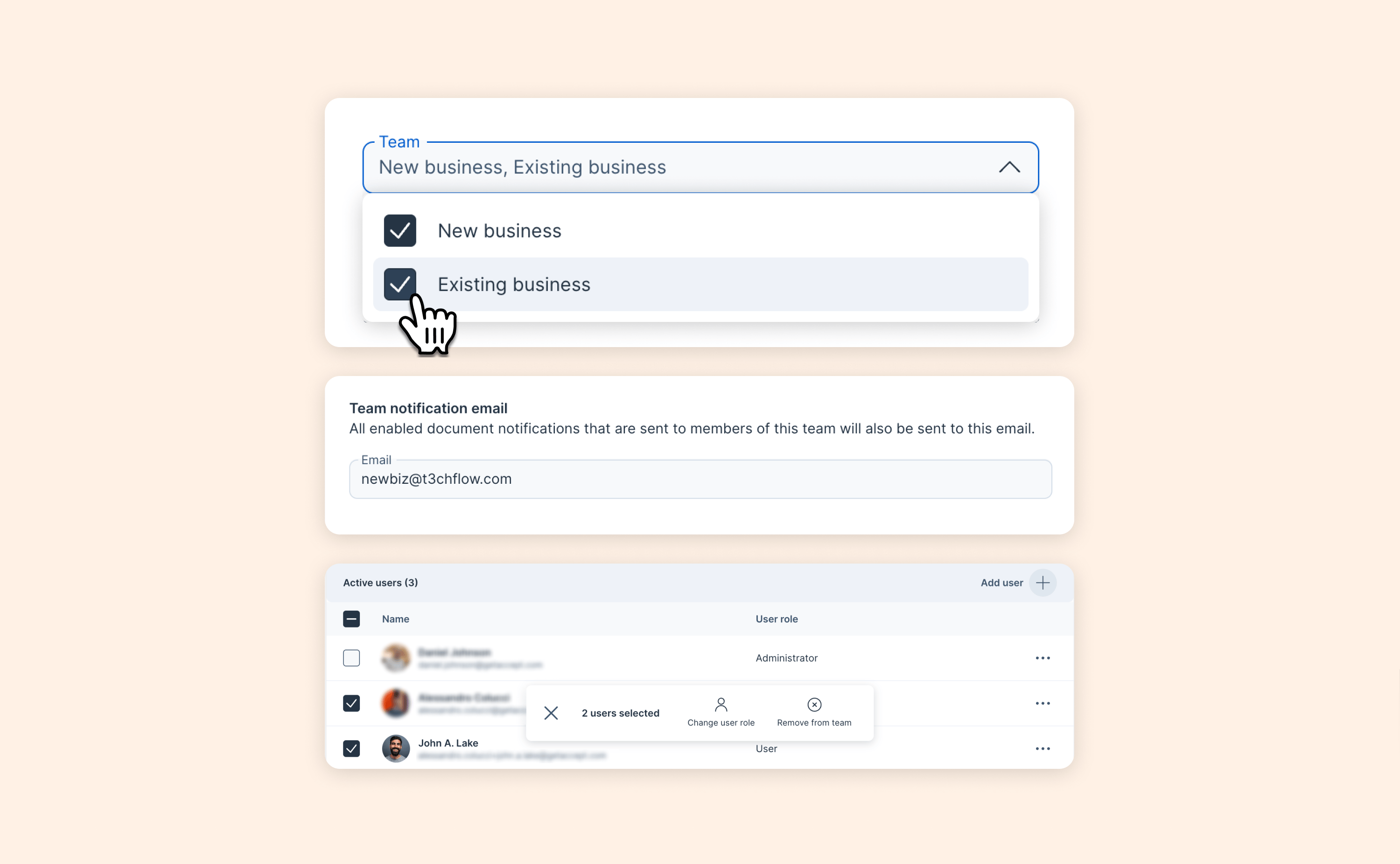
Your org chart isn't always one person <> one team – and now GetAccept isn't either.

Most companies aren't neatly divided into one person, one team. People work across regions, split time between new and existing business, or pitch in wherever they're needed. Now, GetAccept reflects that.

You can now:

  • Add someone to more than one team, so people who work across departments show up where they actually belong

  • Add team members right when you create a team, instead of creating it first and populating it after

  • Manage teams in bulk: change roles, remove people, or add specific roles for multiple team members at once

  • Filter by team across the app – documents, reports, and rooms – so you can see exactly what a team's been up to

  • Set an additional notification email for a team (e.g. sales@yourcompany.com), so team-level notifications land in a shared inbox too, not just individual accounts

Taken together, these changes mean less time spent managing teams and more confidence that what you see reflects how your organization actually works. Set your teams up the way they really are, and let GetAccept keep up.

View help article

Buyer-configurable pricing, now for all CRM integrations

Buyer-configurable pricing, now for all CRM integrations

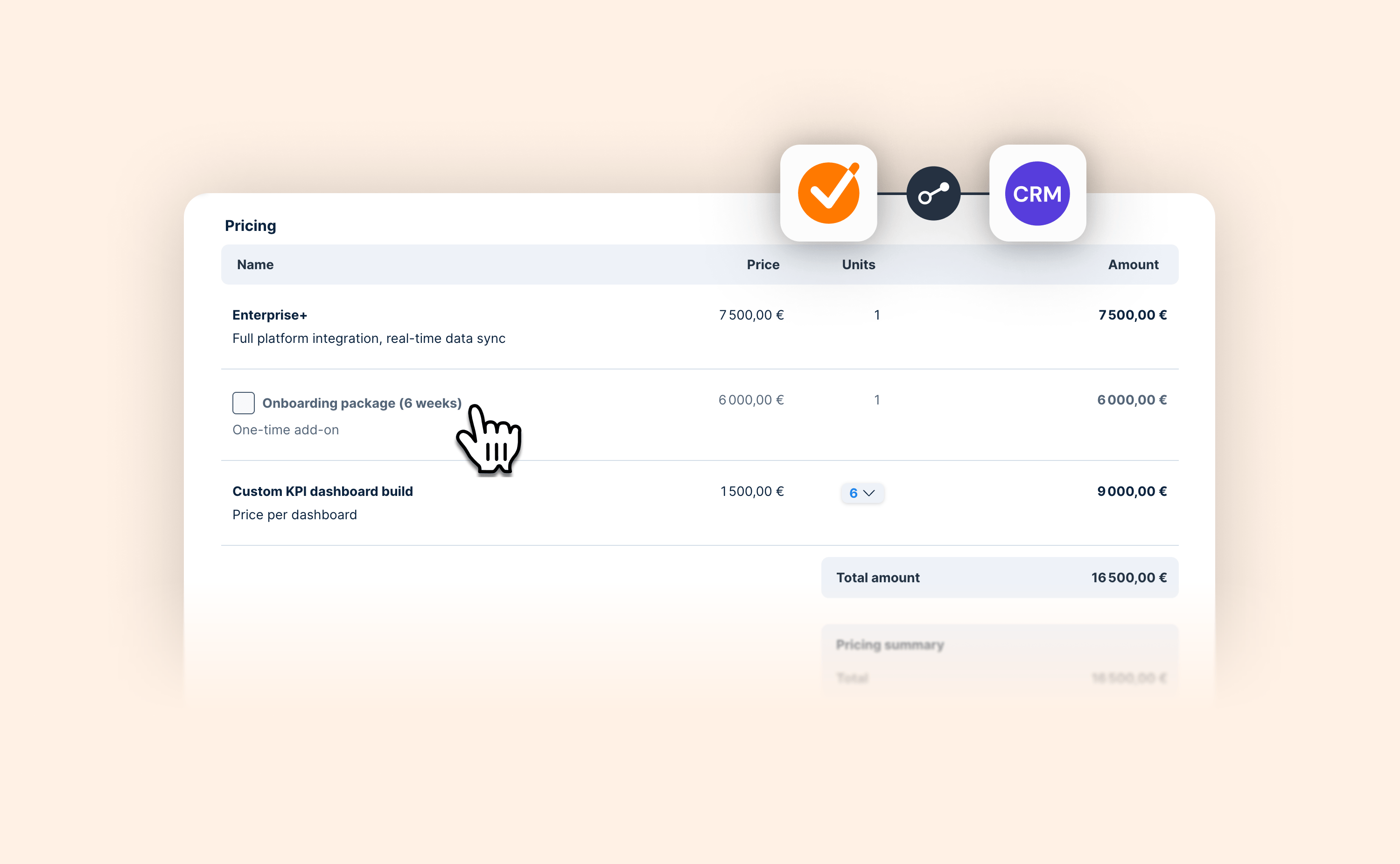
Your Digital Sales Room and your CRM should always tell the same story.

Now they do for our Microsoft Dynamics integration as well.

Whatever a buyer includes, removes, or re-quantifies in the pricing table updates the linked opportunity automatically, so what happens in the deal and what your CRM shows never drift apart.

  • Mark products pushed from the CRM as optional so buyers can include or exclude them in the pricing table.

  • Let buyers set their own quantities on variable products.

  • Buyer changes sync automatically back to the linked CRM opportunity.

Your buyers get a proposal they can shape to fit, and your CRM data reflects the real deal without anyone touching a line item by hand.

Read blog post

August 2026

Your Deal Room and Salesforce now agree on where every deal stands

Your Deal Room and Salesforce now agree on where every deal stands

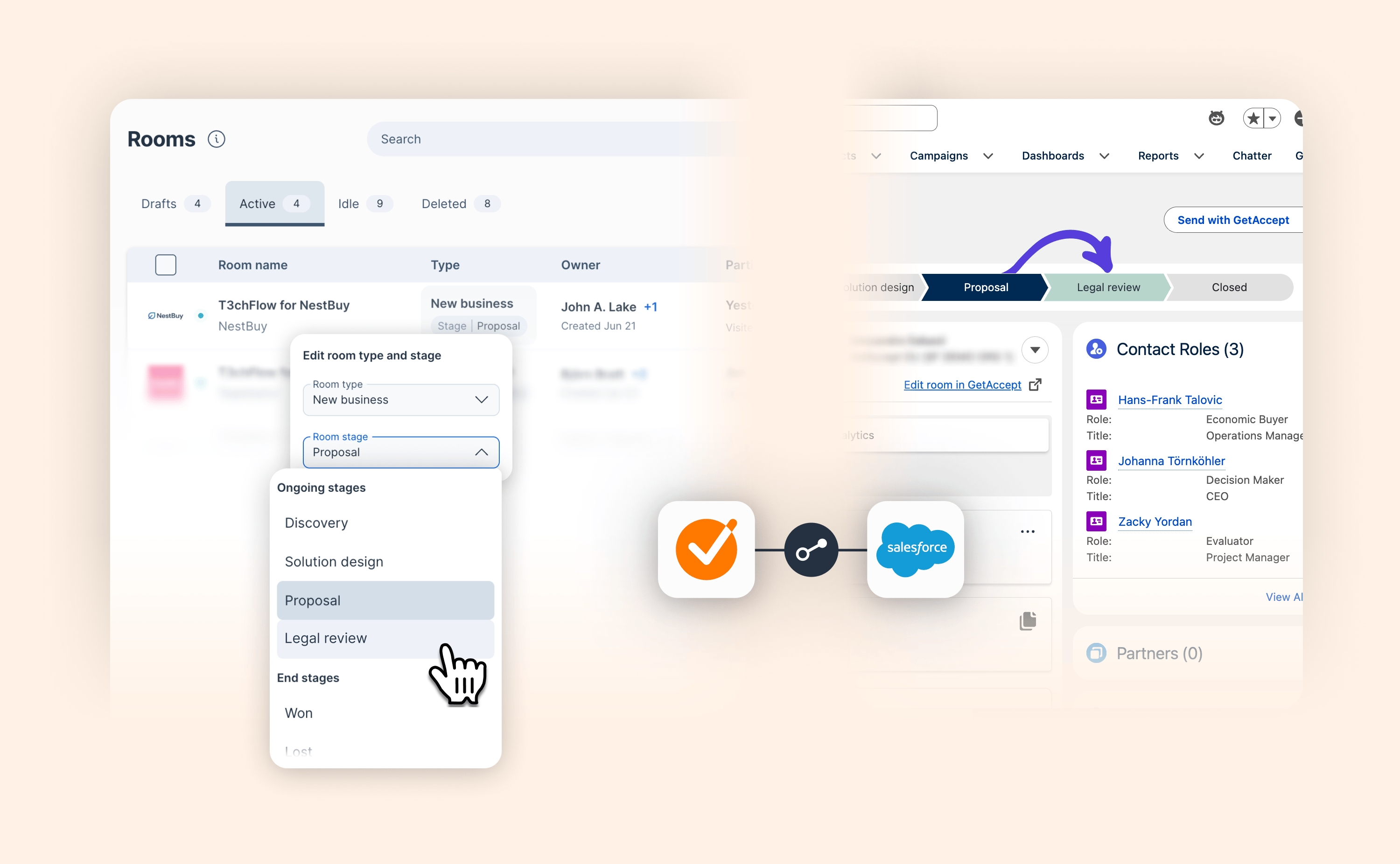
Every deal moving through your Deal Room has a stage: Discovery, Proposal, Legal review, whatever your team calls the steps. It's the shorthand that answers one question: where does this deal actually stand right now? Salesforce tracks the exact same thing under its own name, the opportunity stage. Two systems, two labels, one idea.

From today, you don't have to keep them aligned by hand. Move a deal forward in the Deal Room, and the linked Salesforce opportunity stage updates with it. Move it forward in Salesforce, and the Deal Room follows right back. There's no version to double check, because there's only one true stage, wherever you look.

  • Deal Room stage changes update the linked Salesforce opportunity stage automatically, and vice versa.

  • Map Deal Room stages to any Salesforce field, not just the standard opportunity stage.

  • Use a Deal Room stage change to trigger Salesforce flows: notifications, tasks, pipeline updates, and more.

The result: less manual upkeep for reps, and pipeline data your team can rely on at every stage.

Learn more

The GetAccept Agent in Salesforce is now available in beta

The GetAccept Agent in Salesforce is now available in beta

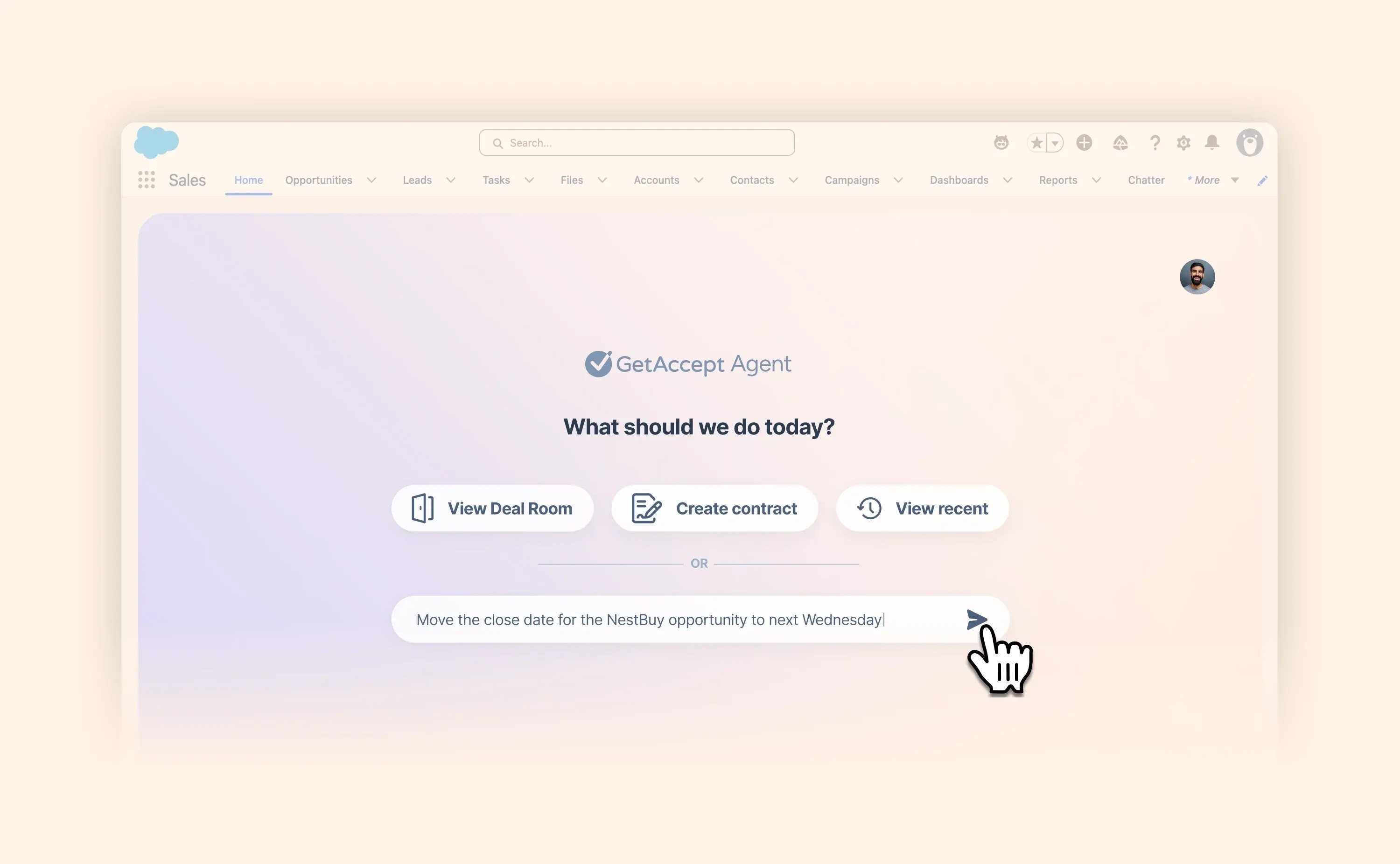
We're excited to introduce the GetAccept Agent in Salesforce – a new, AI-powered experience that shifts the integration from a tool you operate to an intelligent partner that works alongside you, understanding what's happening in your deals and what to do next.

Type what you want in plain language and the Agent reasons about context, proposes a plan, and executes – all without leaving Salesforce. From the Salesforce home page or inside any record (opportunity, account, contact, or custom object), you can:

  • Create Deal Rooms and contracts through a guided, conversational flow

  • Ask what's happening with a deal and instantly see buyer engagement, room activity, and recent timeline events

  • Query and update Salesforce records: ask "show me all opportunities closing in June" for an interactive chart, or "move the NestBuy close date to Wednesday" to update the record on the spot

  • Line up work across your pipeline: ask the Agent to list your qualified deals and spin up a Deal Room for each – in one go, without opening new tabs

This is our first step toward a new way of working we're building across the whole platform. You state intent, the Agent understands context, and the deal moves forward.

Now available in beta for selected customers. Interested in trying it? Reach out to your CSM to get set up.

Read blog post

Signature date now available as a merge tag

Need your contract to state exactly when it became fully signed? Now you can.

Add the new Signature date merge tag from the Document menu in the editor, and it'll automatically populate with the date your contract received its final signature — perfect for referencing an effective date or term start date directly in your contract copy.

This sits alongside your existing per-signer signature dates, giving you a clean way to reference the date the whole agreement was executed, not just when one person signed.

View help article

Look polished on every recording, wherever you're filming

Recording a video straight from GetAccept is one of the easiest ways to add a personal touch to a deal — but what's behind you isn't always camera-ready.

Now you can blur your background or select an image to use instead, right from the recorder. It works everywhere you record video in GetAccept: in the editor, and when recording engagement videos or update posts, across both Contracts and Deal Rooms.

A cleaner look, with zero extra apps.

View help article

GetAccept now available in Polish

GetAccept now available in Polish

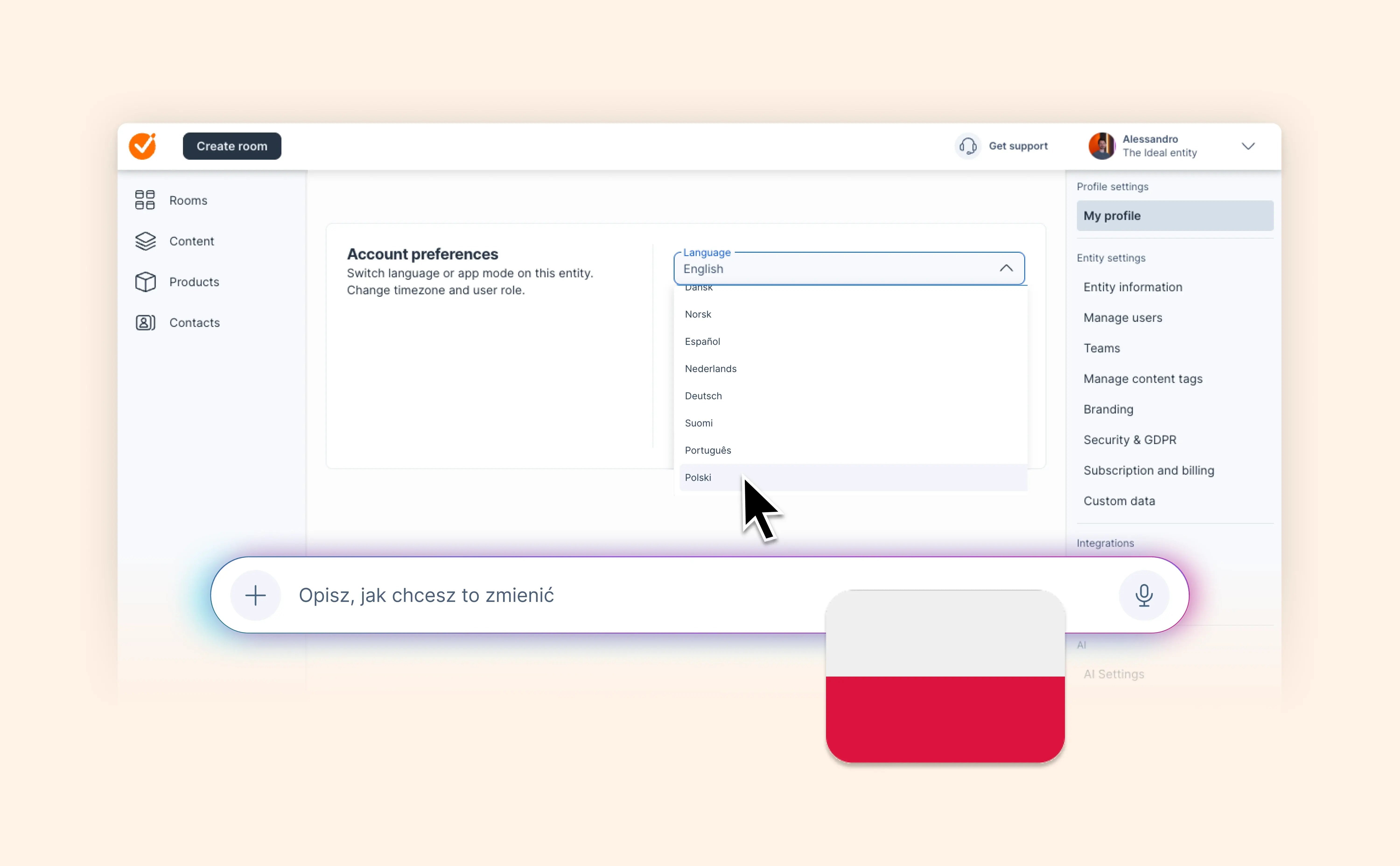
The GetAccept app interface is now available in Polish — select it as your entity language, or set it as your own profile language in Settings → Profile settings → My profile.

This joins the language support already in place for recipients, who see GetAccept in Polish automatically based on their browser language.

One more way GetAccept feels right at home for your team, wherever you're selling.

View help article

Show buyers the moments that matter with Clips

Show buyers the moments that matter with Clips

Some of the most convincing moments in a deal happen live on a call: the demo that finally clicks, the tricky question answered just right, the champion making your case in their own words.

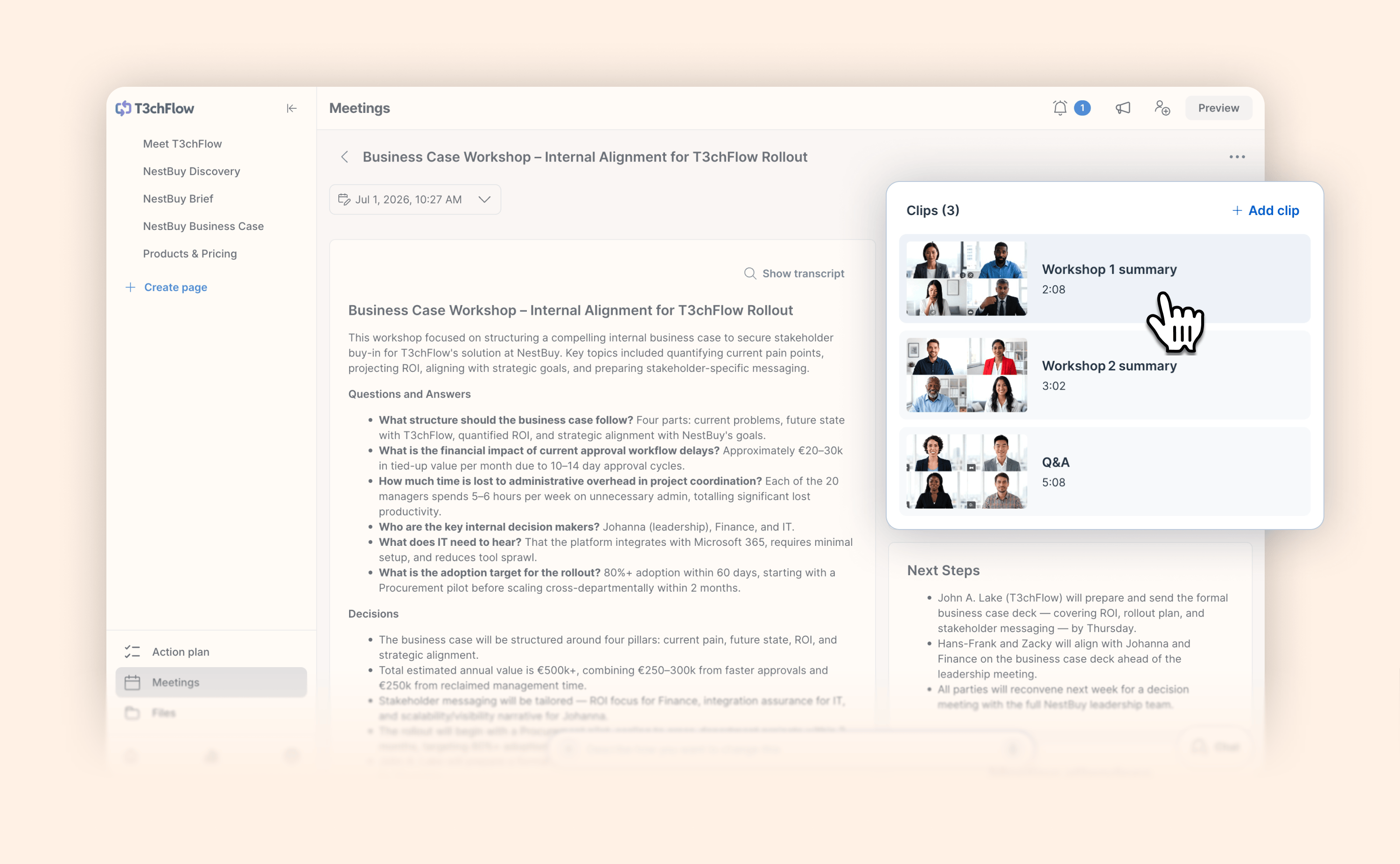
Until now, sharing one of those moments with a buyer meant adding the whole recording to a meeting. Now you can attach just the clips that matter to a meeting and let buyers go straight to what counts.

A few ways to put this to work:

  • Attach the clip where your value really landed so it can be surfaced to the decision-maker who missed the call

  • Add the security answer for IT and the pricing exchange for finance to the same meeting, so no stakeholder has to sit through the parts that aren't for them

  • Keep a dropped-and-reconnected call, or a demo split across two sessions, together as a single meeting

  • Bring the snippets Airspeed already made straight into the room as clips

It adds up to a better story for everyone. Buyers spend their time on the moments that move a deal forward, reps keep every clip tied to one real conversation, and Deal Rooms stay clean and easy to follow.

View help article

Turn your Trale.ai meetings into sales content

Turn your Trale.ai meetings into sales content

The most useful context in a deal often comes directly from your buyer conversations. Now, you can bring that context from Trale.ai into GetAccept.

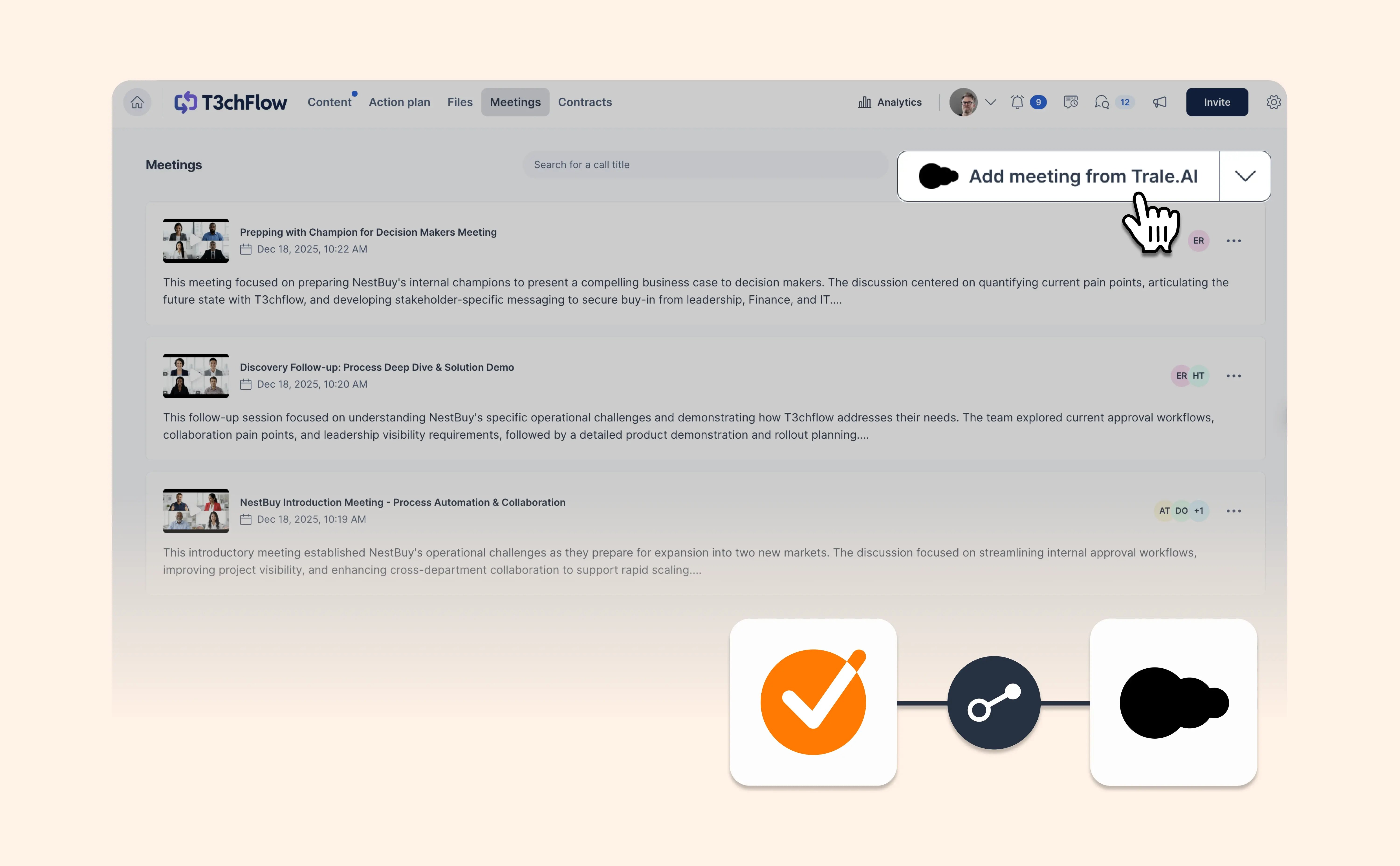
Connect your Trale.ai account and import meeting videos, transcripts, summaries and participant details into your Deal Room.

GetAccept AI can use the meeting as context when creating content. This helps executive summaries, business cases and other deal content reflect what your buyer actually discussed, rather than relying on a generic starting point.

You can also keep the meeting available inside the Deal Room, giving buyers and stakeholders a shared resource when they need to revisit the conversation.

View help article

July 2026

More control over how your tables look

More control over how your tables look

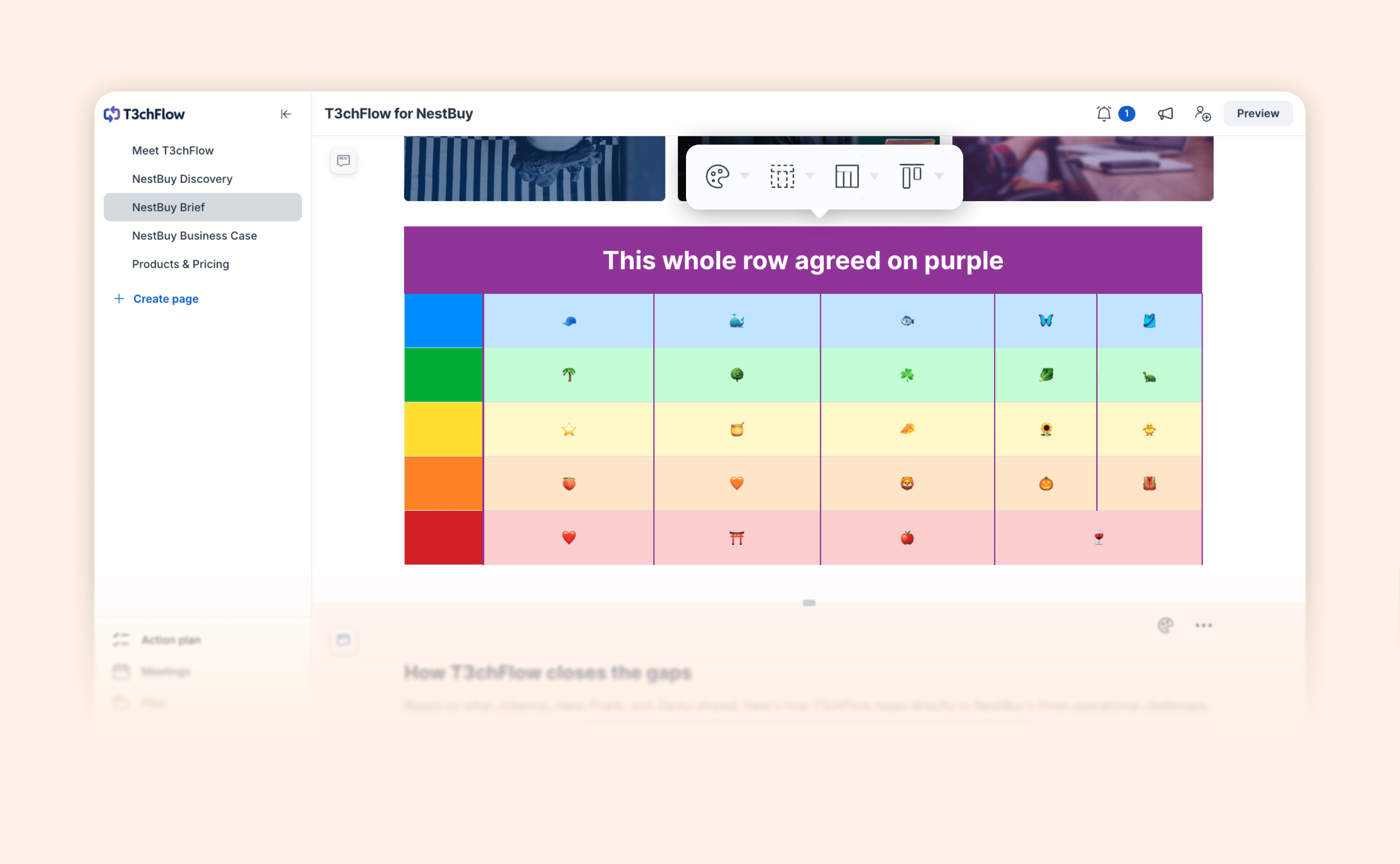
Tables are one of the most common ways to present comparisons and structured information in a proposal, so they should look exactly the way you want. This release gives you that control. You can now:

  • Set a background color on any cell; select multiple cells at once to color a full row or column

  • Change the color of the table borders

  • Merge cells to combine rows or columns and build a custom layout

  • Select, drag to re-order or delete whole rows or columns

The result is cleaner, more readable, and more on-brand tables in every Deal Room and Contract you create.

View help article

Automate GetAccept workflows based on your CRM data

Automate GetAccept workflows based on your CRM data

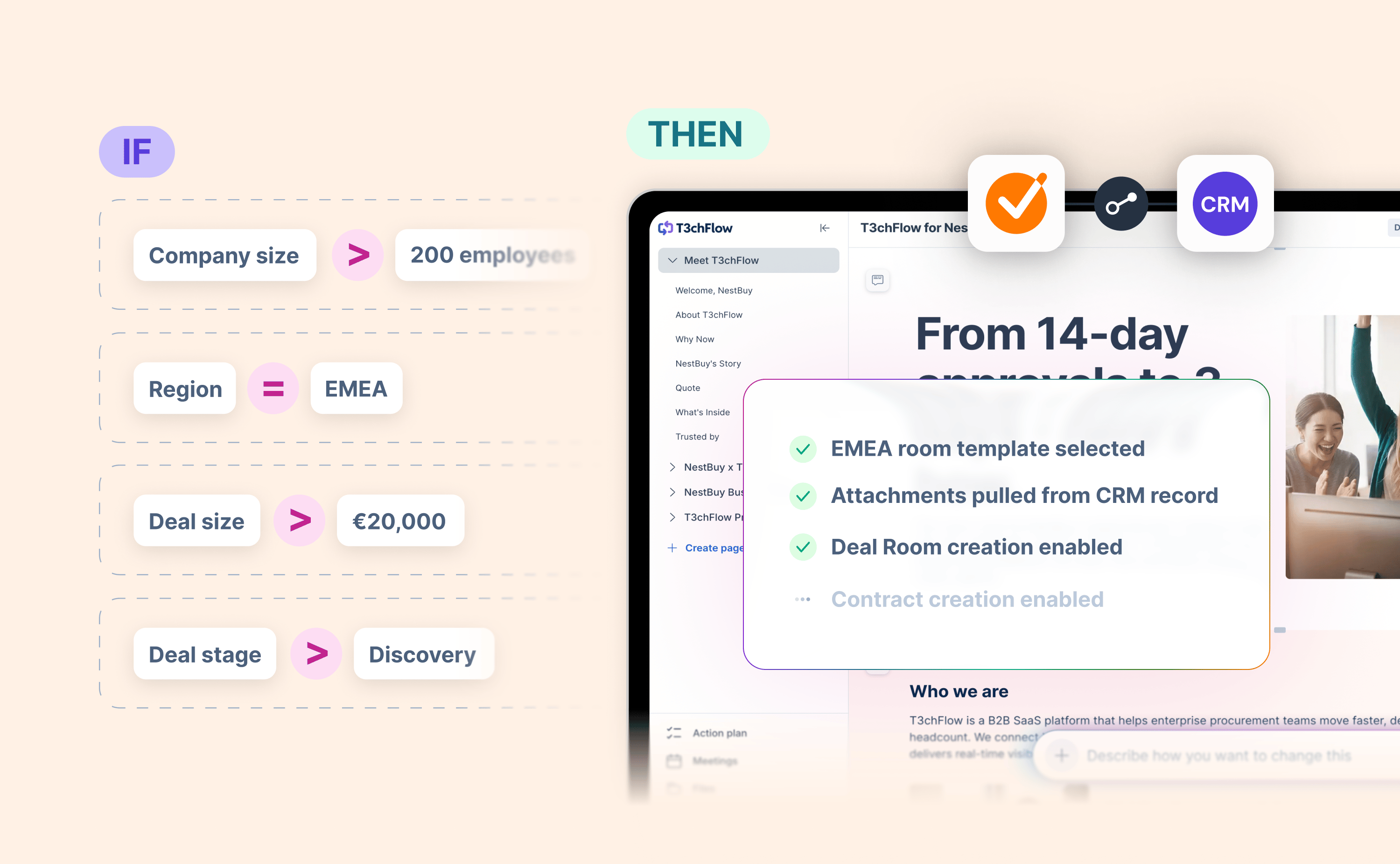
Setting up a workflow in GetAccept shouldn't require reps to make a series of judgment calls – which template, which files, which contacts, which expiry date. When those decisions are left to individuals, you get inconsistency.

Now you can define the rules once, based on data already in your CRM, and let the integration handle the rest.

With conditional setup, you can configure:

  • Template selection: automatically select or suggest the right GetAccept template based on CRM record data, so reps always start from the right place.

  • Create options: dynamically show or hide the ability to create a Deal Room or contract depending on specific criteria.

  • File attachments: automatically pull files and attachments from the CRM record into GetAccept. No manual hunting required.

  • Contact pre-population: intelligently map recipients from the CRM to specific GetAccept template roles.

  • Expiry settings: automatically apply the right document expiry date based on CRM conditions.

The result is a faster, more consistent experience for every rep, and a much shorter list of things for admins to chase.

Read blog post

Keep conditional content up to date after send

Keep conditional content up to date after send

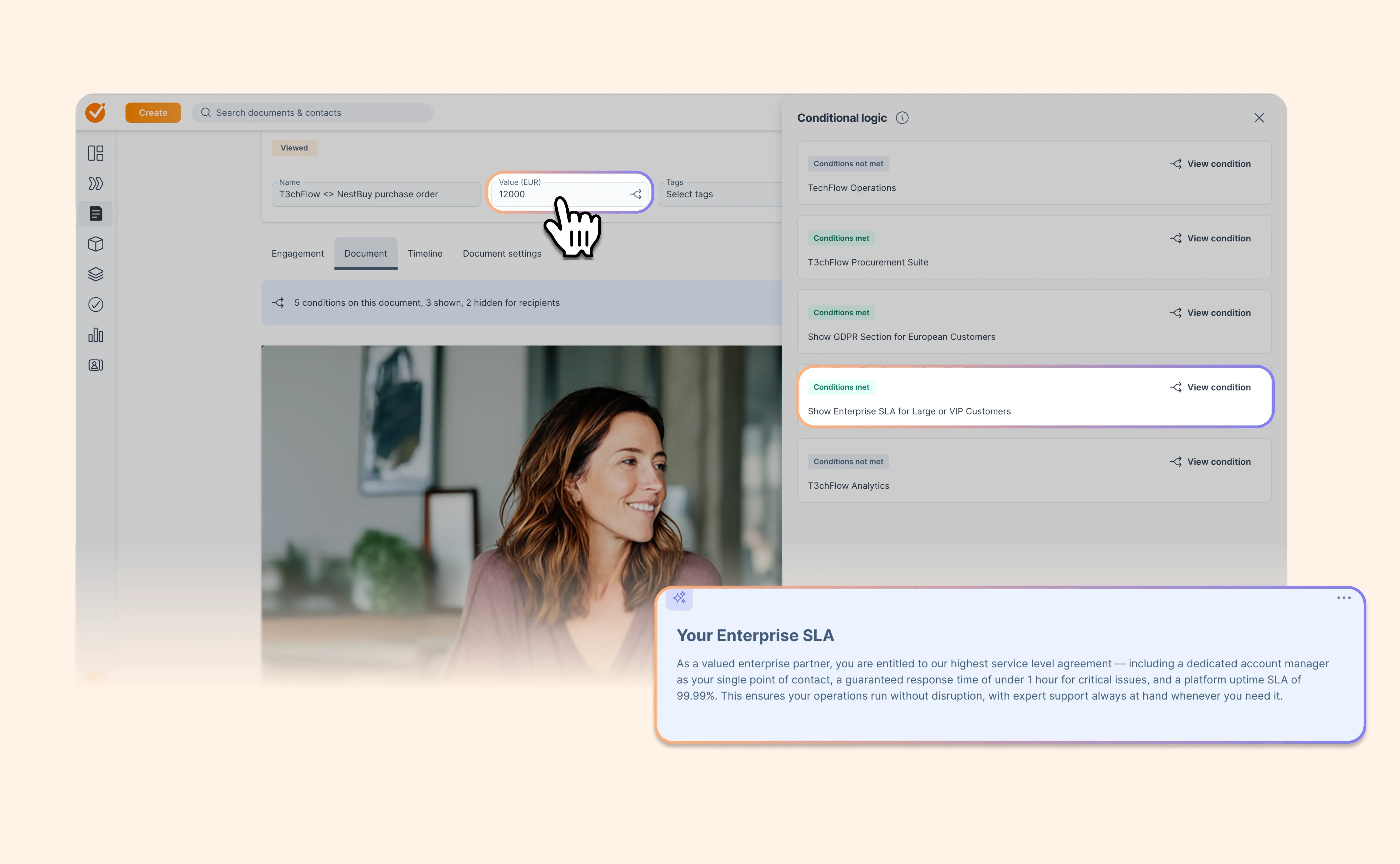
Deals change after you send the contract. Now your conditional content can change with them.

When you edit a signable, unsigned contract, GetAccept re-evaluates its existing conditional logic. Update a document value, custom data or a connected pricing-table field and the relevant content appears or disappears live.

This works with values entered directly in GetAccept, passed in through your CRM or updated through the public API.

Let’s say you discover during negotiation that what you thought was a standard deal has actually become much higher value. You can adjust the deal value to automatically show your Enterprise terms instead of standard terms, without needing to create a whole new contract..

So when the deal changes, you don’t need to rebuild the contract or manually fix every conditional section. Your existing rules keep the content aligned with the latest information.

View help article

Keep the deal moving in Slack

Keep the deal moving in Slack

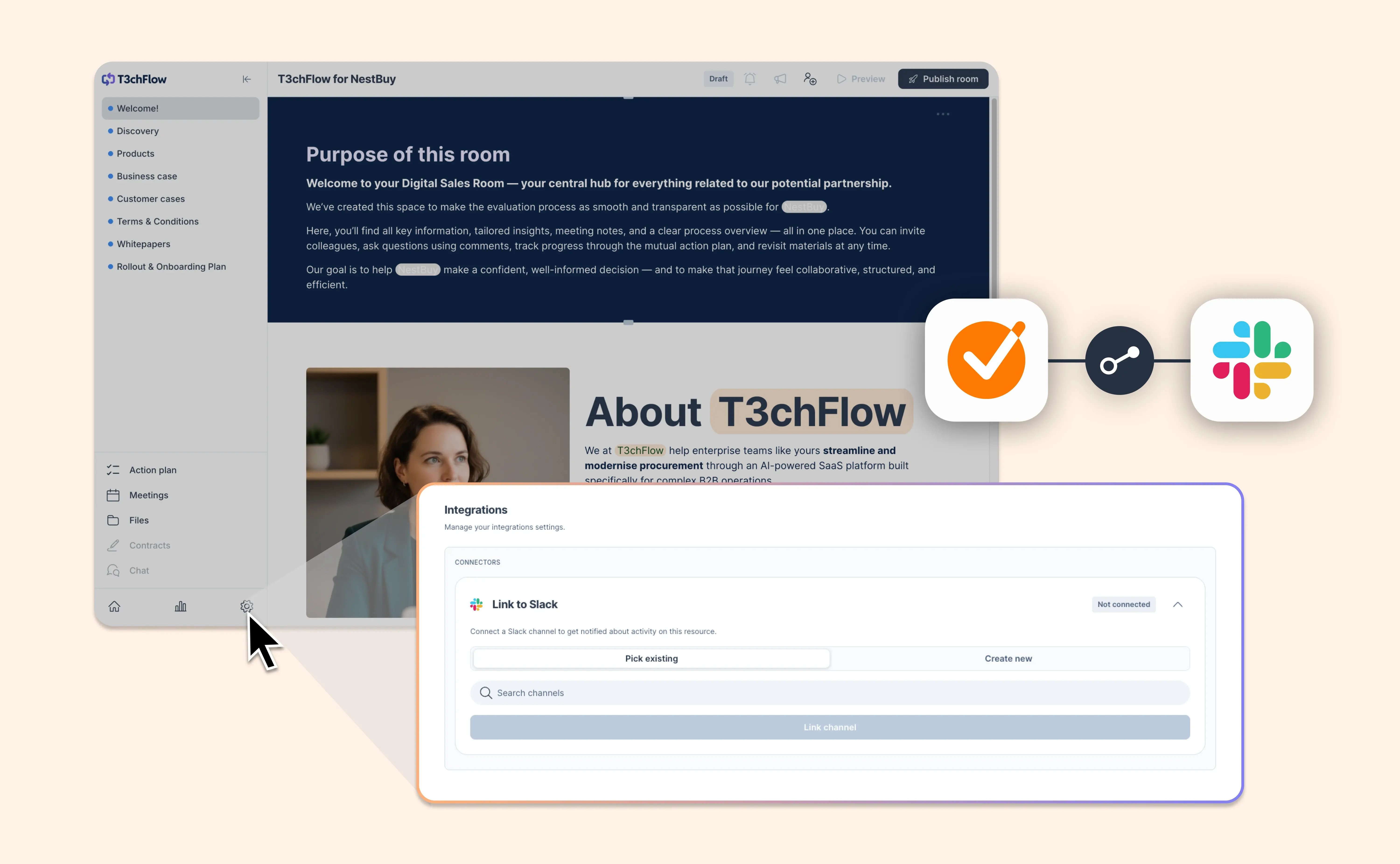
You might send a contract or Deal Room from GetAccept. Or you might send it straight from your CRM.

Either way, once it’s sent, your team needs one clear place to collaborate, track updates and plan the next move.

Now, you can link a Slack channel when sending a Deal Room or contract from GetAccept, Microsoft Dynamics 365, HubSpot and our Chrome extensions for Pipedrive and Upsales.

When a buyer opens a Deal Room, completes a task, leaves a comment or signs a contract, your team can see it in the Slack channel connected to that deal. Think of it as your deal radar, right where your team already works.

Choose an existing Slack channel or create a new one during sendout. Once linked, your team can keep deal conversations, updates and follow-ups in the right Slack space without jumping between tools or copy-pasting links.

Here’s what’s new:

  • Link from sendout: Connect a Slack channel when sending a Deal Room or contract
  • Work from your flow: Available in GetAccept, Microsoft Dynamics 365, HubSpot and Chrome extensions for Pipedrive and Upsales
  • Pick or create: Choose an existing Slack channel or create a new one
  • Keep it optional: Skip Slack linking when you don’t need it
  • Coming soon for Salesforce: Slack linking for Salesforce will follow soon

Less manual handoff. Fewer scattered updates. One smoother way to keep your team aligned after sendout.

PS: To use the latest Slack linking functionality from your integrations, make sure you’re running the latest version of the integration.

View help article

Make text over your images look exactly right

Make text over your images look exactly right

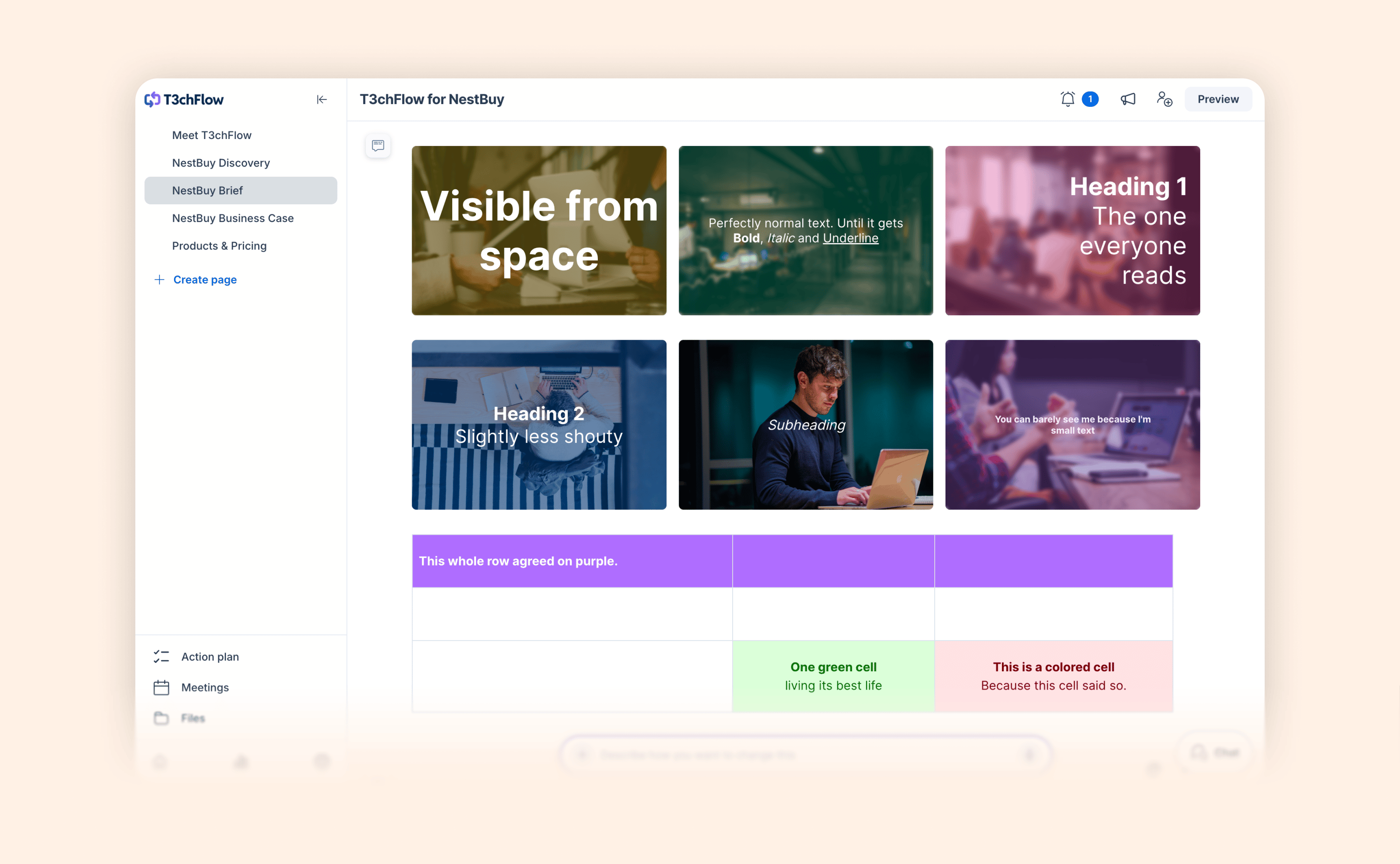
Text over an image is often the first thing people notice, so now you get to make it shine.

You choose the style, and your message lands with the right emphasis every single time. Take your pick from six text styles: Display (the default), Normal text, Heading 1, Heading 2, Subheading, and Small text.

A bold headline, a clean subheading, a subtle caption. It is a small touch that makes every room and document look genuinely polished.

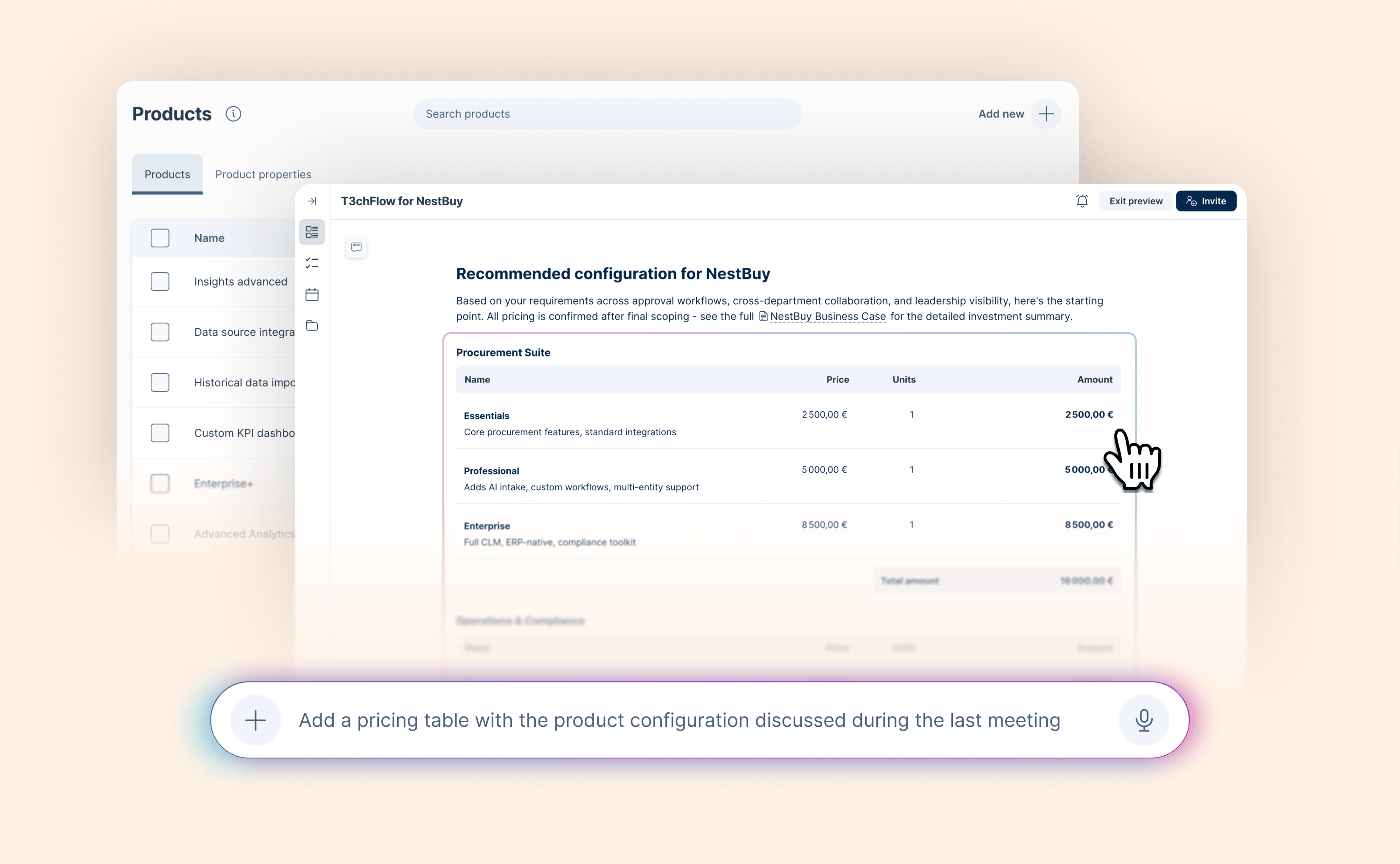
GetAccept AI now generates pricing tables from your product library

GetAccept AI now generates pricing tables from your product library

AI-assisted quoting has always been the goal. But when AI suggests products that don't exist or prices that don't match your catalog, it creates more work than it saves.

GetAccept AI is now connected to your product library, which means every pricing table it generates is grounded in your real products. Ask it to build a quote, or let it read what came up in your last meeting – and it works from what you actually sell.

Read blog post

June 2026

More control over how your Deal Rooms look

More control over how your Deal Rooms look

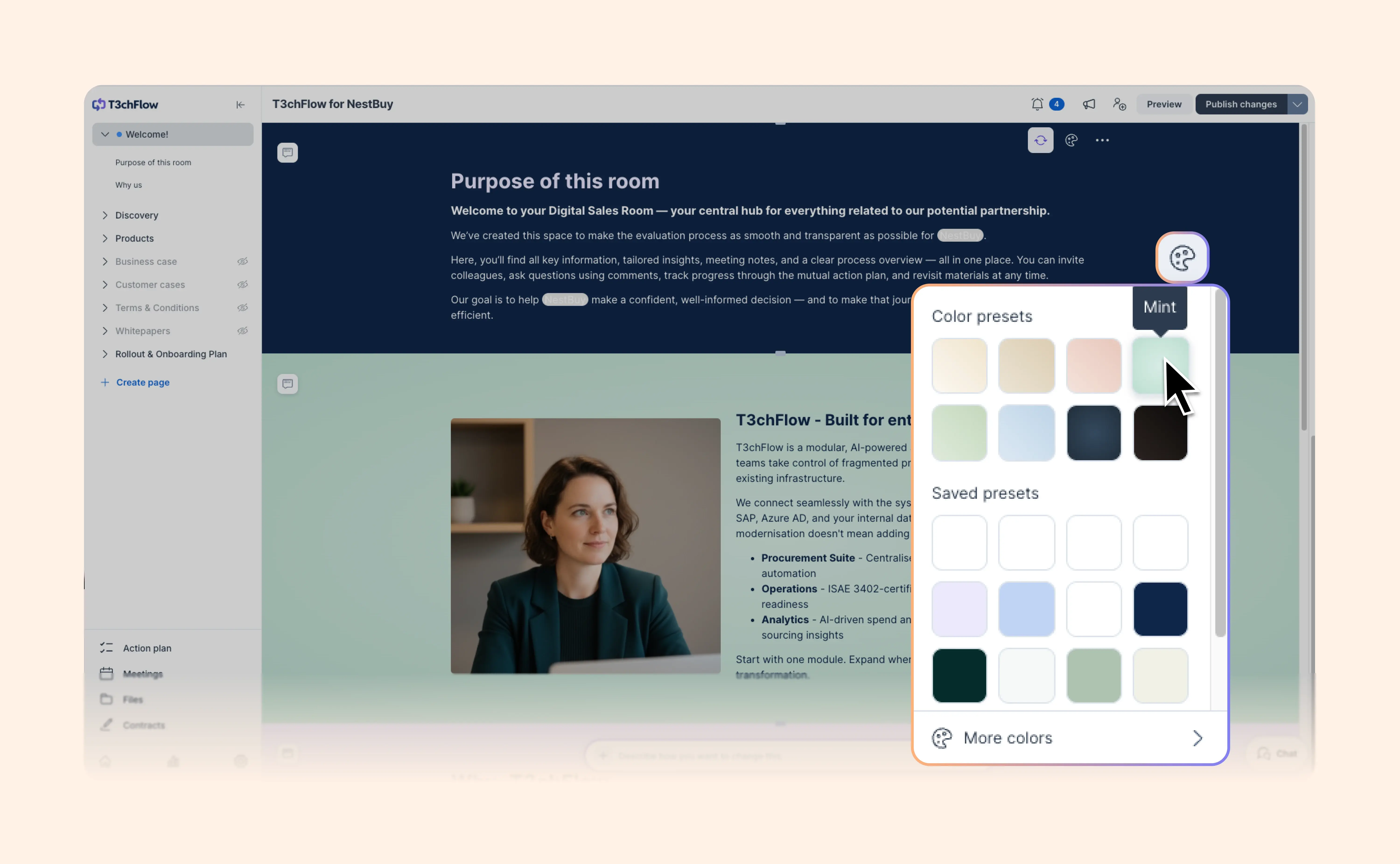
A great Deal Room should feel clear, polished and easy to read.

We’ve updated the Deal Room editor to make visual editing faster and more flexible.

You can now change section colors from visible swatches in the editor, instead of digging through extra menus. Hover over a color to preview it, pick from accessibility-approved presets, or use your saved brand colors when you need to stay on-brand.

We’ve also added more layout control to Media & text. Add extra spacing above and below, or use wide width when your content needs more room to breathe.

Here’s what’s new:

  • Section color swatches: Pick colors faster from visible presets
  • Live preview: Hover over a swatch to see the change before applying it
  • Saved brand presets: Use entity-specific colors directly in the picker
  • Gradient backgrounds: Add more visual depth to sections
  • Media & text spacing: Choose None, Small, Medium or Large spacing
  • Wide width: Give Media & text layouts more space when the default width feels too tight

Now it’s easier to create Deal Rooms that look sharp, feel on-brand and help buyers focus on the right content.

View help article

Set up your signature from your profile

Set up your signature from your profile

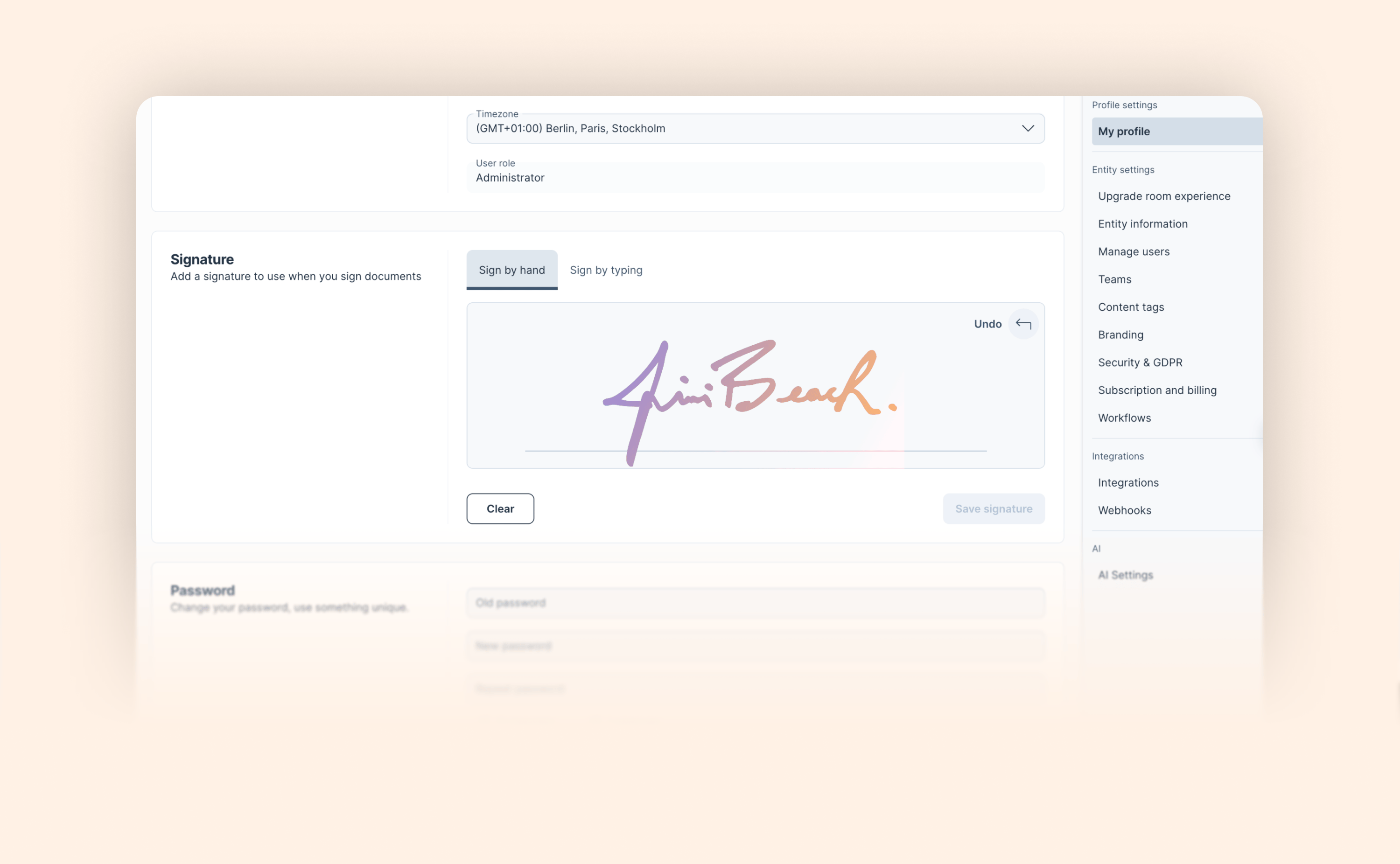
Until now, creating or updating your saved signature in GetAccept meant setting up a document and signing it first.

You can now manage your signature directly from Settings → My Profile:

  • Draw your signature by hand on a canvas

  • Type your name and have it styled for you automatically

  • Preview your current saved signature before making changes

  • Clear and start fresh whenever you need to

  • Save and it applies to all future documents

API-first customers can now manage their saved signature independently, without creating a throwaway document in the core app.

View help article

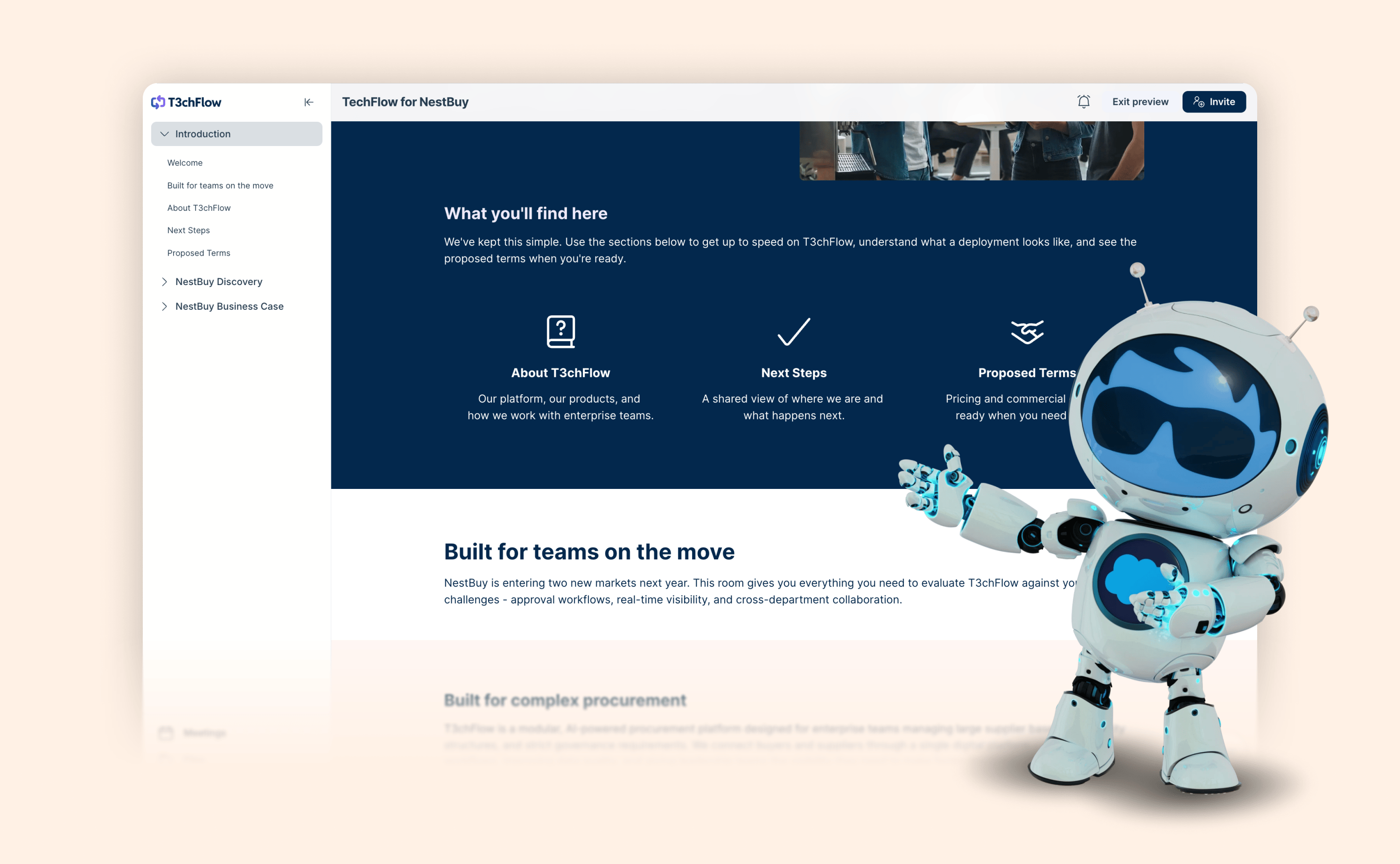
Keep your Deal Room navigation clean

Keep your Deal Room navigation clean

Some Deal Rooms are short and sweet.

Others? They’ve got welcome sections, product details, customer stories, terms, whitepapers and onboarding plans all living in one place.

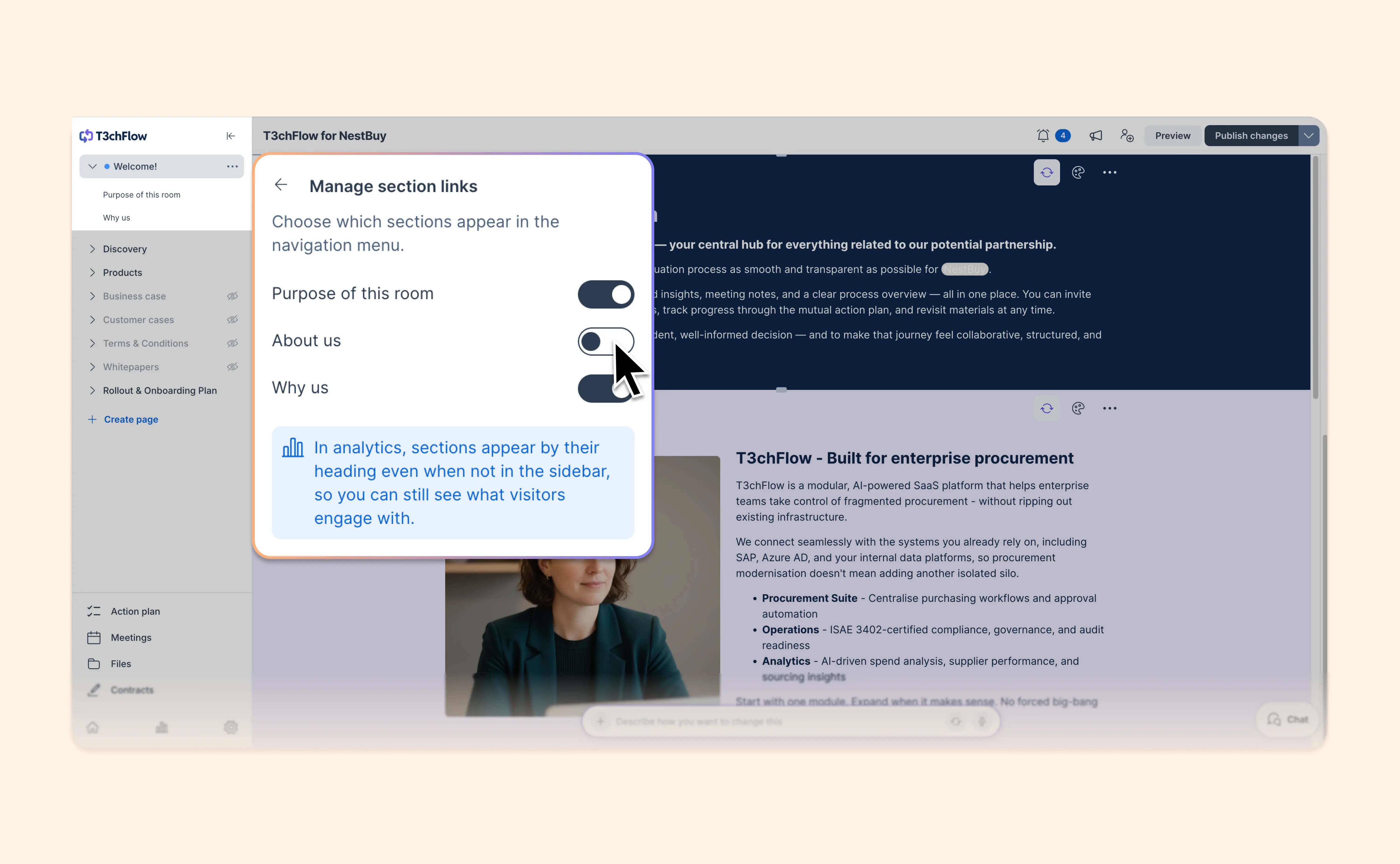
Now you can choose which sections appear in the Deal Room navigation menu.

With Manage section links, you can toggle sections on or off in the left navigation. This helps you keep the buyer’s menu focused on the sections that matter most, without removing content from the page.

A few things to know:

  • Sections turned off in the navigation still appear on the Deal Room page unless you choose to hide them completely
  • They still show up in room analytics
  • Newly created sections are hidden from navigation by default

It’s a small control that makes bigger Deal Rooms easier to navigate. This is available in the new AI-native Deal Rooms only - upgrade to the new experience today.

View help article

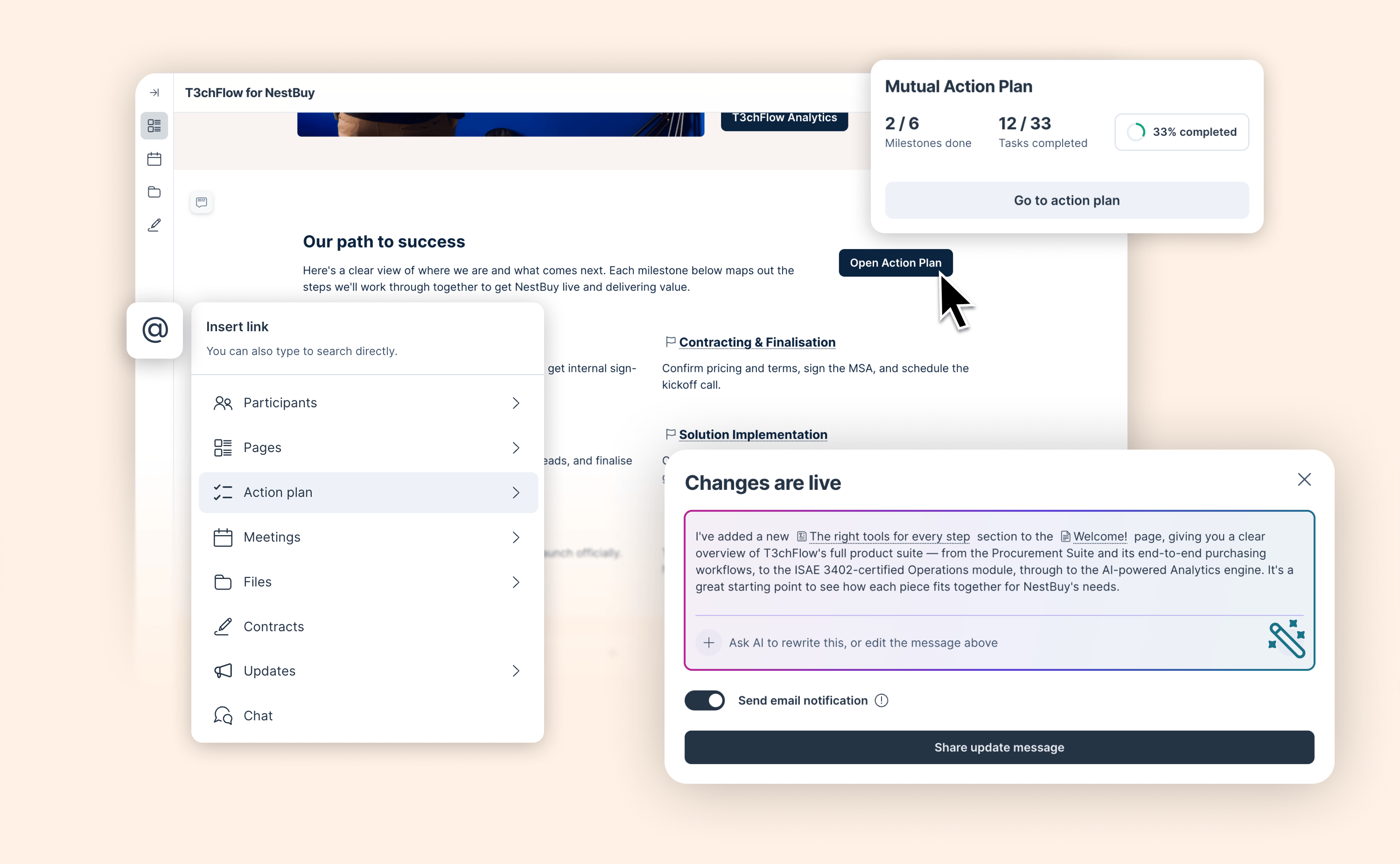
Every part of your room is now one button or @-mention away

Every part of your room is now one button or @-mention away

Most rooms are built like filing cabinets. Everything is in there. But buyers have to figure out where to look.

You can now link directly to a specific page, section, file, meeting, contract, or action plan item – from anywhere in the room. Add a button in your content, drop an @-mention in the chat, reference a task in a comment. Wherever you're writing, you can point buyers to exactly where they need to go.

  • Link to any part of the room from the link element: pages, sections, the action plan, files, meetings, contracts, updates, and the chat

  • @-mention linking in all text elements, chat messages, comments, and MAP tasks. Simply type ‘@’ to reference any destination inside the room

  • Customize the layout of your link elements with button only or with a text and/or an image

And when you change something in the room, AI can now write the update post for you, with clickable links to the sections that changed.

Available now in early access as part of the AI-native Deal Room experience coming later this year. Admins can activate it from the Upgrade room experience page. Not an admin? Share this help article with yours.

View help article

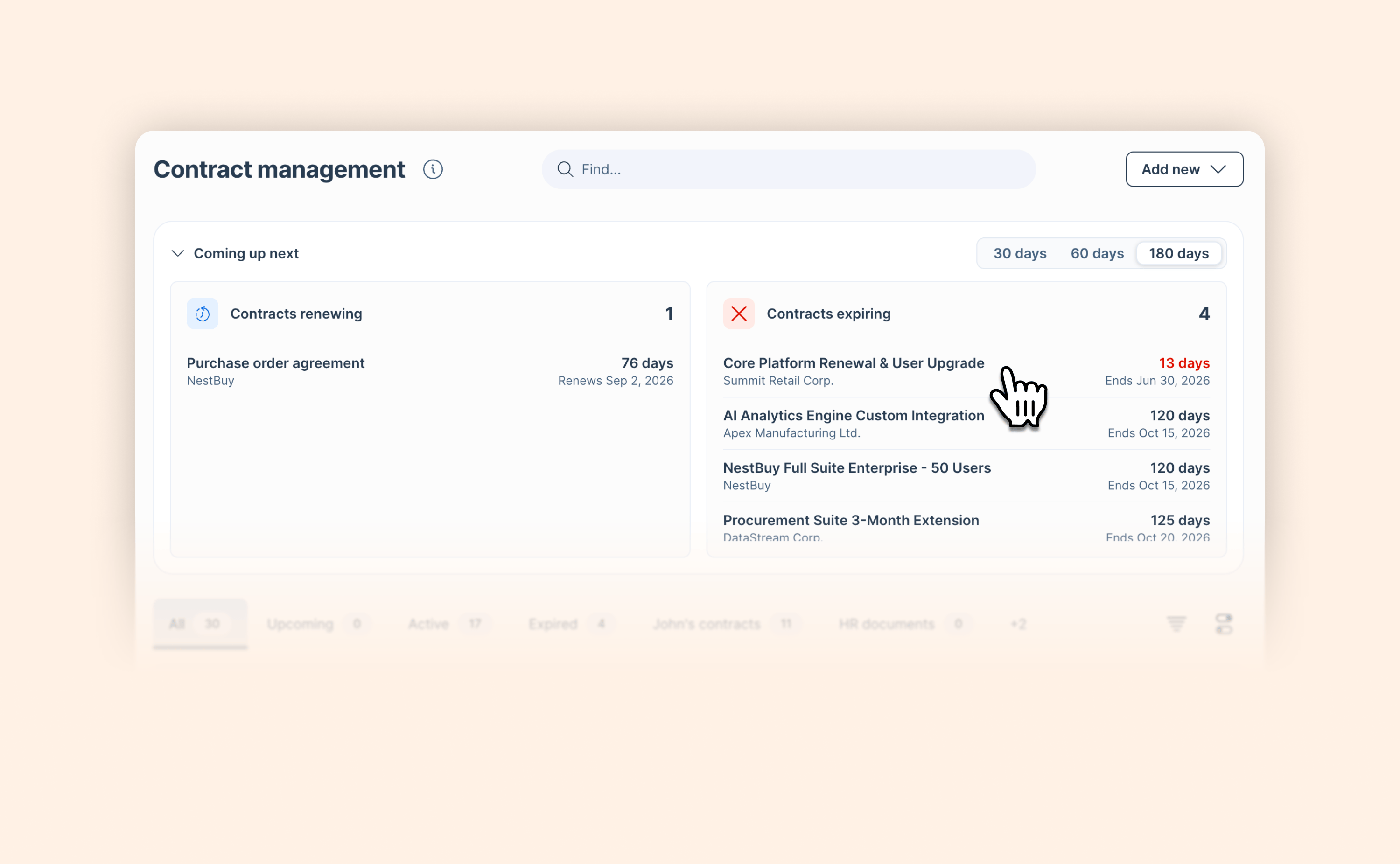
New in AI Contract Management: See what's coming up before it sneaks up on you

New in AI Contract Management: See what's coming up before it sneaks up on you

Staying on top of renewal and expiration dates across your contracts is now easier, with key information that comes to you automatically instead of you having to dig for it.

The new "Coming up next" section in AI Contract Management gives you an at-a-glance view of:

  • Contracts renewing: auto-renewals happening within the next 30, 60, or 180 days

  • Contracts expiring: contracts set to expire within the same window, so you always know what needs attention and when.

AI Contract Management is available as an add-on alongside standard contract management. Reach out to your account manager for a walkthrough.

Learn more

Salesforce Agentforce now reads your entire Deal Room

Salesforce Agentforce now reads your entire Deal Room

Until now, when a rep asked Agentforce about a deal, the AI was working from a partial picture. It knew the CRM record. It could read meeting transcripts and action plan summaries.

With this release, Agentforce has full visibility into everything that happened in the Deal Room – the proposals reviewed, the assets a buyer came back to three times, the action items left untouched for two weeks.

  • GetAccept now exports the full content of a Deal Room to Agentforce: every section, asset, and piece of structured content in the Deal Room is now accessible to Agentforce

  • Complete deal context: meetings, action plan status, shared assets, and buyer engagement data are now available together, giving Agentforce everything it needs to answer deal-related questions accurately

When a rep asks Agentforce about a deal, the AI is now working from the complete buyer picture, not just what's stored in CRM fields or meeting notes.

Read blog post

May 2026

April 2026

March 2026

February 2026

January 2026

December 2025

November 2025

October 2025

September 2025

August 2025

July 2025

June 2025

May 2025

April 2025

March 2025

February 2025

January 2025

December 2024

November 2024

October 2024

September 2024

August 2024

July 2024

June 2024

May 2024

April 2024

March 2024

February 2024

January 2024

No updates match your filters.

Explore changelog

Try a feature, category, or keyword. Type at least 3 characters to start searching.

Categories

Recent updates