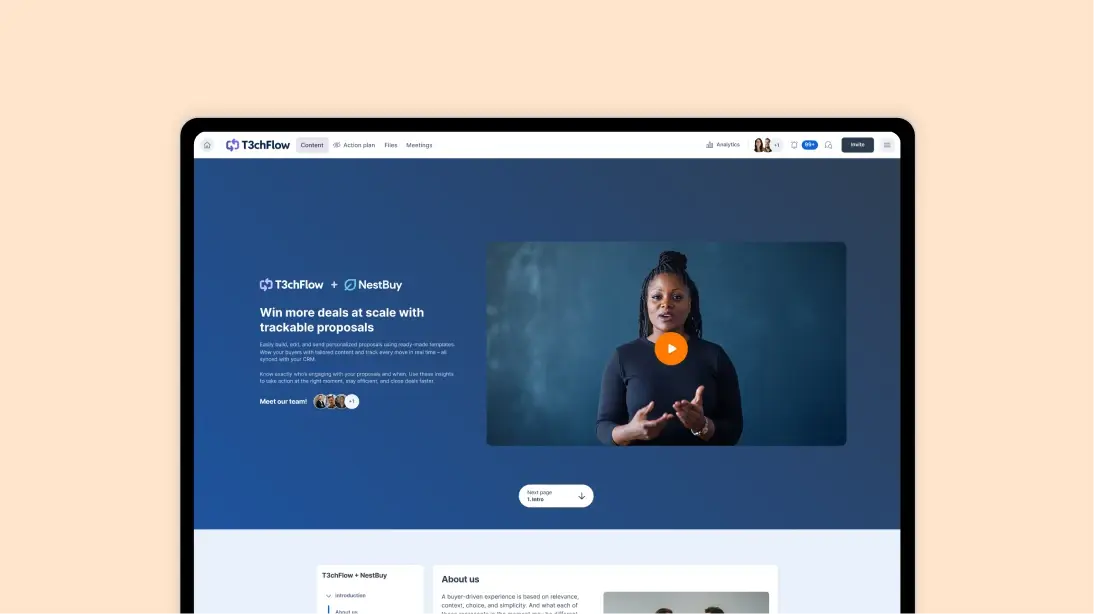
- Digital Sales Rooms centralize all deal content in one secure space, eliminating scattered email threads and improving buyer collaboration throughout the sales cycle.
- Companies using DSRs see measurable results: 67% shorter sales cycles, win rates doubling from 13% to 26%, and reps saving 16 hours monthly.
- Buyers spend only 5% of their purchase time with sales reps, leaving the other 95% for self-evaluation, which is crucial for winning deals.
- DSRs provide real-time visibility into which stakeholders view content and when, replacing guesswork with actual buyer behavior data for better forecasting.
-
DSRs earn their keep in longer deals with many stakeholders. For quick deals with one decision-maker, they're mostly setup nobody opens.
TL;DR
What is a digital sales room?
A digital sales room is a secure, shared space for sellers to inform, interact, and negotiate with buyers.
Also known as a dealroom, it is a branded, living resource for interactive sales collateral: proposals, case studies, meeting recordings, the action plan and the contract all sit behind one link, and the seller sees who engages with what.
If you've seen the acronym and wondered about DSR meaning in sales: DSR stands for digital sales room. It's built for the stretch between "opportunity created" and "deal closed", where deals tend to stall.
For buyers, that means one place to find everything. A new stakeholder who joins in week 6 can catch up without anyone digging through their inbox.
For sellers, it means reading buying signals. You see who opened the proposal, a new stakeholder in the room, which pages get read twice, and which get skipped.
Digital sales room vs. Virtual sales room, Deal room, Data room, and Sales portal
Digital sales room, virtual sales room, digital deal room and sales deal room are often used interchangeably and mean the same thing. Each one is a shared online space where buyers and sellers collaborate throughout the sales cycle.
A few neighbouring terms mean something different, and mixing them up leads to buying the wrong tool:
|
Term |
What it usually means |
Same as a DSR? |
|---|---|---|
|
Virtual sales room |
Another name for a DSR |
Yes |
|
Deal room, digital deal room, sales deal room |
A DSR, when used in a sales context |
Usually |
|
Online deal room, virtual data room |
A locked-down document store for M&A, fundraising or due diligence, with permissions and audit logs |
No |
|
Sales portal, content portal |
A one-way library of collateral that every buyer browses |
No |
So, what is a deal room? In sales, it's a DSR. In finance, it's usually a data room. The quick test: if there's one room per deal, both sides can talk inside it, and the seller sees engagement, it's a digital sales room.
GetAccept uses "Digital sales room" because the name accurately describes what the platform does: it gives every deal its own room online.
GetAccept is a Digital sales room platform where sellers and buying committees share content, track engagement, and sign contracts in one place. We launched the Digital sales room category with G2 in October 2021.
How is a digital sales room different from a shared folder like Google Drive?
A shared folder stores files, while a digital sales room runs a deal: it puts content in the order the buyer needs it, keeps the conversation and the mutual action plan next to it, shows you which stakeholders read what, and ends with a signed contract.
|
Shared folder (Google Drive, SharePoint, Dropbox) |
Digital sales room |
|
|---|---|---|
|
Built for |
Storing and sharing files |
Running one deal from discovery to signature |
|
Structure |
Folders you organize yourself |
Pages in the order the buyer needs them, revealed as the deal moves |
|
Conversation |
Happens in email, outside the folder |
Comments and chat next to the content |
|
Next steps |
Tracked somewhere else |
A mutual action plan with owners and dates on both sides |
|
Engagement |
Who has access to which file |
Visits and time per page for each stakeholder |
|
Proposal and contract |
Sent and signed in other tools |
Edited, signed and synced to your CRM in the same room |
Used only as a place to drop files, a DSR does behave like a shared folder with a logo on it. You see the difference when you use the mutual action plan, the chat and the engagement data.
How is a digital sales room different from sending a PDF proposal via email?
A PDF proposal is a file you send and then lose sight of. A digital sales room keeps one live version, shows you who on the buyer's side reads it, and lets the whole group comment and sign in the same place.
Email works fine when 2 people are deciding. Once 6 people need the same proposal, things start getting lost between inboxes.
|
Email + PDF |
Digital sales room |
|
|---|---|---|
|
Versions |
A new attachment for every change |
One live proposal, editable after sending |
|
Who read it |
Unknown, unless someone replies |
Visits and time per page, per stakeholder |
|
A new stakeholder joins |
Your champion forwards a thread |
You invite them, and the full history is waiting |
|
Questions |
Scattered across inboxes |
Comments and chat next to the content |
|
Signature |
A separate e-signature tool |
Signed in the same room |
Do virtual sales rooms replace email? Mostly, though not completely. You'll still email to point people to the deal room, so email becomes the doorbell.
Does a digital sales room replace a live product demo? No. Put the demo recording in the room so stakeholders who missed the call can watch it, and share it internally without you.
How do digital sales rooms work?
A Digital Sales Room works by creating a secure, branded microsite for each deal. Here's the step-by-step flow:
Step 1: You create the room
After your discovery call, you build a Digital Sales Room directly from your CRM or from your meeting notes. You add your slides, pricing, case studies, ROI calculator, technical specs - whatever your buyer needs. Everything lives in a single URL instead of being scattered across 7 email attachments.
Step 2: You invite your buyer
You send a single link. No downloads, no logins, no friction. Your buyer clicks and lands in a branded space that feels professional, organized, and built specifically for them.
Step 3: Your buyer explores (and you watch)
You see who opens the room, what they view, how long they spend on each section, and when they share it with colleagues.
If your champion forwards the link to procurement, you know. If the CFO just glances at the business case, you know. If a new stakeholder appears 14 days into the deal, you know, and you can act in time.
Step 4: Collaboration happens in the room
Buyers leave comments, ask questions, and tag colleagues, all inside the DSR. You respond in the same space, so all communication and key information is visible to everyone. No more "let me forward this to my team and circle back next week." The room becomes the single source of truth for the entire buying committee.
Step 5: You close the deal
When your buyer is ready, you send the proposal, and they sign the contract in the same room. The entire journey, from qualified opportunity to signed contract, happens in one place, tracked in your CRM automatically.
The result?
- You replace the chaos of email-based selling with a structured, visible process.
- Your buyer gets a great experience.
- You look professional.
- You get engagement data that tells you where your buyers stand.
- Your forecast becomes grounded in buyer behavior, not rep intuition.
We've seen similar results with our customers after implementing GetAccept’s Digital sales rooms, with customers reporting increased win rates and decreased sales cycles.
6 benefits of digital sales rooms
The deal room benefits all come back to one thing: you can see the parts of the deal that happen when you're not in the room.
Shorter sales cycles
Digital sales rooms reduce sales cycles by providing buyers with a single destination for everything they need, eliminating delays caused by forwarding materials across email threads.
When you can see exactly where a deal is stuck, you fix it that day instead of finding out at the forecast call.
The result: One of GetAccept’s customers reduced the sales cycle length from 150 days to just 50 days in some cases. A 67% shorter sales cycle.
Increased win rates
Digital sales rooms increase win rates by letting you tailor content for each stakeholder in the buying committee:
-
Finance sees business cases
-
Technical reviewers get security documentation
-
Legal accesses contract terms
A DSR lets you serve each of them without your champion playing a game of telephone.
A Gartner survey found that tailoring content to the buying group's shared needs raises consensus by 20%.
The result: SalesScreen's enterprise win rate went from 13% to 26% after rolling out GetAccept (the team is clear it wasn't the only change that year).
Forecast from buyer behavior
Digital sales rooms provide visibility by tracking which stakeholders view your content, how long they spend on each section, and when they're most active.
This data shows which stakeholders are active, what they read, and when engagement drops off. A deal where nobody has opened the room in 2 weeks belongs lower in the forecast, whatever the rep says.
This visibility improves how you forecast pipeline. You know which deals are progressing and which ones are at risk.
Stand out by making it easier to buy from you
Digital sales rooms help you stand out by making it easier to buy from you. Stakeholders find what they need without waiting on email forwards, new reviewers get caught up without scheduling calls, and the entire evaluation happens in a branded, centralized space.
This is extra important in 2026 when buyers are spending only about 5% of their time with sales reps. If you're not making that 95% easy, you're making it easy for them to choose someone else.
Read more: Buyer enablement explained
How a digital sales room aligns with the sales cycle
Using engagement features like video, chat, and automatic reminders increases win rates by 51%
When a digital sales room is worth it, and when it isn't
A DSR pays off in long deals with many buyers, but in quick deals with one decision-maker, it's mostly setup nobody opens.
Go to Reddit and ask r/sales whether digital sales rooms are worth it, and you'll get both answers in the same thread. One rep called them "glorified shared drives." Another sold several $100k+ deals where more than half the buyers never logged in. Others say they can't run a complex deal without one anymore.
They're all right. It depends on the deal.
It's worth it when
- 3 or more people on the buyer's side have a say.
- The cycle runs for weeks or months, not days.
- Your product needs explaining: security reviews, technical validation, implementation planning.
- Several teams on your side are involved (sales, CS, legal, implementation).
- The buyer already knows what they're looking for. For example, it can make sense to set up a room for most of the inbound deals and some outbound ones.
For how each of these plays out, see the use cases by deal type below.
Skip it when
- One person makes the decision.
- You can close in a few emails and a call.
- The buyer is wary of links from unknown domains. Some public-sector and heavily regulated buyers fall in this group.
- Nobody on your team will keep the room up to date.
Why deal rooms go unused, and what fixes it
-
The link looks like phishing. A system email from a domain the buyer has never seen can trip every security training they've had. Tell them the room is coming on the call, then send the link from your own inbox. (GetAccept supports custom domains or sending from the rep's email.)
-
The room went out too early. Rooms sent after a first call often sit untouched. Create one once the deal is qualified and has a real next step.
-
There's nothing to do in it. A room full of PDFs is a shared drive. Ask the buyer to review one specific thing before the next call, and keep the action plan live.
-
The content goes stale. Without an owner, rooms drift out of date and reps go back to attaching PDFs. Give someone in RevOps or sales enablement ownership of the templates.
-
It takes too long to build. If each room is a custom website, reps will skip it. Templates bring setup down to minutes, and GetAccept can build a first version of the room from your meeting notes and CRM data.
Case in point: Marketing platform N.Rich cut deal room setup from 4-8 hours in the previous tool down to roughly 10 minutes with GetAccept's AI functions.
One more thing: an unopened room is also information. Reps can use it to disqualify early: if nobody on the buyer's side opens the proposal, that tells you how serious the deal is.
Digital sales room use cases by deal type
Digital sales rooms work across every sales motion where complexity, multiple stakeholders, or long cycles create friction:
Enterprise deals with multiple stakeholders
When you're selling to organizations with 5+ decision-makers, DSRs give you visibility into who's actually engaged.
You'll see which executives opened your pricing deck, which technical buyers skipped the security documentation, and if the champion forwarded materials to legal.
This stakeholder-level tracking helps you multithread effectively and stay in control of the buying committee.
Complex product sales requiring education
If your solution needs technical validation, security reviews, or integration planning, digital sales rooms consolidate all supporting materials in one space.
Buyers access technical specs, compliance documentation, implementation guides, and case studies without hunting through email threads. And you can be confident that you are always sending the correct and up-to-date materials.
High-velocity mid-market deals
Teams closing 15-30 deals monthly use digital sales rooms to standardize proposal delivery while keeping communication personal.
Instead of reformatting proposals for every opportunity, Account Executives deploy branded templates with dynamic content blocks, embedded videos, and mutual action plans.
This consistency reduces cycle times while improving win rates through better buyer experiences.
Cross-functional sales requiring internal alignment
When deals involve sales to customer success handoff, Implementation, and Legal, digital sales rooms allow all parties to collaborate easily. Deal rooms carry all the needed information to other departments responsible for onboarding and implementation.
Digital sales room use cases by role
For sales reps
Account Executives use Digital Sales Rooms to manage complex deals by seeing all stakeholders involved, personalizing content for each decision-maker, and tracking engagement to know when to follow up and what to discuss.
They gain more control over each deal as they juggle multiple active deals in different pipeline stages. Deal rooms also save AE's time through bidirectional integrations with CRMs.
Like a Senior Account Executive at Dealfront said:
“Since I started using GetAccept, my sales process and communication with my prospects are way more project and solution-oriented. They know where to find the content they need, and I can focus on providing solutions.”
For RevOps
RevOps teams use Digital Sales Rooms to enforce standardized processes, maintain clean CRM data, and gain visibility into what's actually working across deals.
Rooms sync to the CRM automatically, engagement data flows in without manual logging, and templates keep messaging and pricing within approved limits. You get governance without handing reps more admin work.
For sales leaders
Sales leaders use Digital Sales Rooms to forecast accurately, coach effectively, and standardize execution across the team.
You can see which deals are moving, which have stalled, and which content gets read. Remi Morken, SVP of Sales at SalesScreen, describes it as a way to "control the narrative" and make sure reps stick to the process you've set.
Remi Morken, Senior Vice President of Sales and SalesScreen, said, "This is a way for you to control the narrative. To make sure your reps are sticking to the process, adopting the principles you’ve set, and helping your customers to experience value instead of just product pitching."
Digital sales room best practices
Start with qualified opportunities
Create rooms after the discovery call to focus your efforts on high-potential deals. Use the room from then until signature (and past it, for onboarding), and tell the buyer what the room is for before you send it.
Use templates for consistency
Allow reps to create branded, consistent rooms in minutes, not hours. Lock the sections that must never change, like legal terms, security answers and pricing rules, and leave the rest open to personalize.
Track engagement strategically
Use insights on who is viewing what to inform your follow-up strategy. Read the patterns across visits: which roles are active, what gets reread, and when activity stops.
Let AI do the heavy lifting
Connect the Digital Sales Room to your CRM and conversational intelligence tool and let the room build out relevant content for you. AI can draft pages from what was said on calls: objections, requirements, next steps.
Replace tools instead of adding one
The rollouts that fail usually stack a DSR on top of existing proposal, e-signature, contract and tracking tools. Pick 3 to 5 tools the room replaces and tell reps which ones.
Let leaders lead
Adoption follows what managers ask about. When a VP asks "who's engaged on the buyer side?" in deal reviews instead of "what's the status?", reps get the message fast.
CRM integration and your tech stack
Native CRM integrations
A native CRM integration between the Digital Sales Room and your CRM saves a lot of time and effort.
If the DSR doesn't sync with your CRM, reps won't use it. They won't create a room in one tool and then copy opportunity details, contacts and activity into Salesforce by hand. They'll skip the room, or use it without logging anything, and your forecast gets worse.
A native digital sales room CRM integration mirrors what happens in the room in Salesforce or HubSpot, syncs buyer engagement in real time, and keeps contacts up to date in both systems. Pressure-test it during evaluation.
Make sure to thoroughly pressure-test the CRM integrations when evaluating Digital Sales Rooms.
Conversational intelligence
DSRs should integrate with conversational intelligence platforms to use insights from sales calls directly in your deal rooms. Your call transcripts identify stakeholder concerns, objections, and requirements. This integration connects what happens in live conversations with what buyers need to evaluate asynchronously.

What would your Digital Sales Room look like?
See what a Digital Sales Room could look like for your company and how it could fit into your process in a 30-minute custom demo.
Frequently asked questions
-
Digital sales rooms reduce the sales cycle length because all buyer communication and content are shared in one space. Forecast accuracy improves thanks to stakeholder tracking that eliminates gut feeling and guesswork from the pipeline.
Why deals close faster:
- Mutual Action Plans keep buyers accountable (no more “we’ll circle back”)
- Templates mean reps stop rebuilding the same proposal 47 times
- Real-time chat and commenting reduce back-and-forth email cycles
- You pull decision-makers in early
Why the forecast becomes more reliable:
- Deal room activity shows who’s actually engaged vs. who’s going cold
- Engagement tracking separates “commit” from “best case” before your forecast call
- Business case collaboration reveals if buyers are serious or just kicking tires
-
There are many. One of the biggest will the analytics on your prospects’ engagement with your content, as you will be able to determine which of your sales collateral grabs the most attention, which part of your proposal is too complicated and in short - which piece of sales content sells and which doesn’t, to help you become a top performer. A digital sales room will also allow you to gather all the relevant stakeholders needed to close a deal, in a single virtual space, as well as identify new ones added to the digital sales room by your champion directly. Being an easily accessible (but secure) repository of all the information needed by your prospects, it will also make the customer experience much greater than fragmented communication through email chains.
-
Creating and maintaining a digital sales room takes minutes. With built-in templates, automatically fetched CRM data, and AI, it’s possible to set up a high-quality Digital Sales Room in just a few clicks. Ongoing updates are automated primarily through AI and real-time syncing with existing sales tools, such as conversational intelligence tools.
Time breakdown:
- Sales Enablement or RevOps: Set up templates once
- Reps: 2-5 minutes to spin up a room
- Updates: 5-10 minutes after big meetings. AI does the rest
-
Get buyers actually using the room by recording a quick video intro so they know you’re a real person. And create interaction by using chat to answer questions directly and by creating Mutual Action Plans with actual deadlines, so “let’s reconnect next month” stops killing your deals.
What gets buyers engaged:
- Video intro: 30 seconds on camera beats a wall of text because buyers see who they’re working with
- Live chat: Answer questions the moment they pop up
- Mutual Action Plan: Assign tasks with dates. It’s more difficult for buyers to vanish when they’ve committed to deliverables
- Auto-reminders: Keep deals moving without you having to chase everyone down
How to make sure they actually see it:
- Drop the link everywhere → email, LinkedIn, SMS
- Watch what content they’re consuming so you know what matters (and what to skip next time)
- Let buyers invite their CFO, legal, whoever. It’s easier than forwarding a 47-email thread and helps you stay in control
-
Introduce the digital sales room right after qualifying the deal. Don’t waste time building rooms for tire-kickers. That way, you make sure you invest the time only in deals where it makes sense. Getting it in early means buyers actually use it, and you set expectations for how you’ll work together (no more email chaos from day one).
Why timing matters:
- Early stage: You look put together while competitors are still sending email attachments
- Proposal stage: Edit terms in real-time with everyone watching, making sure everyone is aligned
- Negotiation stage: Legal and procurement get all the context they need in one place instead of asking your champion to explain everything