


Introduction
Meetings are where deals actually move forward. When the insight from those conversations is captured and shared, alignment improves and deals move with less friction. This lesson will explain how best to use your meetings to create buy-in and close faster.
Why meetings matter in your Deal Room
Meetings are where priorities are clarified, objections surface, and decisions are made. They’re also where misalignment begins if context isn’t captured clearly.
When meeting insight stays scattered across personal notes or email threads, stakeholders remember different versions of what was agreed. Next steps get repeated or missed, and new participants need extra catch-up calls just to understand the current state of the deal.
Adding meetings to the Deal Room turns it into a shared record of the deal journey – a place both sellers and buyers can rely on as the single source of truth.
Adding a meeting to your Deal Room
The Meetings tab will appear in Deal Rooms unless the feature has been disabled by an admin. This gives teams a dedicated place to capture and reuse buyer conversations as deals progress.
You can host meetings in any tool you prefer, such as Zoom, Google Meet, Microsoft Teams, or in person.
After the meeting, you bring it into GetAccept in one of three ways:
-
Upload a transcript, whether it was generated by your meeting tool or another transcription service
-
Use a supported integration, such as Gong or Glyphic, to sync recordings and transcripts automatically
-
Add details manually, by writing notes or uploading a summary
You can choose whether or not you want to make the meeting visible to your buyer. Once the meeting details are added, GetAccept’s AI can generate a structured summary and next steps.
For more information, check out the help article.
How the AI meeting summarizer works
When a transcript is available, GetAccept’s AI summarizes the meeting using a prompt. The meeting prompt defines how the summary should be structured and what it should focus on.
There is always a standard GetAccept summary available. This standard format is designed to capture key points, decisions, and next steps, giving teams a reliable baseline without requiring any setup.
In addition:
-
Admins can create and manage custom meeting prompts
-
Admins can set a default prompt for the entity, ensuring every meeting summary follows the same structure
-
Users can choose whether to use the default prompt or select another pre-created prompt when summarizing a meeting
This flexibility allows teams to adapt summaries to different situations while still maintaining consistency. For example, some teams may require every summary to include a dedicated “technical discussion” or “security considerations” section.
Why prompt-based summaries matter
Prompt-based summaries make meeting output predictable and useful, without forcing identical wording.
They follow a format that matches how your team sells, reviews deals, and creates content.
For example, some teams require every summary to include a dedicated section for technical discussion or security considerations. Others want risks, blockers, or stakeholder responsibilities explicitly highlighted.
By using prompts and defaults, teams avoid rewriting summaries after every meeting. Instead, they start with output that already matches their review process and buyer expectations – making summaries easier to scan, share, and act on.
From meeting insights to Smart Content
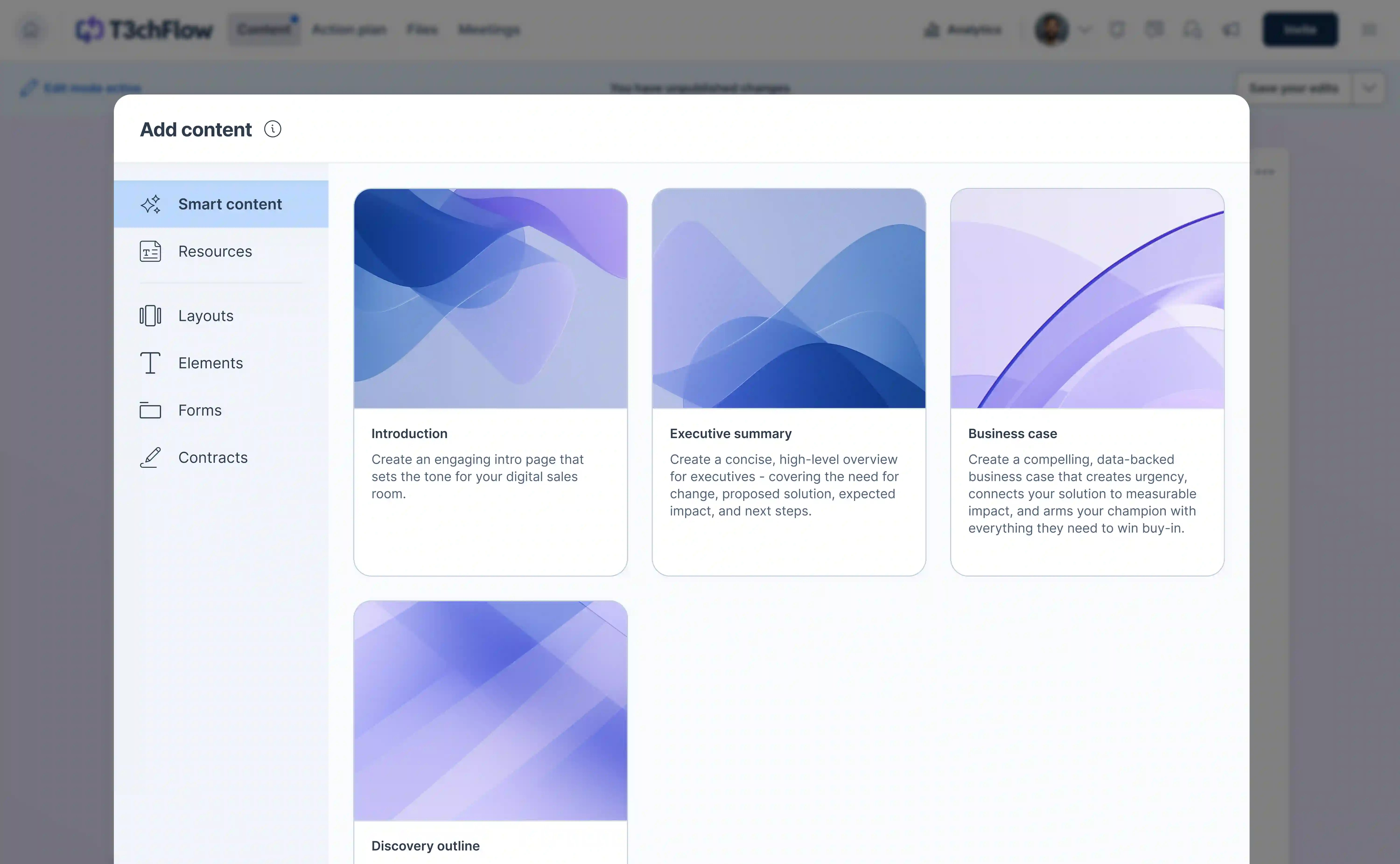
Meeting summaries do more than document what happened. They actively power Smart Content and other AI generated material in GetAccept.
Smart Content uses AI to pull from:
-
Meeting transcripts and summaries
-
Buyer and seller information
-
Content already shared in the Deal Room
This allows you to generate personalized materials such as business cases or executive summaries that reflect the buyer’s real challenges, goals, and language.
As more meetings are added, the AI content you produce becomes more complete and more relevant.
Best practices for feeding AI output
-
Upload transcripts whenever possible so the AI has rich input
-
Use default or custom prompts that match your sales process
-
Refresh Smart Content after important meetings to keep materials up to date
-
Keep buyer and seller details accurate so generated content stays specific
Why centralizing meetings benefits sellers
-
Faster follow-ups, with every discussion captured in one place
-
Better visibility into what has been discussed and agreed
-
Less time spent rewriting notes, summaries, and business cases
Why centralizing meetings benefits buyers
-
One shared place to review past discussions and decisions
-
Easier onboarding for new stakeholders joining the deal
-
Clear alignment on priorities, requirements, and next steps
Putting it all together
-
Whenever you start a sales conversation with a buyer, create a Deal Room, either directly within GetAccept or via your CRM.
-
After you take a meeting with the buyer, head to the Meetings tab in the Deal Room and upload your notes or transcript.
-
You can then use your preferred AI prompt to transform that conversation into a summary that fits your process.
-
Publish the meeting so it’s visible to buyers. Both sellers and buyers use the Deal Room as a shared reference point throughout the process.
-
Use your meetings to create or update smart content in the Deal Room such as business cases or executive summaries, or to produce your own AI output.
Recap
By now, you should be able to:
-
Add meeting details and transcripts to a Deal Room
-
Use prompt-based AI summaries, including default and custom structures
-
Leverage meeting insights through Smart Content to create personalized business cases and summaries that move deals forward