


Introduction
Buyers expect contracts to feel relevant to their situation. Their industry, region, and product choices matter – and they notice when a contract includes sections that don’t apply to them. Conditional content helps you meet those expectations without slowing down your process. In this lesson, you’ll learn how to use conditional content in GetAccept to automatically tailor contracts using CRM data and custom fields.
Why conditional content matters
Buyers expect contracts that feel made for them, not recycled documents filled with irrelevant sections. Manually customizing every contract can work – but it’s slow, risky, and frustrating.
Conditional content closes that gap. You define the rules once, and GetAccept personalizes the contract automatically. Buyers see only what applies to them, and you avoid spending hours editing documents before sending them out.
From merge tags to conditional content
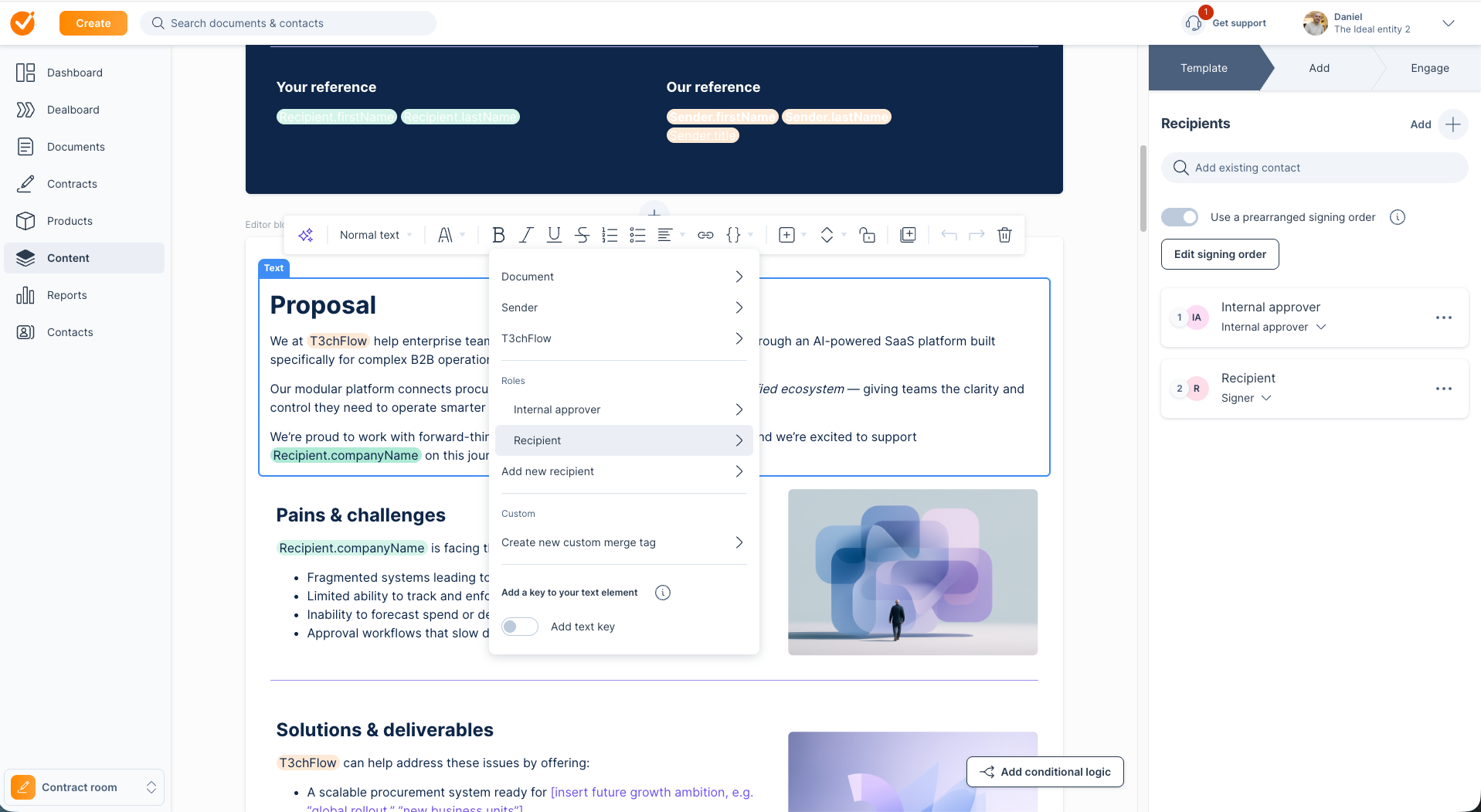
Before going further, it helps to separate two levels of personalization.
Basic personalization comes from merge tags. In GetAccept, merge tags pull data like company name, address, VAT number, or contact details directly into the contract from your CRM or deal data. This ensures every contract is accurate and specific to the buyer, without manual typing.
Conditional content builds on that foundation. Instead of just filling in fields, it changes what the buyer sees by showing or hiding entire sections based on who they are, what they’re buying, or how the deal is structured.
What conditional content actually means
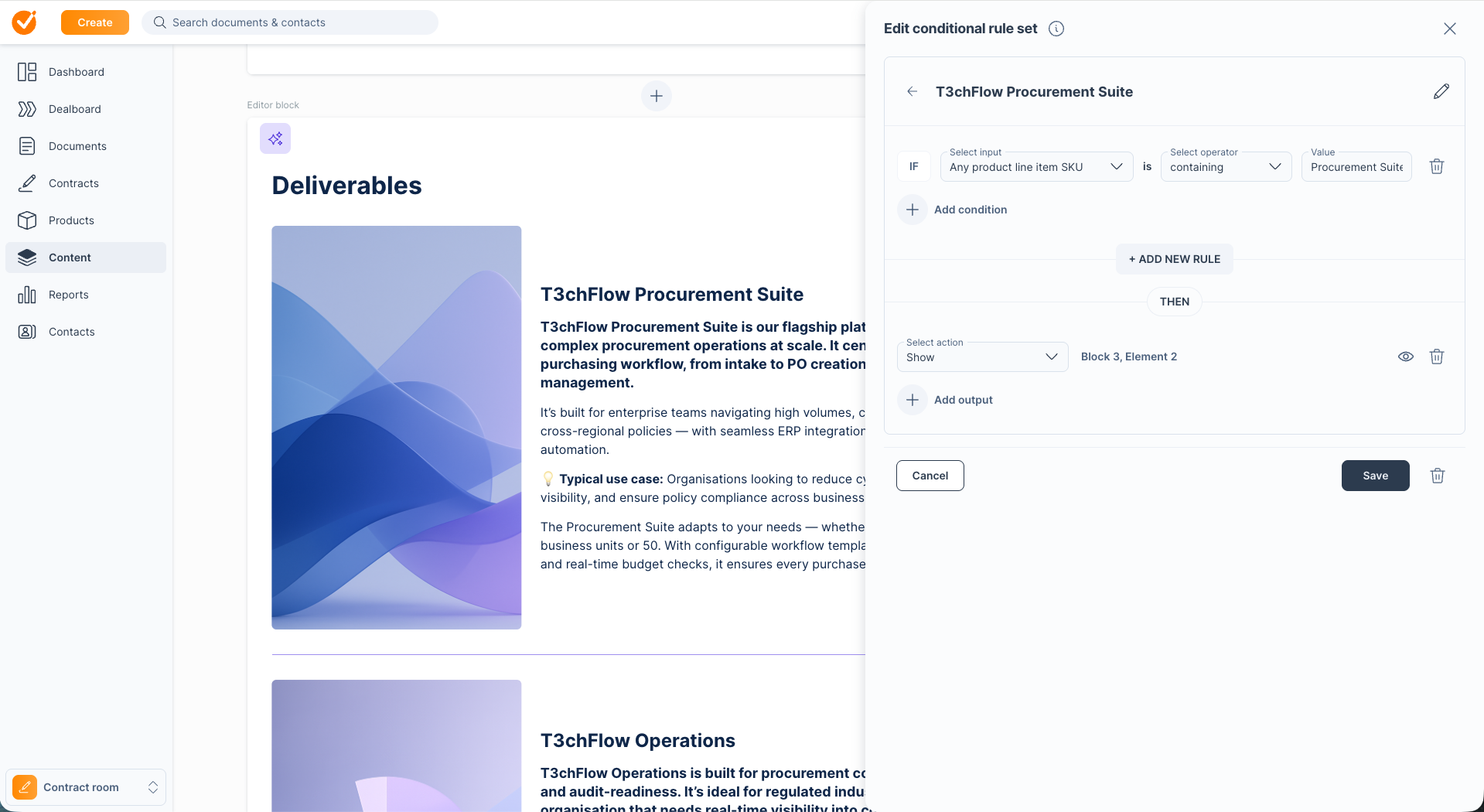
Conditional content allows parts of a contract to appear or disappear depending on the data you provide. Rather than maintaining multiple templates, one master template adapts dynamically to each deal.
In GetAccept, conditional rules can be based on:
- Product line items selected in the deal
- CRM fields such as country, region, industry, or account type
- Custom data properties you define in the template, like Deal size or Customer type
- Other contract fields such as document name or recipient title
This allows your contract to automatically include or exclude content such as:
- Regional compliance or regulatory clauses
- Industry-specific annexes
- Product-specific SLAs or support terms
- Special approval or pricing conditions for larger deals
Merge tags handle the data inside a section, while conditional rules decide whether that section appears at all.
The problem this solves
Without conditional content, teams often rely on workarounds that don’t scale:
- Multiple templates for different regions, products, or industries
- Manual edits to remove irrelevant sections
- Buyers reviewing contracts that clearly weren’t built for them
With custom data–driven conditional content in GetAccept, you replace this complexity with one master template that adapts automatically. Fewer mistakes. Less maintenance. Better buyer experience.
How conditional content works in GetAccept
The setup follows a clear flow.
First, you define custom data properties in your template settings – such as Industry, Region, Deal size, or Product line.
Next, those properties are populated automatically from your CRM or selected during contract creation.
In the GetAccept editor, you apply conditional visibility rules to specific content blocks. For example:
- Show this section if Industry = Manufacturing
- Show this clause if Region = EMEA and Product line = Enterprise
When a rep generates the contract, GetAccept evaluates those rules and displays only the relevant sections. The result is a personalised, accurate contract created in far less time.
Structuring templates for data-driven logic
Before adding conditional rules, structure your template carefully.
Start by identifying the inputs that matter most, such as industry, region, product line, deal size, or customer type. Then group related content into clear, modular blocks that can be shown or hidden as needed.
To keep things reliable:
- Ensure your CRM mapping pushes the right data into GetAccept
- Make it clear which fields reps must verify if they aren’t auto-filled
- Keep content blocks focused and easy to manage
Clean structure makes conditional logic easier to build and maintain.
Common rule patterns that work well
Certain conditional rules appear again and again in effective templates:
- Product logic: Show premium SLA and support terms only for Enterprise deals
- Region logic: Display local tax or regulatory clauses based on geography
- Industry logic: Include sector-specific compliance language when required
- Deal size logic: Add approval or pricing terms for high-value contracts
- Customer type logic: Show reseller terms for partners and direct terms for end users
Each rule draws from CRM or custom data fields and shapes what the buyer sees.
Benefits for sellers and buyers
Conditional content delivers value on both sides of the deal.
For sellers, it means fewer templates, less manual editing, faster contract creation, and consistent branding and compliance.
For buyers, it means contracts that feel relevant, easy to review, and aligned to their situation – without unnecessary or confusing sections. That clarity often leads to faster internal approvals and smoother decisions.
Putting it together: one template, many tailored contracts
Consider T3chFlow, a fictional SaaS company selling across multiple industries and regions. Their CRM already captured industry, region, product line, and deal size, but contracts still required manual adjustments.
By using conditional content in GetAccept, T3chFlow created one master contract template. Industry-specific clauses, regional notes, enterprise SLAs, and approval terms were all controlled by data-driven rules.
When creating a contract for a buyer like NestBuy, reps simply confirmed the CRM data and generated the contract. The right sections appeared automatically. Irrelevant content stayed hidden.
The result was a contract that felt tailored to NestBuy’s situation – without extra effort from the sales team and without risking errors or inconsistency.
Recap
By now, you should be able to:
- Understand how conditional content personalizes contracts automatically
- Use merge tags for basic data accuracy and conditional logic for deeper personalization
- Structure templates and data inputs so only relevant content appears
- Build rules based on CRM and deal attributes that save time and improve the buyer experience