

Sales contract management is the process of taking a deal from "verbal yes" to a signed agreement: drafting, negotiating, approving, signing, and tracking it after the fact.
Sounds simple, but it rarely is.
Most B2B teams lose deals here because the contract gets stuck. Legal's backed up. The approval never got routed. Nobody's sure which version is current. The average business loses close to 9% of contract value a year to problems like these.
This guide breaks down:
- What sales contract management is, and how it's different from CLM
- The 5-stage contract lifecycle
- The biggest failure points revenue teams run into
- 10 best practices to speed up contracting without adding risk
- What to look for in contract management software
Let's get into it.
👉 Get a demo of GetAccept's Contract Management Software
What is sales contract management?
Sales contract management is the process of creating, negotiating, approving, signing, storing, and tracking sales agreements across the deal cycle.
It covers everything from the moment a deal is ready to move to paper (or screen) through to signature and beyond. That includes drafting the initial agreement, managing redlines and negotiations, routing for internal approvals, getting the buyer to sign, and tracking what was agreed after the ink is dry.
Sales contract management vs. CLM vs. general contract management
These three terms overlap, but they solve different problems at different speeds.
General contract management covers the full spectrum of agreements an organization handles: vendor contracts, employment agreements, procurement deals, NDAs, partnership agreements, and more. It's broad, and it's typically owned by legal or procurement.
CLM (contract lifecycle management) is the system layer. It's the infrastructure for managing any contract from creation through to renewal or termination: templates, version control, approval workflows, obligation tracking, e-signature. CLM is category-agnostic. It doesn't care whether the contract is a sales deal or a vendor agreement.
Sales contract management is the sales-specific operating model that runs on top of CLM. It's built for revenue workflows: CRM-connected intake, commercial terms, sales-led approvals, buyer engagement tracking. The whole system is optimized for speed and commercial accuracy, not just legal completeness. Deals have close dates. Reps have quotas. Buyers have competing priorities.
The practical difference: you can have CLM without it being built for sales (and many organizations do, which is why their sales teams hate using it). A well-designed sales contract management process uses CLM capabilities as its engine but wraps them in a workflow designed around how deals move.
|
General contract management |
CLM |
Sales contract management |
|
|---|---|---|---|
|
Primary owner |
Legal / procurement |
Legal ops / IT |
Sales / RevOps |
|
Optimized for |
Risk and compliance |
Lifecycle control |
Deal velocity and buyer experience |
|
Speed priority |
Low to moderate |
Moderate |
High |
|
CRM integration |
Rarely needed |
Optional |
Essential |
|
Typical tools |
SharePoint, manual tracking |
Ironclad, Icertis, Agiloft |
GetAccept, PandaDoc, DocuSign CLM |
How poor sales contract management affects revenue
The contract stage carries the highest revenue risk, and the damage shows up in five places.
Deal velocity takes a direct hit. Every day a contract sits unsigned is a day the deal could fall apart. Budgets get frozen. Champions leave. Competitors re-enter. Time kills deals, and slow contract workflows hand time to every force working against you.
A sales lead at a public sector procurement software company described proposals taking 40 to 60 minutes each across Excel, Word, the ERP, and SharePoint, and during a busy quarter running around 20 opportunities, having to drop the ball on the deals that didn't fit.
Forecasting accuracy falls apart. When contract status isn't visible in your CRM, managers are forecasting based on rep optimism rather than actual deal progress. You can't tell the difference between "legal is reviewing" and "the buyer ghosted us three days ago." That uncertainty compounds up the chain, from frontline managers to the VP of Sales to the CFO, and turns your forecast into guesswork.
"Poor forecast accuracy is hurt by the limited deal visibility and understanding of what's actually being reviewed, and how close you really are to closing."
— Account management lead, energy technology company
Revenue leaks through the cracks. Poor contract management costs money after signature too. The leakage comes from missed renewals, unenforced pricing terms, unauthorized discounts that make it into contracts without approval, and obligations nobody tracks after the ink is dry.
Buyer experience suffers. A clunky, slow contract process is a bad first impression of what it's like to work with your company. It also removes your ability to respond. Several teams we spoke with had no way of knowing whether a prospect had even opened a sent proposal, which means follow-up becomes guesswork at exactly the moment the deal is most fragile.
Legal becomes an unintentional bottleneck. When every contract, regardless of size or risk, requires a full legal review, the queue builds fast. Without pre-approved templates, clause libraries, and defined fallback positions, legal's time gets consumed by routine deals that don't actually need their attention. That leaves high-value, high-risk agreements waiting longer than they should.
The sales contract lifecycle: from opportunity to signed agreement
A sales contract lifecycle includes five core stages: intake and pre-authoring, authoring and negotiation, review and approval, execution, and post-execution management. Each stage has distinct owners, handoffs, and failure points.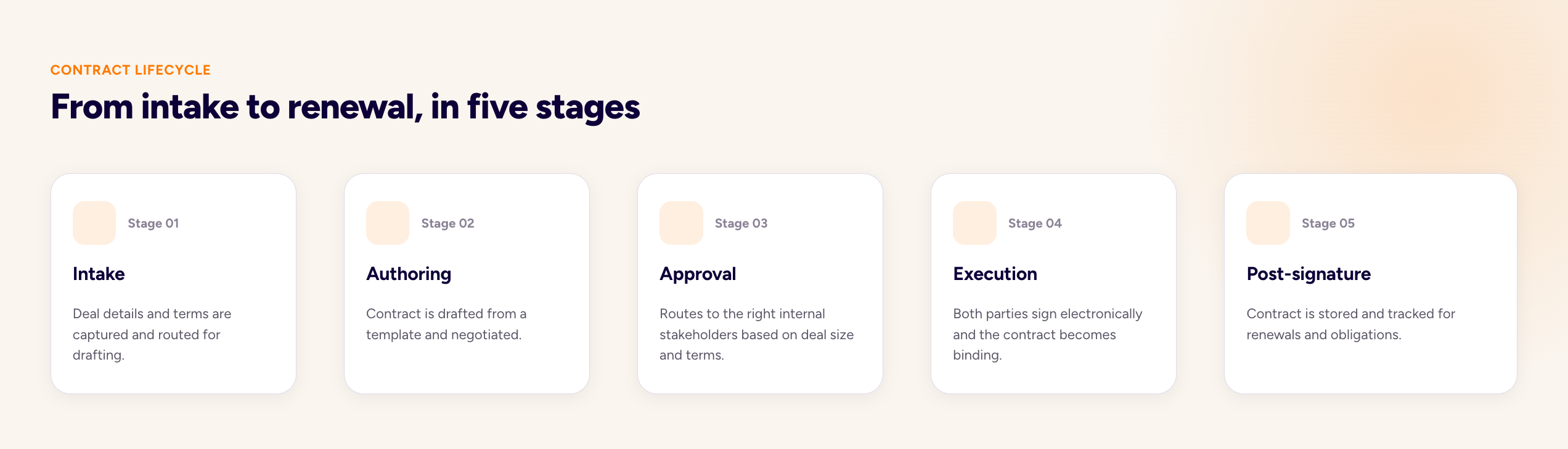
Stage 1: Intake and pre-authoring
This is where the contract request originates. A rep has reached verbal agreement with a buyer and needs to generate a contract. The intake stage captures the deal details (pricing, terms, product scope, parties involved) and routes them into the contract creation process.
In a well-run system, this happens through a structured intake form or CRM-triggered workflow, not a Slack message to legal. The goal is to capture everything needed to draft the contract accurately the first time. Missing information at intake creates rework later.
Stage 2: Authoring and negotiation
Once the deal details are captured, the contract gets drafted. In most modern sales environments, this means pulling from a pre-approved template library rather than starting from scratch. The rep, or an automated system, populates the template with deal-specific data.
Then comes negotiation. The buyer reviews, requests changes, and the back-and-forth begins. This is where version control, redlining tools, and clear fallback positions matter most. Without them, you end up with conflicting edits, lost changes, and deals that stall because nobody's sure which version is current.
Stage 3: Review and approval
Before the contract goes to the buyer, or is finalized after negotiation, it needs internal sign-off. Depending on the deal size and complexity, that might mean a manager approval, a legal review, a finance check on pricing, or all three.
Sales, legal, finance, and operations should each have defined responsibilities and service-level expectations so routine contracts don't stall waiting for informal handoffs. When approval routing is manual and informal, this stage becomes a black hole where deals disappear for days.
Stage 4: Execution
This is the signature stage. Both parties sign, ideally through a secure e-signature workflow, and the contract becomes legally binding. In a modern sales process, this should be fast, frictionless, and trackable.
Buyers should be able to sign from any device without creating an account or downloading software. Reps should get notified the second the contract is signed. The signed document should sync back to the CRM automatically.
Stage 5: Post-execution management
The deal is signed, but the contract's job isn't over. After signature, contract management should continue with centralized storage, obligation tracking, milestone monitoring, and renewal or termination management.
This is where most teams drop the ball. The signed PDF gets filed somewhere, the rep moves on to the next deal, and nobody tracks what was actually agreed, until a renewal comes up or a dispute arises.
Who owns what
Ownership varies by company, but a typical breakdown looks like this:
-
Sales owns intake, initial drafting, and buyer communication
-
Legal owns template approval, non-standard term review, and risk assessment
-
Finance or deal desk owns pricing validation and discount approval
-
RevOps owns process design, system integration, and reporting
-
Customer success owns post-signature obligation tracking and renewal preparation
When these handoffs are clear and automated, the process moves. When they're informal and manual, deals stall.
Common types of sales contracts
|
Contract Type |
Description |
Typical Use Case |
|---|---|---|
|
Master Service Agreement (MSA) |
Framework agreement governing the overall relationship |
Enterprise relationships with multiple transactions |
|
Order form |
Commercial document capturing pricing, product, and term |
Specific transactions under an MSA |
|
Statement of Work (SOW) |
Detailed deliverables, timelines, and responsibilities |
Project-based engagements |
|
NDA |
Non-disclosure agreement |
Early-stage conversations before detailed info sharing |
|
Subscription agreement |
Terms of ongoing software access |
SaaS deals |
The specific mix varies by deal type, company size, and industry. Enterprise SaaS deals look different from professional services agreements. But the core elements are consistent.
The biggest challenges in sales contract management
Most B2B teams know their contract process is broken. They're less sure exactly where.
To find out, we went through our recorded conversations with revenue, finance, and transformation leaders across various industries. Five problems came up again and again:
Contracts live everywhere, so they live nowhere
The most repeated pain point by a wide margin. Signed agreements end up spread across inboxes, SharePoint, the CRM, ERP systems, local drives and whatever tool the last team used.
"Storage is fragmented today. Signed contracts sit in SAP, or in HubSpot, or in a Drive, or on someone's local computer. When a person leaves, a lot of knowledge disappears with them."
— Revenue leader, enterprise payments group.
The problem compounds with volume. One transformation lead at a fintech described the scale of the lookup problem directly:
"So actually locating the correct terms is a bit of a challenge, because there could be 100, 150, 200, 300 order forms associated with that one client."
Approval and legal review stall deals for weeks
Every non-standard term routes to a human, and those humans have day jobs. What should be a two-day review becomes two weeks because the queue is manual, the reviewers are senior, and nobody can see where a contract is sitting.
"I'm currently managing six parallel enterprise deals, and this is 40% of my time — telling the tech team and external and the lawyers to review some clauses. It even goes out of my scope."
— CFO, AI sales technology company (early-stage) [verify size]
At an employee benefits platform, contract back-and-forth consumed 20-30% of one legal associate's time.
And at a large payments group, the gap between a customer saying yes and a signed contract ranged from two to twelve months, with the longest cycles driven by extensive redlining across multiple document versions.
Negotiation happens in email and Word, so version control collapses
The moment a contract leaves the platform to get redlined, the audit trail fragments. Teams end up reconciling tracked changes across attachments, chat threads, and copy-pasted tables.
At a maritime software company, an acquisition took the standard agreement from 4 pages to 42, and the review cycles grew accordingly:
"Complex contract management process, increased from 4 to 42 pages after acquisition. Time-consuming legal review with customers. Inefficient back-and-forth about contract terms."
— Director of Maritime Sales, maritime training and software company
The pattern is consistent: the more the negotiation moves outside a shared system, the more time is spent reconstructing what was agreed rather than agreeing it.
Nobody can see renewals, key terms, or contract data
Once a contract is signed, the data inside it goes dark. Renewal dates, notice periods, payment terms and risk clauses are locked inside PDFs that nobody has time to read. So renewals get missed, invoices don't match contracts, and risk clauses go undetected.
Many teams reported the same pattern from the cost side: missed termination dates on supplier agreements driving avoidable spend, no dashboard view of upcoming renewals, and contract data that employees fill in inconsistently, making the records that do exist unreliable.
Manual contract creation produces errors, and errors produce rework
Every field a human types is a field a human can get wrong. And in contracting, small errors are expensive because they restart the process.
"They wrote on the contract that payments were due 80 days, and that's not what it means. It forced three more interactions in the process because we needed to send a request for change of the contract. It took another week and a half to close something that was already closed."
— CFO, AI sales technology company
The same CFO described a redlining error where a rep needed to replace "Europe" with "Sweden" three times in a single paragraph and changed it once. And a recurring mismatch where payment data entered manually (wrong ID, wrong tax ID) meant the invoice didn't match the contract.
Best practices for faster, cleaner sales contract management
Here's what high-performing teams do differently.
Use pre-approved templates and clause libraries
Well-built contract templates reduce repetitive tasks and copy-paste errors. They also protect your brand and help new reps ramp faster by giving them a proven foundation to work from.
A typical template must include:
-
A client-facing contract name, set with merge tags so every document is named consistently without manual edits
-
Standard terms and conditions approved by legal
-
Consistent pricing and product sections
-
Optional modules for add-ons or configuration differences
-
Variable fields for company details, dates, and contract specifics
-
A personalization block for messaging that speaks directly to the buyer
The goal is simple: build it once, then reuse it confidently across every deal.
Hear from the experts
Legal pre-approves the standard language. Sales pulls from the library. Negotiation happens within defined guardrails. Everyone moves faster, and legal's review is reserved for genuinely non-standard situations.
H
DivideBuy, a financial services company using GetAccept, cut contract creation time so significantly that they now save roughly 20 hours per month on proposal and contract workflows alone. Most of that gain came from templated contracts pulling deal data directly from the CRM, so reps stopped drafting from scratch.

➡️ Read the full success story.
Use AI to compress drafting time further
AI is changing the contract creation step in ways that matter for deal velocity. Tools now auto-populate contract fields from CRM data, suggest clause alternatives during negotiation, and extract key terms from signed agreements for post-signature tracking.
For teams already using templates, AI compresses the remaining manual steps: populating variable fields, adapting language to the buyer's industry, and flagging terms that fall outside pre-approved guardrails.
Put key terms in the spotlight
Don't bury the commercial terms in a wall of legal text. When a buyer can scan your contract in 90 seconds and find the five things they actually care about, you've removed friction that most competitors haven't thought about.
Structure your contracts so that pricing, term, renewal conditions, and termination rights are easy to find and review:
-
Use clear section headers
-
Put pricing and payment terms in a table, not buried in paragraph 7.3(b).
-
Highlight renewal and termination windows so nobody misses them
Tailor the contract to the audience
A 50-page enterprise MSA is not the right document for a $10,000 annual subscription. Match the contract complexity to the deal size and buyer sophistication.
Build tiered templates:
-
Lightweight order forms for standard deals
-
Mid-complexity agreements for commercial transactions
-
Full MSAs for enterprise relationships
Let the deal size and risk profile determine which document you use.
Establish and automate fallback positions
One of the most reliable ways to cut the back-and-forth in contract negotiations is deciding your fallback positions before the negotiation starts, not during it.
Not every point needs to go back to legal. Define the terms you're willing to accept without escalation, and build them into your contract workflow.
When a buyer pushes back on a standard clause, the rep or deal desk can offer the pre-approved alternative without waiting for a legal review. This alone can cut days off negotiation cycles.
Common fallback positions include liability caps (you'll accept 12 months of fees instead of 24), payment terms (net 45 instead of net 30), and auto-renewal language (90-day notice instead of 60). Legal decides the boundaries once. Sales operates within them hundreds of times.
Move to dynamic digital contracts
Static PDFs and email attachments are the enemy of fast contract execution. When both parties can review, comment, and negotiate in a shared digital environment, the whole process compresses. Version control happens automatically. Changes are tracked in real time. Nobody's working from an outdated file.
Automate your internal approval workflows
Manual approval routing is one of the most common sources of contract delay. When a rep has to Slack a manager, wait for a response, then email legal, then wait again, days disappear.
Automated approval workflows route contracts to the right people based on deal attributes (size, discount level, non-standard terms) and track progress in real time. A $15,000 deal with standard terms goes straight to the buyer. A $150,000 deal with a 25% discount triggers manager and finance approval. A deal with custom liability language routes to legal automatically.
Approvers get notified immediately. They can review and approve from their phone. The system tracks who's reviewed, who's pending, and how long each step is taking.
Make CRM the single source of truth
Contract data should live in, or sync back to, your CRM. When contract status updates automatically in the CRM, managers get real-time pipeline visibility, forecasting improves, and the post-sale handoff to customer success is cleaner.
Bidirectional sync matters. Deal data flows from CRM to contract (auto-populating buyer name, pricing, product details). Contract status flows back to CRM (sent for signature, buyer opened, legal reviewing, fully executed). Signed terms and dates sync back after signature so customer success knows exactly what was agreed. This gets especially important when your offering is complex.
Hear from the experts
Sunday, an all-in-one payment solution for restaurants operating across France, the US, and the UK, was managing nearly 40 contract templates to cover different countries, segments, and pricing configurations. Reps were spending over an hour creating and sending a single contract.
By connecting GetAccept's contract workflows directly to Salesforce with bidirectional sync, Sunday's reps now create and send a contract in under five minutes.
CRM data auto-populates the contract on the way out, and signed customer details (company name, billing address, VAT number) sync back to Salesforce automatically after signature. No manual data entry, no duplicate work, no CRM records that don't match what was actually signed.

➡️ Read the full success story
Define SLAs between sales, legal, and finance
Informal handoffs are where contracts go to wait.
Legal commits to a 24-hour turnaround on standard deals, 48 hours on complex ones. Finance commits to pricing approval within four business hours. Sales commits to completing intake forms so legal isn't chasing missing information.
Track the metrics. Report on them. When legal is consistently hitting their SLA but sales isn't providing complete deal information, you know where the bottleneck actually is. When finance is taking three days to approve discounts that should take four hours, you have a conversation backed by data. SLAs make invisible delays visible so you can fix them.
Enable mobile signing
Buyers don't always sign from their desks. Your buyer is at an airport, ready to sign, and your contract requires desktop-only plugins or multi-step authentication that doesn't work on their phone. The moment passes. They'll "get to it later." Later becomes next week.
Make it easy to sign from anywhere. No account creation required. No app downloads. Open the link, review, and sign.
👉 Further reading: 8 Contract management best practices for revenue teams
What to look for in sales contract management software
When you're evaluating tools, here's what actually matters for sales workflows.
|
Feature |
Why It Matters |
Questions to Ask |
|---|---|---|
|
Template and clause library |
Reduces drafting time, maintains consistency |
Can legal lock sections while sales edits commercial terms? |
|
Automated approval routing |
Eliminates manual handoffs, tracks progress |
Can approvers sign off from mobile? |
|
Redlining and version control |
Prevents conflicting edits, maintains audit trail |
Can both parties negotiate within the platform? |
|
E-signature |
Speeds execution, improves buyer experience |
Works on mobile without account creation? |
|
CRM integration |
Keeps pipeline data accurate, enables forecasting |
Bidirectional sync with Salesforce/HubSpot? |
|
Buyer engagement tracking |
Enables data-driven follow-up |
Shows time spent per section? |
|
Post-signature visibility |
Prevents revenue leakage |
Tracks renewals, obligations, termination windows? |
Template and clause library management
Can legal pre-approve standard language and make it available to sales? Can reps generate contracts from templates without touching the underlying legal text? This is table stakes for any team doing more than a handful of deals a month.
The best systems let legal maintain control over language while giving sales the speed they need. Look for tools that support multiple template types (MSAs, order forms, SOWs) and let you lock certain sections while leaving commercial terms editable.
How this works in GetAccept
Templates live in the Content library. Commercial fields like pricing, term length, and buyer details are left editable and auto-populate from CRM data. Reps start a contract from an approved template directly inside Salesforce or HubSpot, and the contract is generated with the right data already in place.
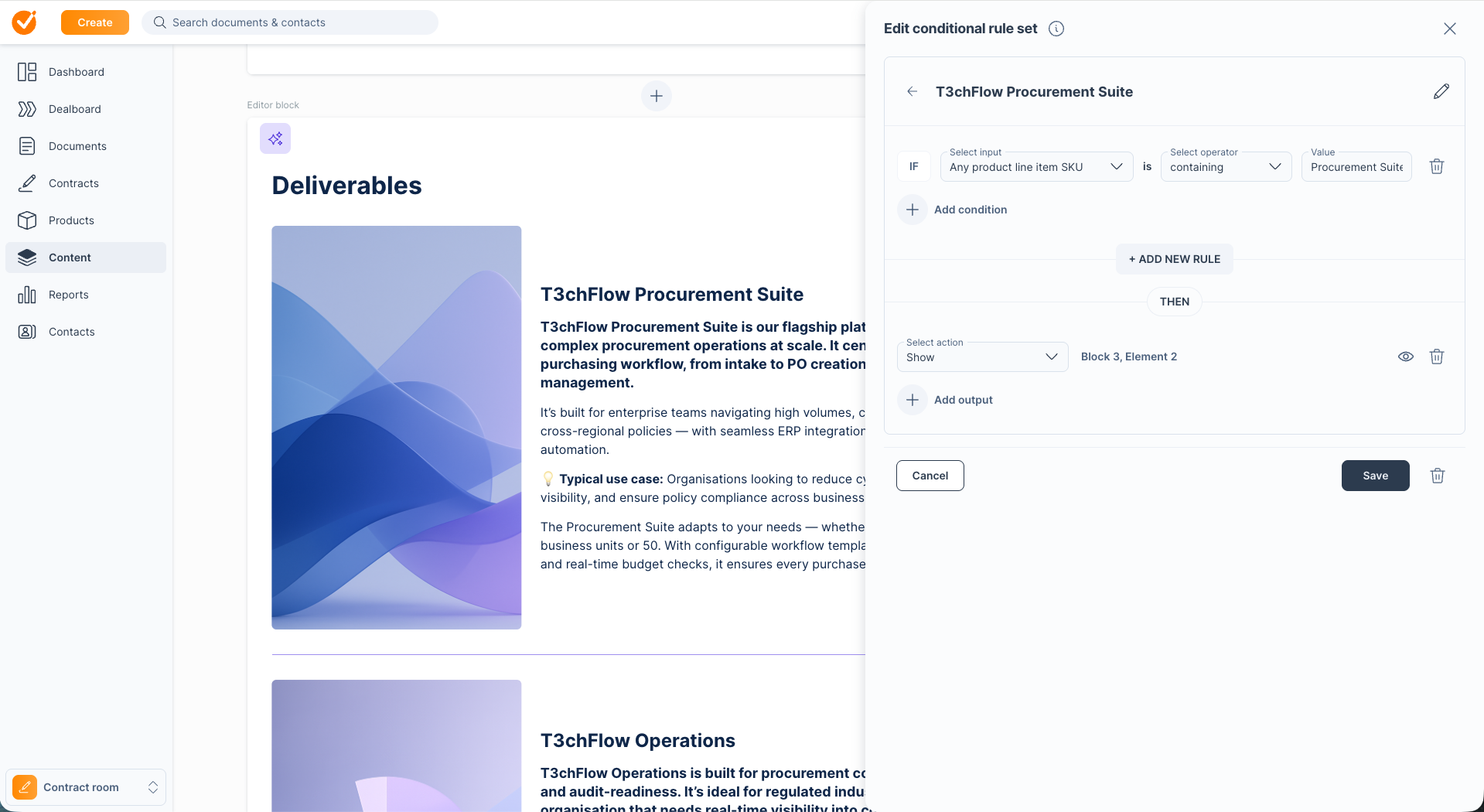
For teams selling across regions or segments, conditional content takes this further. Instead of maintaining 10 or 20 templates, you build one master template with rules that show or hide sections based on CRM data: industry-specific clauses, regional compliance language, enterprise SLA terms. The contract adapts automatically to each deal.
Automated approval routing
Can the system route contracts to the right approvers automatically, based on deal size, discount level, or non-standard terms? Can approvers review and sign off from their phone? Can you see where a contract is stuck in the approval chain in real time?
How this works in GetAccept
You define approval rules once: deals under a certain threshold go straight to the buyer, deals above it route to the right combination of manager, finance, and legal review, automatically. Approvers get notified immediately and can review from mobile. Managers can see which contracts are pending and for how long.
Redlining and version control
Can both parties negotiate within the platform, with a clean audit trail? Does the system prevent conflicting edits and track every change? This is critical for deals with any meaningful negotiation. Look for a platform that maintains a single source of truth rather than passing files back and forth over email.
How this works in GetAccept
Contracts live behind a single shared link. Both parties comment directly on specific clauses inside the contract, and all changes are tracked in real time. Updates can be made to a sent contract without changing the link, so buyers always see the latest version.
Buyers can also redline changes directly on the signing page, and the sender accepts, declines, or replies to each one without the deal ever leaving GetAccept. The entire negotiation stays in one place, with a clean audit trail of who proposed what. 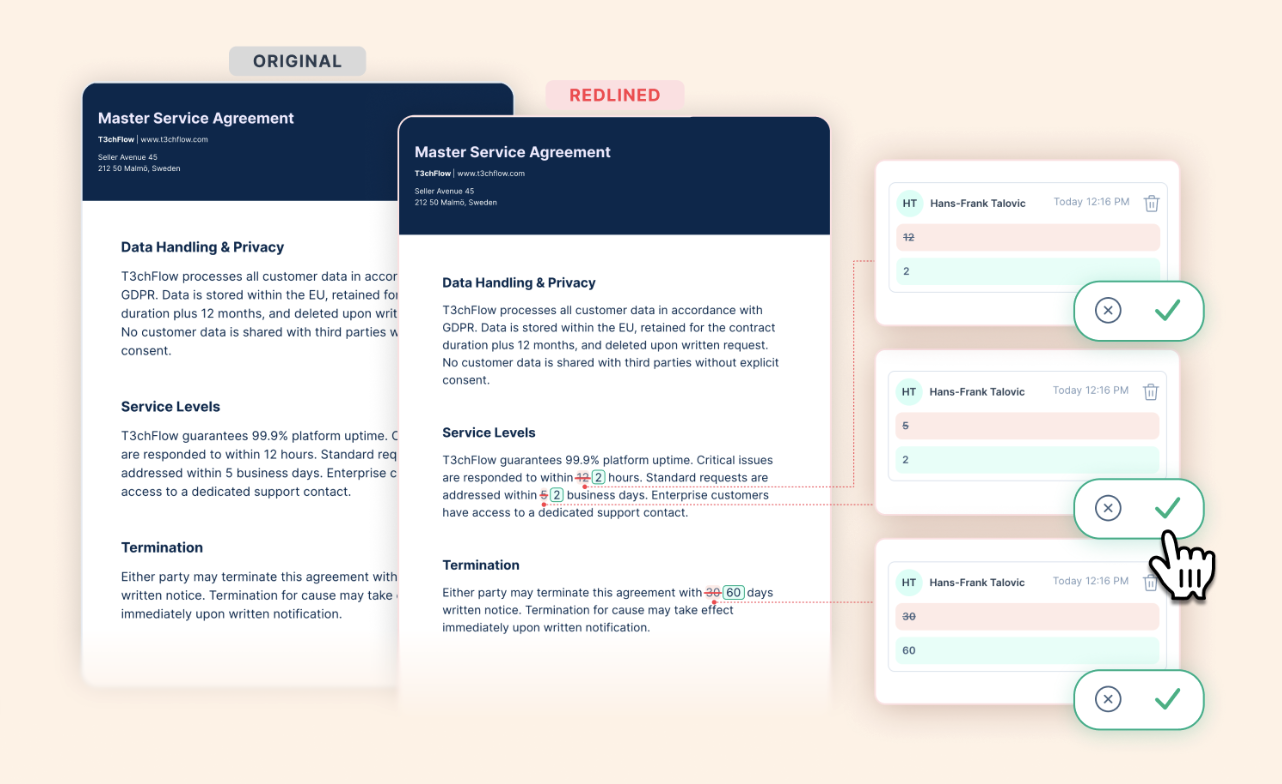
E-signature
Is the e-signature legally binding and compliant with relevant regulations (eIDAS, ESIGN, UETA)? Is it frictionless for buyers, with no account creation required and full mobile support?
How this works in GetAccept
E-signature is built into the same flow as the contract itself. Buyers review, comment, negotiate, and sign without leaving the document or switching tools.
You choose the security level based on the deal: standard handwritten/typed signatures for routine agreements, Advanced Electronic Signature (AES) for higher-assurance deals, or Qualified Electronic Signature (QES) for regulated environments. Signing order can be set (e.g., CEO before CFO), and reps get notified the second each person signs.

👉 Further reading: How digital contracts help your sales team close deals faster
Two-way CRM integration
Does the tool sync bidirectionally with your CRM? Can it pull deal data to auto-populate contracts? Does it push contract status, signed terms, and key dates back to the opportunity record?
This is where deals break for a lot of teams: the contract tool and the CRM are two separate worlds, so managers can't see contract status in the pipeline and reps are logging updates manually. Bidirectional sync eliminates that gap entirely.
How this works in GetAccept
GetAccept integrates natively with Salesforce, HubSpot, Microsoft Dynamics, Pipedrive, and others. Deal data (buyer name, products, pricing, term) flows from CRM to contract to auto-populate fields. Contract status (sent, opened, signed) flows back to the CRM in real time, updating the opportunity record without any manual logging.
After signature, key terms and dates sync back so customer success and finance have what they need from day one.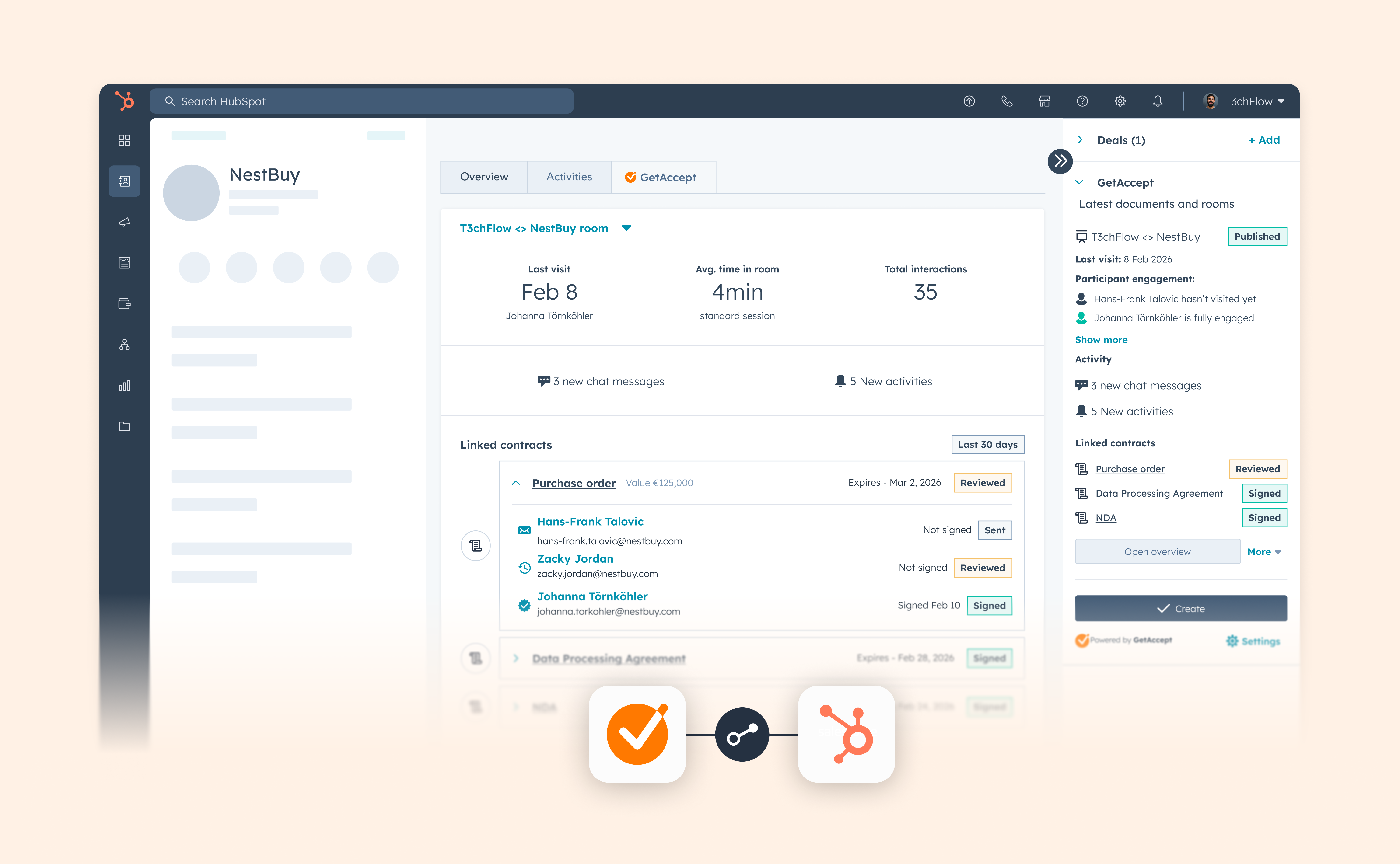
Buyer engagement tracking
Can you see when the buyer opened the contract, which sections they reviewed, and how long they spent? This is a powerful signal for follow-up timing. Knowing a buyer just spent 20 minutes on the pricing section is very different from knowing they haven't opened the document yet.
How this works in GetAccept
GetAccept's Digital Sales Room shows you exactly who opened the contract, when they opened it, how long they spent on each section, and whether they forwarded it to other stakeholders.
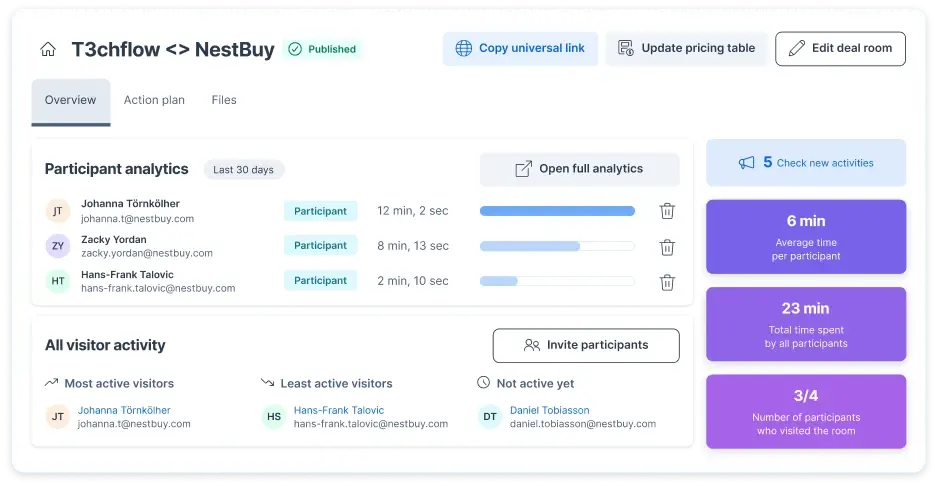
That visibility turns follow-up from "just checking in" into something relevant and well-timed.
Post-signature visibility
The signed contract isn't the end of the process. Renewal dates, termination windows, and milestone obligations should be tracked and surfaced proactively, not discovered after the fact.
Look for tools that make it easy to search, filter, and report on signed agreements so revenue and legal teams can act before value is lost.
How this works in GetAccept
After a contract is signed (or uploaded), GetAccept's AI Contract Management reads the document and extracts key data automatically: contract value, start and end dates, renewal type and date, notice period, payment terms, status, and any custom fields you define (SLA tiers, region, indexation percentages).
You can search, filter, and report across all your signed agreements instead of opening PDFs one by one. Automated reminders surface upcoming renewals before they're at risk.
👉 Further reading: How to use generative AI for improved contract management process
Reporting and KPI tracking
Can you measure contract cycle time, approval turnaround, redline frequency, and time-to-signature? Without measurement, you can't improve.
The right tool should give you visibility into where the process is working and where it's breaking down, so you can tighten up the bottlenecks over time.
👉 Further reading: Best contract management software for sales & RevOps teams
When do you need full CLM versus lighter-weight tools?
Not every team needs enterprise-grade contract lifecycle management software. The honest answer depends on your deal volume, complexity, and how much post-signature tracking you actually need.
You probably need full CLM if:
-
You're managing hundreds of active contracts with custom terms
-
Multiple departments (sales, legal, procurement, finance) need access
-
You have complex approval workflows with different rules for different deal types
-
Post-signature obligation tracking is critical (renewals, milestones, compliance requirements)
-
You need detailed audit trails for regulatory or enterprise buyer requirements
You can start with lighter-weight tools if:
-
You're closing fewer than 50 deals per month
-
Most agreements use standard templates with minimal negotiation
-
Approval workflows are simple (one or two stakeholders max)
-
Post-signature needs are basic (just storage and renewal reminders)
The key is to match the tool to your actual requirements. Many teams start with e-signature plus good templates, then graduate to full CLM as volume and complexity grow.
Getting started with sales contract management
If you're staring at a contract process that's clearly broken, here's where to start. It's about finding the biggest pain point and fixing it first.
Map what's actually happening right now
Walk through a recent deal from the moment it was ready for contract through to signature:
-
Who touched it?
-
Where did it sit?
-
How long did each stage take?
-
Which handoffs were smooth and which ones added days?
You're looking for the truth, not the official process. The official process says contracts get reviewed within 24 hours. The truth is they sit in someone's inbox for three days because nobody knows they're waiting. Map the truth.
Identify your biggest bottleneck
Once you see the full picture, one problem will stand out as costing you the most time or the most deals. Maybe it's drafting time because every contract starts from scratch. Maybe it's approval delays because there's no defined routing. Maybe it's buyer friction at signature because your e-signature experience is clunky.
Pick the one that hurts most and start there. You can't fix everything at once, and you don't need to.
Build your template library
For most teams, this is the highest-leverage first step. Work with legal to create pre-approved templates for your most common deal types: standard subscription agreements, professional services SOWs, order forms under your MSA, whatever your team closes most often.
The goal is to get 70-80% of your deals moving on pre-approved rails, so legal's time is reserved for the deals that actually need custom review. This single change can cut contract creation time from hours to minutes and reduce legal review volume dramatically.
Define your approval rules and build them into the workflow
Write down which deals need which approvals. Deals under $25K go straight to the buyer. Deals $25K-$100K need manager approval. Deals over $100K or with non-standard terms need legal review. Discounts over 20% need VP sign-off.
Whatever your rules are, document them clearly and build them into your contract workflow so routing happens automatically.
Connect your tools so data flows automatically
At minimum, your contract tool should talk to your CRM. When a contract moves to negotiation, that updates in the opportunity record. When it's signed, the signed copy and key terms sync back automatically. When a renewal date is approaching, your CRM flags it.
If you're starting from scratch, look for tools that integrate natively with your CRM rather than through middleware. The fewer systems data has to pass through, the less likely something breaks.
Measure, set targets, and iterate
Track your contract cycle time from initiation to signature. Track approval turnaround time. Track how often deals get stuck in negotiation and for how long. Establish a baseline, set improvement targets, and review progress monthly.
Small teams can start with templates and better approval routing. Mid-market teams usually need those plus proper contract management software and CRM integration. Enterprise teams need the full stack: CLM, automated workflows, obligation tracking, and post-signature visibility.
The contract stage doesn't need to be where deals go to wait.
Sales contract management protects the pipeline you worked hard to build, maintains the margins you negotiated, gives your managers the visibility they need to forecast accurately, and delivers a buyer experience that doesn't create friction at the finish line.
Fix the templates, automate the approvals, connect the CRM, and most of the problem disappears. GetAccept runs all of that inside one platform, connected to your CRM.
Book a demo to see how it can work for your team.