


Why the last stretch of a deal gets messy
Most deals don't stall on price or product. They stall on paperwork.
The moment a buyer's legal or procurement team wants to change a few words, the contract usually leaves the platform it was built in. Someone exports it to a PDF, marks it up by hand or in a separate tool, and emails it back. The seller then retypes each change into a fresh version and hopes nothing slipped through.
It is slow, it is manual, and it happens at the most fragile point of the deal, right when the buyer is closest to yes. Worst of all, it happens where the seller has the least visibility.
What recipient's markup is
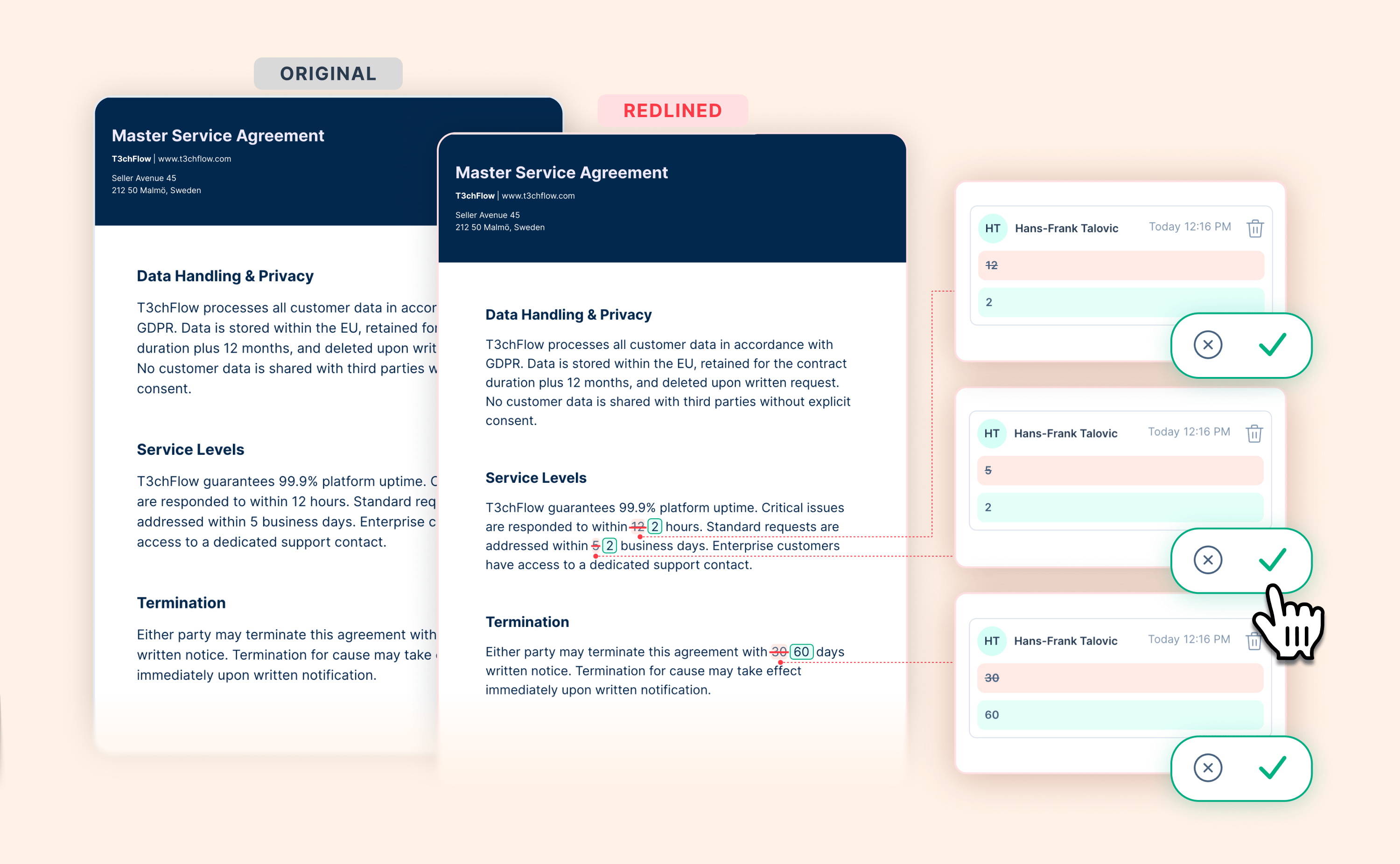
Recipient's markup lets the person receiving a contract suggest changes directly on the signing page. Instead of describing a change in an email, the recipient proposes the exact wording, right in the document. The seller reviews each suggestion and stays in full control of what actually changes.
It builds on GetAccept's commenting, so a single contract can hold both comments and suggested edits at the same time. Suggestions apply to the contract's text (pricing tables cannot be marked up).
How it works in practice
When a recipient opens the signing page, a gentle hint points out what they can do. They can:
- leave a comment to ask a question or start a discussion,
- propose new wording for a passage, or
- suggest a deletion.
On the seller side, every comment and suggestion collects in one place. You see each change as a clear before and after, with the original struck through and the proposed text highlighted. You then accept, decline, or reply. Nothing changes silently. When you are happy with a batch, you publish a new version, and your buyer gets a single notification for the whole set of changes. AI drafts the notification message for you, so you can review it before it goes out.
Both sides can open a full version history and toggle exactly what was added and removed, so no clause ever moves unnoticed. Version history covers the contract's text, not pricing tables or attachments.
.webp?width=3000&height=1852&name=recipient_s_markup_buyer_redlining_blog_hero%20(1).webp)
How buyers experience it
Buyers need no account and no setup. They work right on the signing page, propose the changes they need, and see the outcome once you publish. It feels like a conversation, not a document thrown back over a wall.
How sellers and teams benefit
- The negotiation stays inside GetAccept, so you keep full visibility.
- No exporting, no retyping, no chasing versions in your inbox.
- Every change and decision is tracked, which matters when several people are involved.
- The deal keeps its momentum through the step that used to slow it down.
Best practices
- Encourage buyers to suggest changes in the document rather than in email, so everything stays in one thread.
- Use replies to keep the reasoning attached to each change.
- Publish deliberately once you have reviewed a batch, so your buyer gets one clean update.
- Check the version history before signing to confirm exactly what was agreed.
Example in practice: T3chFlow
T3chFlow, a fast-growing software company, sends a subscription agreement to a new enterprise customer. The customer's legal team wants to soften a liability clause and change the payment terms from 30 to 45 days.
In the past, that would have meant exporting the contract, emailing a marked-up PDF back and forth, and rebuilding the document by hand. This time, the legal reviewer simply proposes the new wording directly on the contract. The T3chFlow account executive sees each suggestion as a clear before and after, accepts the payment-term change, replies to explain a small tweak on the liability wording, and publishes an updated version.
The customer gets one notification, opens the new version, and signs the next morning. No lost versions, no guesswork, and the deal never left GetAccept.
Recap
- The final round of contract edits is a common place for good deals to stall.
- Recipient's markup lets buyers suggest changes directly on the contract, so the negotiation stays in GetAccept.
- Sellers review each suggestion, stay in control, and publish a clean new version.
- A full version history shows exactly what changed, keeping both sides aligned all the way to signature.